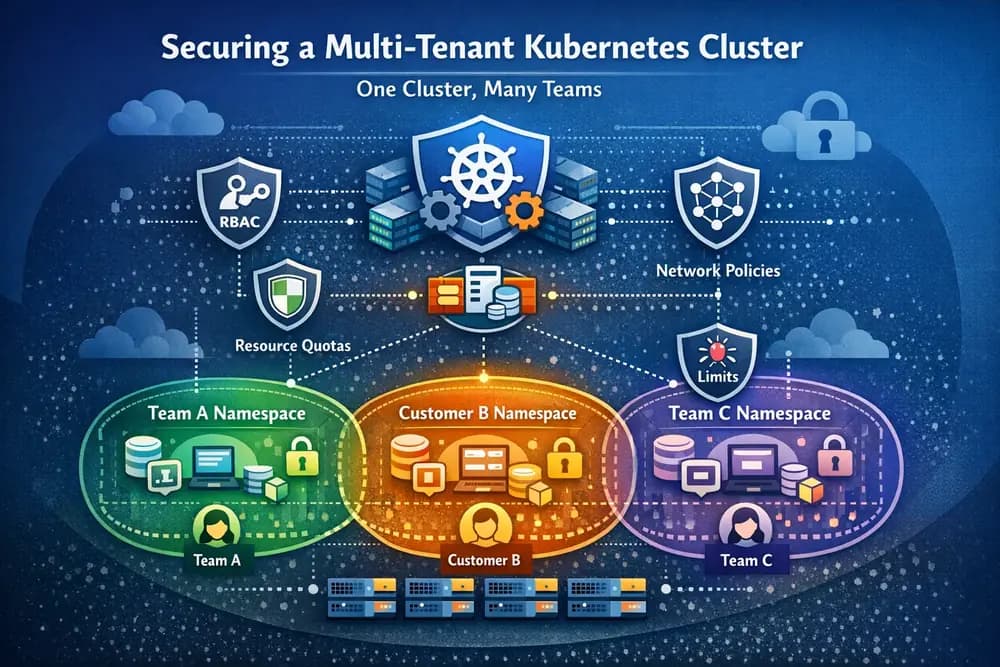
Sharing a single Kubernetes cluster among multiple teams or customers is a practice known as multi-tenancy it can dramatically improve resource utilization and reduce costs. Instead of running dozens of small, underutilized clusters, organizations often prefer one big cluster hosting all workloads. However, multi-tenant clusters introduce serious challenges in isolation and security. Kubernetes has no built-in “tenant” object, meaning tenants inevitably share underlying resources (nodes, network, etc.) and the control plane. Without careful design, one tenant’s actions could impact others or even compromise the whole cluster. In fact, many enterprises avoid these risks by using one cluster per tenant, accepting higher operational overhead to achieve strong isolation. This article explores how to achieve secure multi-tenancy in Kubernetes using upstream, open-source tools so you can confidently share a cluster between teams or customers without the “one-cluster-per-tenant” sprawl.
1) Challenges of Kubernetes Multi‑Tenancy
A. Resource Isolation & “Noisy Neighbors”:
When multiple tenants share a cluster, they also share finite CPU, memory, I/O and other resources. A misbehaving or greedy tenant can become a noisy neighbor, monopolizing resources and degrading performance for others. For example, a single team deploying a memory-hungry app could consume all available RAM on the nodes, causing others’ pods to evict or fail. Excessive logging or API calls by one tenant might overwhelm cluster components (e.g. the API server), impacting everyone. Preventing noisy neighbors requires enforcing fair resource usage per tenant, so no one app can starve the rest.
B. Network Segmentation:
By default, all pods in a cluster can talk to each other across namespaces. In a multi-tenant scenario, this is dangerous, one team’s pod should not freely connect to another team’s services. Kubernetes NetworkPolicies allow defining ingress/egress rules to isolate network traffic by namespace or labels. A common best practice is applying a default “deny all” policy, then whitelisting necessary flows, so each tenant’s pods only communicate within their own namespace or via approved gateways. However, NetworkPolicies alone are often insufficient. They operate at L3/L4 (IP and port) and do not restrict everything, e.g. they don’t filter access to cluster DNS or API server. If a pod is compromised, it might still attempt to call Kubernetes API endpoints or exploit node-level networking. Moreover, NetworkPolicies cannot stop pods on the same node from interacting via the host (loopholes if the kernel or host networking is breached). This means purely relying on NetworkPolicy leaves gaps in isolation. Strong multi-tenancy demands additional network segmentation measures (like strict RBAC, or even physically isolating certain tenants’ workloads to dedicated nodes or networks).
C. Security & Cross-Tenant Access:
In a multi-tenant cluster, a critical challenge is preventing any tenant from accessing or affecting others’ resources. This includes avoiding cross-tenant data leakage (one tenant shouldn’t read another’s Secrets, volumes, etc.) and blocking privilege escalation (a malicious tenant shouldn’t gain cluster-admin powers). By default, Kubernetes’ namespace separation is logical, many cluster-scoped resources (nodes, cluster roles, CRDs) are still shared. Without proper controls, a user in one namespace could create overly privileged pods (e.g. with hostPath volumes or running as root) and potentially escape the container sandbox or sniff host information, impacting the whole cluste. Also, multi-tenancy means multiple teams deploying in one environment, a tenant might unintentionally interfere with others by installing conflicting Custom Resource Definitions or cluster-wide operators. Security isolation requires strict Role-Based Access Control so tenants can only access their namespace, and admission controls to prevent dangerous configurations. The goal is that even if one tenant is compromised, the blast radius is confined to their own sandbox.
D. Operational Complexity:
Running a shared cluster for multiple groups introduces governance complexity: how to onboard new tenants safely, how to enforce consistent policies across teams, and how to monitor per-tenant usage. There’s also the question of varying trust levels, internal teams might have some mutual trust, whereas external customers (in a SaaS scenario) require zero-trust isolation. Balancing these needs often means combining multiple Kubernetes features and add-ons. It’s undeniably more complex to secure one big cluster than to manage separate smaller ones, which is why many give up on multi-tenancy altogether. But with the right approach, you can achieve a good balance of efficiency (shared cluster, no duplicate infrastructure) and security (strong tenant isolation).
2) Open-Source Solutions for Multi‑Tenancy
Kubernetes provides a “toolkit” of features that, when combined, enable secure multi-tenancy. Think of it as layering multiple isolation mechanisms from basic namespace separation to advanced policy enforcement and creating defense in depth. In this section, we’ll build a multi-tenant architecture step by step using only upstream and open-source tools. Figure 1 below illustrates the high-level approach: multiple tenant applications share one cluster, but each runs in an isolated slice of the cluster (separate namespace) with guards at every boundary.
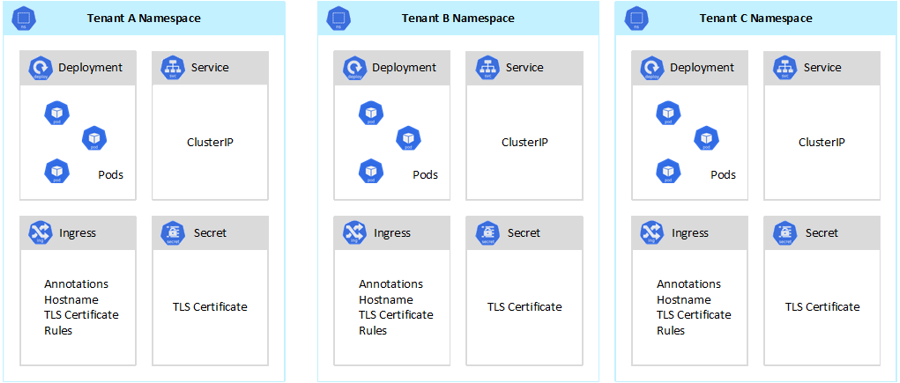
Figure 1: Multi-tenant Kubernetes architecture: a single cluster hosts multiple isolated namespaces, one per tenant (Team/Customer). Each tenant’s application instance runs in its own namespace with dedicated resources. Standard Kubernetes controls like RBAC, NetworkPolicies, and ResourceQuotas (per namespace) enforce isolation between tenants. Additional policies and tooling provide security and fairness across the shared cluster.
3) Namespace Isolation and RBAC Permissions
Namespaces are the basic unit of isolation in Kubernetes. Every tenant (team or customer) should get one or more dedicated namespaces to house their workloads. Namespaces provide scope for names (e.g. two teams can each have a Deployment called “web” without collision) and form a natural security boundary, by default, objects in one namespace aren’t visible to another. While namespaces alone don’t hard-stop all cross-tenant interactions, they are the essential first step for segmentation.
On top of namespaces, configure Role-Based Access Control (RBAC) so that each tenant’s users/service accounts can only act within their namespace. Create Kubernetes Roles for common tasks (like a “developer” role that allows creating pods, services, etc.) and bind them to the appropriate subjects within the namespace. Critically, no tenant user should have permissions beyond their namespace, for example, they should not be granted any ClusterRole that allows viewing or editing cluster-scoped resources. By restricting RBAC rules, you ensure one tenant cannot even accidentally access another tenant’s objects or Kubernetes system components. This addresses part of the privilege escalation risk: even if a team has skilled cluster users, they’re technically unable to list or alter resources in other teams’ namespaces.
Service Accounts and least privilege: It’s also good practice to scope each tenant’s pods to run under dedicated ServiceAccounts in their namespace, with minimal necessary permissions. This way, if an application in one namespace is compromised, the credentials it holds (its ServiceAccount token) won’t authorize it beyond that namespace. In short, Namespaces + RBAC provide the foundation of multi-tenancy: a logical partition of the cluster, and tightly scoped permissions, so each tenant operates in a walled garden.
4) Network Policies for Traffic Separation
Once tenants are separated by namespace, you must enforce that their workloads cannot talk to each other unchecked. Kubernetes NetworkPolicy objects (implemented by the CNI plugin like Calico or Cilium) let you control pod-to-pod communications at the network level. In a multi-tenant cluster, a common approach is: default deny across namespaces. For each namespace (tenant), apply a NetworkPolicy that by default blocks all ingress from other namespaces (and perhaps all egress to other namespaces as well), then explicitly allow only what’s needed (for example, allow ingress from a shared Ingress Controller or allow egress to specific external services). This effectively sandboxs each tenant’s network traffic. Team A’s database service won’t accept connections from Team B’s pods, because Team B’s IP range is not whitelisted, etc.
It’s important to note the limitations of NetworkPolicies. They work at the IP/port level and assume a properly configured CNI. They do not cover access to cluster services like DNS or API server e.g., a pod under attack could still attempt to call the Kubernetes API server or other cluster IPs unless additional measures are in place. NetworkPolicies also can’t stop issues like two pods on the same node communicating via the node’s loopback or shared IPC, should the node kernel be compromised. Therefore, NetworkPolicies are necessary but not sufficient for multi-tenant networking. Always combine them with RBAC (to prevent unauthorized API access) and consider layered network segmentation. For instance, some teams run sensitive tenants in separate node pools or subnets, using Kubernetes node selectors / taints so certain tenants’ pods run on dedicated nodes, which adds an extra physical isolation on top of logical policies. Also, service mesh solutions (Istio, Linkerd) can provide additional network-layer isolation and encryption if needed, though at the cost of complexity.
In summary, use NetworkPolicies to enforce that each tenant’s pods only communicate in approved ways. This mitigates lateral movement (an attacker in one namespace can’t just scan the entire cluster network). But stay mindful of their gaps and bolster network isolation with other safeguards as appropriate.
5) Resource Quotas and Limits (No More Noisy Neighbors)
To prevent one tenant from hogging all the CPU, memory, or other resources, Kubernetes offers ResourceQuota and LimitRange objects at the namespace level. A ResourceQuota sets an upper limit on resource usage in a namespace for example, you can cap “Team A” to 10 CPUs, 20 GB of memory, 100 pods, etc.. If Team A tries to create more pods beyond the quota or consume more CPU than allowed, Kubernetes will reject the new pods once the quota is exhausted. This ensures no single tenant can consume more than their fair share of the cluster’s capacity. It directly addresses the noisy neighbor problem: _even if a tenant attempts to run hundreds of pods, they’re limited by their quota and won’t overwhelm the cluste.
A LimitRange complements this by defining per-pod or per-container limits and requests within the namespace. For example, a LimitRange might declare that any container in “Team B’s” namespace can request at most 2 CPU and 1 GiB memory and must have a minimum request of 100m CPU. This prevents tenants from running pods with no resource limits (which could opportunistically grab all node resources) or with excessively low requests (which could pack too many containers on a node and then cause contention). In essence, LimitRanges enforce sane boundaries on each container’s usage, while ResourceQuotas enforce global caps per tenant. Together, these mechanisms throttle runaway tenants and insulate others from their resource spikes.
It’s a best practice to set a ResourceQuota for each tenant namespace based on that tenant’s entitlement whether it’s an internal policy (e.g. QA team gets fewer resources than Prod team) or a SaaS customer plan (e.g. free tier vs premium tier. Kubernetes will then automatically enforce those allocations. Combined with cluster autoscaling, quotas also help ensure that if one tenant suddenly needs more resources, Kubernetes won’t steal them from others; it will instead scale out the cluster or queue the work, preserving overall stability. In a well-tuned multi-tenant cluster, ResourceQuotas and LimitRanges are your first line of defense against noisy neighbors.
Pod Security and Admission Controls
Even with namespaces, RBAC, network locks, and quotas, we must prepare for misconfigurations or malicious actions within a tenant’s boundaries. What if a team accidentally deploys a pod with privileged=true, or with a mounting of the host filesystem hostPath), or tries to run as root user? Such pods could break out of containment and affect the host or other pods. Kubernetes Pod Security Standards define baseline policies (baseline/restricted) to avoid dangerous pod specs. In Kubernetes v1.25+, you can use the built-in Pod Security Admission or custom admission controllers to enforce these standards.
A popular approach is to use open-source admission controllers like OPA Gatekeeper or Kyverno. These act as policy engines that evaluate every Kubernetes object creation/update against custom rules, rejecting those that violate security policies. For multi-tenancy, you can deploy cluster-wide rules such as: “no tenant pod may run privileged or mount host paths” (preventing container escapes). Other examples include requiring all images come from an approved registry, forbidding use of certain capabilities (no NET_ADMIN, etc.), or enforcing that each deployment has specific labels or resource limits. By defining these policies, even if a tenant has access to create pods in their namespace, they cannot create pods that violate your security guardrails the admission webhook will reject the request before it runs.
Kyverno, for instance, makes it easy to write a rule like “disallow containers running as root UID 0” or “require read-only root filesystem.” Gatekeeper (OPA) can do the same with Rego policies, and it integrates well with a GitOps workflow for managing policies. Implementing these Pod Security Policies (via Kyverno/Gatekeeper) is critical now that Kubernetes’ deprecated PodSecurityPolicy resource is gone. They fill the gap by ensuring that even inside their own namespaces, tenants operate under safe constraints. In effect, admission controllers act as cluster-wide referees, preventing risky configurations that could jeopardize multi-tenant isolation.
Additionally, consider enabling or integrating runtime security tools (like open-source Falco) to detect if a container does manage to do something suspicious at runtime, but that’s more of a last-resort detection. The primary strategy is to prevent unsafe actions via policy so that tenants are kept within secure boundaries at all times.
6) Multi-Tenant Governance Tools (Namespaces Plus)
While the above features cover the basics of isolation, you can simplify multi-tenant cluster management further using open-source tools purpose-built for this scenario:
Hierarchical Namespace Controller (HNC): HNC is a Kubernetes SIG project that helps organize namespaces into a hierarchy (parent-child). It doesn’t add isolation beyond normal namespaces, but it makes life easier for administrators of a multi-tenant cluster. For example, you might create a parent namespace per tenant (say
team-a), and then allow that team to create sub-namespaces liketeam-a/dev,team-a/prodfor their environments. HNC ensures certain policies (RBAC roles, NetworkPolicies, ResourceQuotas, etc.) are automatically inherited by child namespaces. This way, the platform team can set up tenant-wide rules at the parent, and the tenant can self-service new namespaces under it without extra cluster-admin work. HNC is especially useful for large organizations with internal multi-tenancy, to delegate some control to teams while keeping central governance. It’s an open-source add-on (not built-in), and as of HNC v1.1 it’s still evolving (e.g. improving cross-namespace quota enforcement, but it addresses the management complexity of multi-namespace isolation.Capsule (Clastix): Capsule is a CNCF sandbox project that introduces a higher-level “Tenant” custom resource on top of namespaces. Think of Capsule as an operator that groups multiple namespaces under a Tenant and automatically applies isolation policies between tenants. When an admin creates a Tenant object, Capsule will ensure that any namespace belonging to that tenant gets the proper NetworkPolicies, quotas, etc., and that tenants cannot interact. For example, Capsule’s policy engine can prevent one tenant’s RoleBindings from referencing a ServiceAccount in another tenant, and can enforce inter-tenant network isolation by default. Capsule basically makes Kubernetes multi-tenancy “native”, tenants can be managed like first-class citizens, without custom scripts. It even allows delegating certain privileges: you can allow each tenant owner to create namespaces (within their tenant) on demand, without needing cluster-admin, since Capsule will attach those namespaces to the tenant and keep them isolated. This significantly reduces ops overhead compared to manually managing dozens of separate namespaces. Capsule is completely open-source and works with upstream Kubernetes (it uses only CRDs and admission webhooks under the hood. Many teams use Capsule to avoid the cluster-per-team explosion while still giving each team a feeling of owning their environment.
In practice, these tools can be combined. For instance, you might use Capsule to handle multi-tenant policies and self-service, and also use HNC if sub-division of namespaces is needed within a tenant. The key point is that the Kubernetes ecosystem recognizes the difficulty of multi-tenant management and provides these open solutions to streamline it. They build on top of the primitives (Namespaces, RBAC, etc.) we discussed, so you’re not replacing anything, you’re augmenting Kubernetes with smarter multi-tenancy governance.
Virtual Clusters for Hard Isolation
All the approaches so far implement soft multi-tenancy, meaning tenants share the same Kubernetes control plane and nodes, with isolation enforced by policies. This is suitable when tenants have some level of trust or when the risk is acceptable given the cost savings. But what if you need stronger isolation without going to completely separate clusters? This is where virtual clusters come in an emerging open-source approach for “hard” multi-tenancy.
A virtual cluster (vCluster) runs a separate Kubernetes control plane for each tenant, but all on top of a shared underlying cluster. In simpler terms, each tenant sees a Kubernetes API just for them (they can even have admin rights in their virtual cluster), yet their pods actually run on a shared set of worker nodes in the host cluster. Tools like vCluster by Loft Labs provide this by spinning up lightweight Kubernetes API servers (often as containers) per tenant. The tenant interacts with their vCluster’s API server, which in turn creates real pods on the host cluster (usually in a namespace dedicated to that vCluster). The benefit is strong control plane isolation: tenants have separate etcd, scheduler, API endpoint, so they cannot even see other tenants’ Kubernetes objects, it feels like having your own cluster. Also, things like CRDs or tiller releases are isolated per vCluster, avoiding cross-tenant interference at the cluster API level.
Virtual clusters still share the worker nodes (unless combined with node isolation), so they are a middle-ground between soft and full isolation. They are great for scenarios like a SaaS with untrusted external customers: you can give each customer a virtual cluster for their app instance, so their Kubernetes view is completely isolated, and you rely on the underlying cluster’s security for the data plane isolation. Open-source projects like vCluster (Loft) implement this model, as does Kubernetes KubeVirt / K3s in K8s in some solutions, and Kamaji (which runs control planes as pods. These are upstream-friendly and avoid having to run dozens of full-blown clusters. The trade-off is increased complexity (you now run multiple API servers) and some performance overhead, but it is still far lighter than managing separate physical clusters for each tenant.
In summary, if soft multi-tenancy (namespaces) is not sufficient for your security needs, consider virtual cluster technology as an open-source way to get per-tenant control planes (hard isolation) without the one-cluster-per-tenant burden. Many organizations find a mix is optimal: use namespaces (perhaps with Capsule) for internal teams (soft isolation), but use virtual clusters for external untrusted tenants or where regulatory isolation is needed. The combination of these tools allows you to fine-tune isolation vs. cost on a per-tenant basis.
Conclusion
Achieving true multi-tenancy in Kubernetes is challenging but very feasible with today’s open-source ecosystem. The key is defense in depth: Kubernetes alone gives you the raw pieces (namespaces, RBAC, quotas, policies) and you should enable all of them to compartmentalize tenants. Namespaces and RBAC form the security sandbox for each tenant, NetworkPolicies lock down cross-tenant traffic, and ResourceQuotas/LimitRanges ensure fair resource sharing to eliminate noisy neighbors. On top of that, use admission controllers (Kyverno/Gatekeeper) to globally enforce security best practices (no privilege escalation, no dangerous mounts, etc.). This closes the loopholes that could allow one tenant’s workload to harm the cluster. For easier management at scale, leverage multi-tenancy operators like Capsule or HNC which simplify tenant provisioning and apply policies consistently. And for the highest isolation needs, virtualize the control plane with vCluster or similar solutions, giving each tenant their own Kubernetes API while still pooling the underlying infrastructure.
Ultimately, there is a spectrum between convenience and isolation. If you implement the strategies above, a single Kubernetes cluster can safely host many tenants, avoiding cluster sprawl while containing risks. Many organizations have found that with the right configuration, a shared cluster is both cost-efficient and secure. By contrast, spinning up one cluster per team or customer should be a last resort for only the most extreme isolation requirements, or if your tooling cannot support multi-tenancy. With upstream tools and community projects, you can achieve multi-tenancy “the Kubernetes way.” The result is a platform where teams and customers (“tenants”) get the agility of cloud-native deployment without risking each other’s environments. Kubernetes multi-tenancy, done right, provides the best of both worlds: strong isolation and unified infrastructure**. It may require careful planning and governance, but the payoff is huge in efficiency. Start by applying these open-source best practices step by step, and soon your one cluster will securely serve many tenants, no compromises required.
Sources
Kubernetes & cloud provider official docs, and real-world learnings learn.microsoft.com medium.com medium.com medium.com.