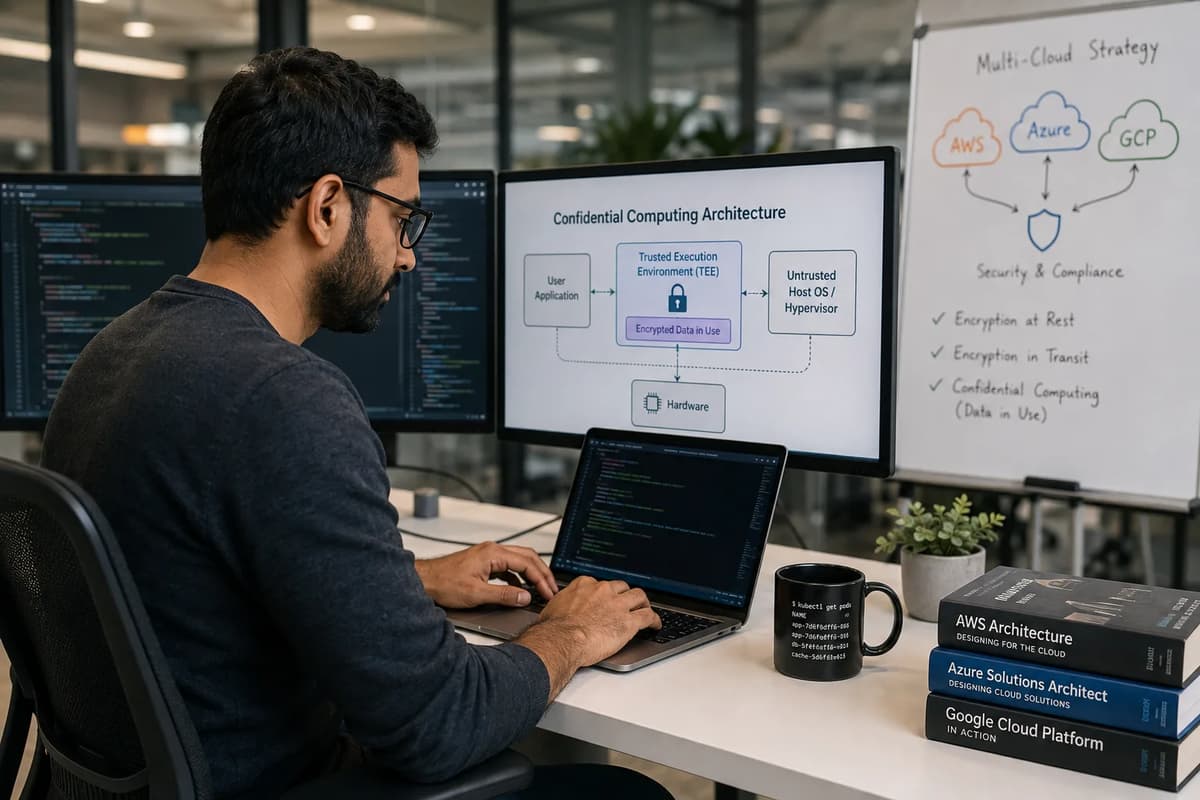
When compliance auditors ask, “Sure, your data is encrypted on disk and on the wire, but what protects it while it’s being processed?”, cloud engineers used to shrink. Encryption at rest and in transit are well-covered by modern clouds, but “data in use” (decrypted in memory during computation) was an open question. For years, there was simply no transparent solution: data had to be decrypted in RAM for computation, leaving it exposed to anyone with root or hypervisor access. In fact, Fortanix explains it plainly: “Data exists in three states: at rest, in transit, and in use. Until now, it was impossible to encrypt data in use. Confidential Computing has solved the problem by retaining data encrypted even at runtime in memory.”
By 2026, all three major clouds have implemented confidential computing solutions: Trusted Execution Environments (TEEs) that keep data encrypted in use. None of these came from a single blockbuster press release this year; instead, 2026 is the year these technologies reached maturity across AWS, Azure, and Google. We’ll explain what TEEs do and how each cloud offers them now, so you can confidently answer the auditor’s question and guide your architecture to “encrypt everywhere.” For deeper cloud security training, see the Refonte Learning Cloud Engineering Program, which covers AWS, Azure, and GCP.
The Compliance Question That Used to Have No Good Answer
Auditors and architects have long listed data protection like this:
At rest: Data encrypted on disks and databases (AES-256, etc.).
In transit: Data encrypted over networks (TLS, VPNs).
In use: Traditionally left unencrypted while running in memory.
Cloud providers have solved the first two with built-in tools (for example, KMS/EBS encryption and HTTPS), but in-use data was vulnerable until very recently. Compliance scans routinely check rest and transit, and then the inevitable question comes: who can read our memory? This list of data states, at rest, in transit, and in use, makes clear that the gap was data in use. With confidential computing and TEEs, that last item is finally checked.
Encryption at Rest, in Transit, and the Gap in Between
By 2026, “encrypt at rest” and “encrypt in transit” are standard in all clouds. Every disk and backup can be encrypted (S3/Blob/Azure Disk encryption), and every network connection is protected (TLS by default). However, consider the risks of data actively being computed on:
Memory scraping: Without TEEs, an attacker or buggy software could dump a VM’s RAM and read sensitive data.
Privileged access: A cloud admin or hypervisor with root access could inspect a VM’s memory.
Decrypted during processing: Applications must decrypt data to work on it. That plaintext window was a vulnerability.
In short, traditional encryption left the “in use” data exposed to the host system. None of those protections help once data is being processed. Until confidential computing, the recommendation was to minimize trusted code and trust the cloud provider’s security. Now, hardware TEEs fill that gap by encrypting data even in memory, ensuring an extra layer of protection exactly where auditors needed it.
What a Trusted Execution Environment Actually Does
A Trusted Execution Environment (TEE) is a hardware-isolated enclave where code and data are shielded from the rest of the system. In a TEE, a special secure processor subsystem encrypts memory pages and CPU registers so that anything outside the enclave only ever sees ciphertext. Microsoft’s Trusted Execution Environment documentation defines it succinctly: “A TEE is a segregated area of memory and CPU that’s protected from the rest of the CPU by using encryption. Any code outside that environment can’t read or tamper with the data in the TEE.” In other words:
Hardware Isolation: The CPU and RAM used by the enclave are encrypted from the outside. No OS or hypervisor can peek inside those pages.
Authorized Code Only: Only code running inside the TEE (approved by the platform) can decrypt and work with the data. To the outside world, that data is always encrypted.
Remote Attestation: TEEs support cryptographic attestation, letting you verify that your trusted code is running in the enclave as expected.
These features mean that even a compromised host OS, hypervisor, or malicious administrator cannot read the enclave’s memory. The TEE hardware (on Intel SGX, AMD SEV, or Nitro Hypervisor, etc.) enforces that guarantee at the silicon level. Thus, in a confidential compute model, data-in-use remains confidential.
Isolated From the Host, the Hypervisor, and Even the Root User
Critically, TEEs are invisible to anyone outside them. For example, AWS Nitro Enclaves are built on the Nitro Hypervisor, which “ensures that the parent instance has no access to the isolated vCPUs and memory of the enclave”. In practice this means:
No host or hypervisor access: The parent VM’s processes (even root) cannot access enclave memory or files. The data and applications inside the enclave “cannot be accessed by the processes, applications, or users (root or admin) of the parent instance”.
No network or SSH: Enclaves cannot be reached over the network. There is no SSH or Internet interface into an enclave. They only communicate over a secure local channel (vsock) with their parent.
No persistent storage: Enclaves have no disk; they exist only in RAM. If an enclave stops, its memory is gone.
In summary, a TEE is a locked box inside the machine: the host OS/hypervisor might as well not exist for the enclave. Even AWS documents note that enclaves “provide only secure local socket connectivity with their parent instance” and no outside access. This is how confidential computing achieves what neither disk nor network encryption could: protecting data even from the host itself.
AWS Nitro Enclaves: How the Isolation Actually Works
According to the AWS Nitro Enclaves documentation, Nitro Enclaves is an EC2 feature built on the AWS Nitro System. When you launch a Nitro Enclave, AWS carves out part of an existing EC2 instance’s CPU and memory into a separate confined VM. The Nitro Hypervisor then completely isolates that enclave from the parent. Key points:
Dedicated hardware isolation: The enclave uses its own vCPUs and RAM, and the Nitro Hypervisor enforces that the parent instance cannot access those resources. AWS also notes that Nitro Enclaves is “processor agnostic”: it runs on Intel, AMD, or AWS Graviton instances, while the isolation is enforced by the Nitro hardware.
No host interfaces: Enclaves have no SSH, no network, and no storage. They are ephemeral memory regions. The only way to get data in or out is via the parent EC2 instance using a secure vsock channel. This design prevents any external attack, limiting communication to a controlled interface. (Enclave developers typically use a parent process to fetch data or keys and pass them into the enclave.)
Attestation and KMS integration: AWS provides an attestation service integrated with AWS KMS. You can verify the enclave’s cryptographic identity and ensure it’s running approved code, binding your keys so that only the intended enclave can decrypt data.
In practice, using Nitro Enclaves means building or running a trusted application binary within this locked-down VM. Many companies use enclaves for key management, machine learning on PII, or crypto signing. The key is that even EC2’s own root user can’t peek into the enclave. Effectively, Nitro Enclaves answer the compliance question by adding a layer between your data and the host OS.
For context, this approach is completely separate from AWS’s CPU architecture projects. Nitro Enclaves work on existing EC2 hardware (Intel, AMD, and Graviton); the design is about isolation, not raw CPU performance. For the separate processor-architecture story, read AWS Graviton5 and the ARM migration for cloud engineers.
Azure’s Confidential VM Lineup: AMD SEV-SNP and the New Intel TDX Generation
Microsoft Azure has pursued confidential computing through VM families powered by CPU security extensions. The Azure confidential VM overview lists established AMD SEV-SNP families, including DCasv5/v6, DCadsv5/v6, ECasv5/v6, and ECadsv5/v6. By 2026, Microsoft’s current documentation also lists an Intel Trust Domain Extensions (TDX) generation: DCesv6, DCedsv6, ECesv6, and ECedsv6. In both cases, the VM’s memory is transparently protected by the CPU so that the Azure host cannot read it. Azure describes both AMD SEV-SNP and Intel TDX confidential VMs as hardware-isolated options for protecting code and data while they are processed.
Azure also offers confidential GPU instances: the NCCadsH100v5 series combines AMD SEV-SNP with NVIDIA H100 GPUs. This lets you run AI training or inference on confidential data. Microsoft lists the AMD-based generations, the Intel TDX generation, and the H100 GPU series side by side. In each case, the goal is similar protection from the cloud infrastructure stack, implemented through different silicon.
Key Azure confidential VM families: DCasv5/DCadsv5 and ECasv5/ECadsv5 (AMD SEV-SNP); DCasv6/DCadsv6 and ECasv6/ECadsv6 (AMD SEV-SNP); DCesv6/DCedsv6 and ECesv6/ECedsv6 (Intel TDX). Each “dsv” variant has a local temp disk, the “sv” variant is diskless, and “a” or “es” indicate Azure accelerated (GPU) support.
Hardware diversification: By supporting both AMD and Intel TEEs, Azure avoids vendor lock-in and ensures options. If one architecture had a flaw, the other provides a path. In practice, both SEV-SNP and TDX “provide similar protections”; they simply take different technical approaches. For a cloud architect, this means you have more choices (for example, Intel TDX VMs may support different regions or have different performance) without giving up data protection.
Why Hardware Diversification Matters Here
Having both AMD and Intel implementations gives you flexibility. Key reasons include:
Vendor independence: You’re not dependent on one chip supplier. This is helpful if supply, pricing, or vulnerabilities differ between AMD and Intel.
Architectural trade-offs: SEV-SNP and TDX have different features (for example, SEV-SNP includes encrypted nested paging, TDX uses a separate mode for encryption). Azure’s platform abstracts that away, but you might benchmark both for your workload.
Redundancy: If an exploit is found in one technology, you could switch your workload to the other for the time being. (Both protect against the same threat category, a “malicious hypervisor,” but use different hardware mechanisms.)
Performance/availability: The newer Intel-based VMs expand capacity (more instance types) and may have different performance profiles. For instance, an Intel TDX VM might have different boot times or memory throughput than the AMD ones.
In short, Azure’s confidential VM lineup means you can “lift and shift” existing workloads onto a SEV-SNP VM or choose the newer TDX-based VM without rewriting your code. Both kinds encrypt memory, they just use different chips underneath.
Google Cloud’s Broader Confidential Product Surface
Google Cloud has built out a wide portfolio under “Confidential Computing,” not just VMs. Google Cloud’s Confidential Computing product page explicitly lists Confidential VMs, Confidential GKE, Confidential Dataflow, Confidential Dataproc, and Confidential Space. This shows Google wants to weave TEEs across its broader compute and data-processing stack, not leave them confined to Compute Engine VMs. Key offerings:
Confidential VMs: Regular Compute Engine VMs (C2, C3, E2, etc.) with memory encryption. Google states they “encrypt data-in-use while it’s being processed,” using AMD and Intel CPU technologies. Customers can take existing VM images and enable this with no code changes.
Confidential GKE Nodes: Kubernetes cluster nodes that use the same TEE tech under the hood. Nodes are launched as Confidential VMs, so all pod memory is encrypted. This gives “encryption in-use for data processed inside your GKE cluster” with minimal performance impact.
Confidential Dataflow: Google’s managed data pipelines can run jobs on Confidential VMs. You simply use the Confidential VMs execution backend, and your streaming/batch pipelines gain in-memory encryption.
Confidential Dataproc: Likewise, Spark/Hadoop clusters on Dataproc can be set up on Confidential VMs, giving end-to-end protection for big data workloads.
Confidential Space: This is Google’s multi-party TEE solution. It allows different organizations to pool data for analysis while preserving confidentiality. Google describes it as enabling joint data analysis and machine learning model training with trust guarantees, while keeping data protected from all parties, including the underlying infrastructure and the parties’ own operators.
In short, Google’s list of products now includes anything you might do in the cloud. Confidential computing isn’t just a VM flag; it’s an umbrella for encrypted compute across Compute Engine, Kubernetes, Dataflow, Dataproc, and collaborative ML (Confidential Space). This breadth highlights Google’s strategy: treat in-memory encryption as a fundamental platform feature.
From Confidential VMs to Confidential GKE and Dataflow
The move from VM to full ecosystem means:
Confidential GKE Nodes: Kubernetes pods on a cluster now run on top of encrypted nodes. Under the hood, each node is a Confidential VM, so an attacker on the cluster host (or other pods) can’t read your pod’s memory.
Confidential Dataflow and Dataproc: These managed services now support using Confidential VMs for their worker nodes. That means your data pipelines are protected end-to-end (in memory) without you having to manage the encryption; Google handles it.
By supporting GKE, Dataflow, Dataproc, etc., Google ensures that confidential computing is not just for low-level VMs. Any data processing workload can now opt in for in-use encryption with minimal changes.
The AI-Specific Case: Confidential Computing Meets GPU Acceleration
A recent cloud trend is pairing confidential computing with GPU instances to protect sensitive AI workloads. Both Azure and Google Cloud now offer such machines:
Azure NCCadsH100v5: These new instances combine AMD SEV-SNP with NVIDIA H100 Tensor Core GPUs. This is Azure’s response to customers who want to train or run AI models (e.g. healthcare or finance data) on GPUs but not expose raw data. All CPU-side memory remains encrypted under SEV-SNP, and GPU memory benefits from the H100’s data path encryption.
Google Cloud Confidential VMs with H100 (A3 series): Google’s confidential VMs also run on A3 machines with NVIDIA H100 GPUs. Google notes this lets businesses “unlock the full potential of AI and ML while safeguarding sensitive data,” keeping data protected from when it enters the GPU to when results come out. In short, data moving through NVIDIA HBM and through the inference/training pipeline stays confidential.
These GPU-enabled confidential VMs directly target AI use cases with sensitive data (medical imaging, personal finance forecasts, proprietary algorithms). They ensure that even when exploiting massive parallel computation, the data remains hidden from cloud operators or co-tenants. It addresses a real pain point: AI/ML success often requires huge GPUs, but datasets/models are often proprietary or regulated. Now you can have both acceleration and confidentiality.
Why Healthcare and Financial Data Are the Obvious First Use Cases
When deciding which workloads need confidential computing, the answer often starts with data sensitivity. Industries like healthcare and finance handle data that must be protected by law (HIPAA, GDPR, PCI-DSS). For example:
In healthcare, patient records or genomics data processed in the cloud could violate privacy if exposed. With a TEE, you can run analytics on decrypted patient data and still prove that not even the cloud admin could snoop on it.
In finance, transaction records, credit scores, or proprietary risk algorithms are obvious targets. Nitro Enclaves (AWS) and Confidential VMs (Azure/GCP) allow banks or fintechs to perform computations on sensitive data (like fraud models) without risking insider data exposure.
Blockchain/cryptocurrency: Several crypto companies use Nitro Enclaves for key management and transaction signing, since hardware isolation protects private keys even in a multi-tenant environment.
Government and Defense: Classified or controlled unclassified information can be processed in the cloud under strict assurances. A TEE provides an extra layer of isolation needed for compliance.
Even outside regulated sectors, any proprietary algorithm or secret-shielded machine learning model could benefit. The key is: wherever a breach of in-use data could have severe consequences, confidential computing is a valuable tool. In practice, many organizations will start by moving just the most sensitive parts of their workloads into enclaves or confidential VMs (e.g. decrypting only tokens or personal identifiers in an isolated process).
What This Actually Costs You in Performance and Complexity
Confidential computing adds overhead and complexity, so it’s important to be realistic. In general:
Performance impact: CPU overhead for data encryption in memory is usually small, since modern CPUs (Intel/AMD) have hardware support. For instance, the AWS Nitro system is built to handle encryption with negligible slowdown. However, there is often some added latency: Nitro Enclaves must shuttle data through a vsock, and Azure/Google VMs may do extra work per memory access. In benchmarks, Nitro Enclaves have shown near-normal performance for many workloads, but specialized apps (high I/O or lots of syscalls) may slow down. GPU instances largely keep GPU performance, since NVIDIA handles encryption on-chip, but the host CPU still does attestation and data movement.
Network and I/O limitations: AWS Nitro Enclaves cannot directly use network or storage. All I/O goes through the parent EC2. This means higher latency for outbound calls. Azure Confidential VMs and Google Confidential VMs do support normal networking and disks, but note that Azure requires you to stay in “confidential” SKUs: you can’t resize a non-confidential VM into a confidential one. There may also be fewer regions where these specialized VMs are available initially.
Operational complexity: You must manage attestation, keys, and possibly modify your software. For Nitro Enclaves, your app may need to split into a parent part and an enclave part, communicating via vsock. For Azure/GCP, no code changes are required, but you still need to set up the infrastructure (e.g. enable the Confidential VM flag, use their attestation APIs, etc.). Debugging inside an enclave can be harder since you can’t SSH in. All this adds DevOps overhead.
Cost: Specialized hardware often costs more. Azure’s confidential VMs often have a premium per vCPU, and GCP’s may as well. Even if the base VM price is similar, using TEEs means you have additional work (enclave management) which can translate to personnel cost. You’ll need to factor that in.
In practice, the overhead is often modest for CPU-bound tasks, but can become significant for chatty services or high-throughput databases. Weigh that against your security requirements. If your data absolutely cannot be exposed even on the host, the trade-off may be worth it. Otherwise, you might use confidential computing only for the most critical pieces.
Where the Overhead Shows Up in Practice
Communication Bottlenecks: For AWS Nitro Enclaves, all data goes through the parent via vsock, which may become a bottleneck if your workload streams a lot of data in and out of the enclave.
Resource Constraints: Enclaves often consume a slice of the parent’s RAM and CPUs. Very large enclave workloads might require big instance types or multiple enclaves. Azure/GCP confidential VMs typically lock you into specific families (like DCoS/DcIs/ECos/EcIs), so you can’t scale outside those pools.
Memory Bandwidth: Some confidential VMs (AMD SEV) encrypt memory transparently, which might slightly reduce peak memory bandwidth due to encryption overhead. In most cases this is a few percent, but memory-intensive jobs should be benchmarked.
Development Overhead: Running inside a TEE often means rethinking how your app handles secrets. For example, you may generate keys inside the enclave rather than loading them from files. This doesn’t show up in CPU metrics but does mean more engineering effort.
Overall, expect some performance and management cost. These TEEs are built to minimize impact. AWS presents Nitro Enclaves as hardware-enforced isolation, while Azure and Google promote lift-and-shift confidential VMs that usually require no application changes. Real-world slowdowns are often small, but you should test with your actual workload to confirm the impact.
Evaluating Whether Your Workload Actually Needs This
Not every application requires confidential computing. Ask yourself:
Regulatory requirements: Do laws or standards mandate encryption at every stage (e.g. certain government or health data laws)? If auditors want proof that data was never exposed in plaintext, TEEs help meet that bar.
Risk tolerance: Who do you really need to protect against? If you worry about stolen disk or network eavesdropping, encryption at rest/in transit is enough. If you worry about a malicious cloud admin or hypervisor attack, TEEs address that.
Threat model: If insiders (like cloud operators, or privileged malware) are part of your threat model, confidential computing adds a strong defense layer. If your biggest threat is, say, external hackers over the internet, focus on traditional security controls first.
Value vs. cost: Is your data or model so valuable that its compromise would be catastrophic? For example, training a proprietary AI model on sensitive data might justify the extra cost of secure enclaves. Less sensitive workloads might skip it.
In practice, you might adopt a hybrid approach: run sensitive parts of your app in an enclave or confidential VM, and keep everything else in normal infrastructure. For example, a database could use row-level encryption keys managed in Nitro Enclaves, while the app server remains standard. Or a microservice with a HIPAA enclave only for patient data transformations.
Comparative architectures also matter. If you already use Kubernetes, adding a Confidential GKE node for one namespace could secure that workload. If you use VM pipelines, switching a Dataflow job to Confidential mode is just a flag in many cases. The key is to match the need for secrecy against the difficulty of implementing. Often compliance needs or customer trust drive that decision.
Comparing the Three Clouds’ Approaches Side by Side
Feature | AWS Nitro Enclaves | Azure Confidential VMs | Google Confidential Computing |
TEE Technology | AWS Nitro Hypervisor enclaves (EC2) | AMD SEV-SNP (3rd-gen EPYC) or Intel TDX (5th-gen Xeon) | CPU memory encryption (AMD/Intel based; Shielded VMs) |
Networking | No external network (only secure vsock) | Standard Azure networking (VNet) | Standard GCP networking (VPC) |
Storage | No persistent disk (ephemeral only) | OS disk (Azure-managed, encrypted), optional temp disk | Persistent disks/SSDs (encrypted, like normal VMs) |
GPU Support | None (no GPU enclave mode) | NVIDIA H100 GPUs on NCCadsH100v5 (with SEV) | NVIDIA H100 GPUs on A3 series |
Attestation | AWS KMS attestation service | Azure Attestation (TPM or enclave-based) | Google uses Shielded VM/Cloud KMS attestation |
Code changes needed | Typically yes (vsock-based enclaves) | No (lift-and-shift VMs, no code change) | No (lift-and-shift or container workloads) |
This table highlights the differences. In AWS, confidential computing is an isolated enclave carved from an existing VM, with no external networking and typically enclave-aware code. In Azure and Google, it is a VM or service configuration: your VM or container runs normally while its memory is protected. Azure requires specific confidential VM sizes and now offers AMD and Intel variants, whereas Google supports confidential computing across several VM and managed-service patterns. Azure and Google also retain standard networking and storage behavior.
Where the Three Providers Genuinely Differ
Isolation model: AWS Nitro Enclaves creates a separate execution environment (similar to a micro-VM) with no network or disk, giving the strongest isolation at the cost of flexibility. Azure/GCP encrypt entire VMs but otherwise behave normally.
Hardware stacks: Azure relies on AMD SEV-SNP or new Intel TDX CPUs, giving two hardware options. Google and AWS also rely on hardware TEEs (AWS used to have SGX/SEV early on; now it's Nitro Hypervisor), but Google’s Confidential VMs are primarily AMD/Intel inside standard VMs.
Usability: Azure/GCP solutions require no application changes; existing Linux/Windows apps run inside a CVM. AWS Nitro may require re-architecting parts of an app to communicate via the enclave’s vsock interface. This makes Azure/GCP easier for legacy apps, whereas AWS’s approach may be more work but provides arguably stronger isolation.
Service breadth: Google leads in services (GKE, Dataflow, etc.), while AWS currently focuses on Nitro Enclaves (and has SGX on some instances) and Microsoft focuses on VMs and AKS (Azure’s Kubernetes can use CVMs).
GPU confidentiality: AWS currently has no direct GPU enclave offering; you’d have to use other means. Azure and Google both support NVIDIA H100 in confidential mode out of the box.
In summary, AWS Nitro Enclaves takes a specialized “mini-VM” approach, whereas Azure and Google embed memory encryption into their regular VM offerings. Each has trade-offs, but all three achieve the same goal: encrypting data in use so even privileged users can’t see it.
What This Means for Compliance and Audit Conversations
From a compliance standpoint, confidential computing is the final piece of the “encrypt everywhere” puzzle. You can now point auditors to documentation and demonstrations showing that data remains encrypted at all times: on disk, in flight, and even in CPU and RAM. This can support regulations and internal controls that require rigorous data protection. For example:
Audit evidence: You can show the auditor a successful enclave attestation report or Confidential VM launch log, proving that only authorized code ever handled the plaintext. Cloud providers’ docs (AWS Nitro, Azure CVM, Google Confidential VM) can be cited to confirm the guarantees.
Policy wording: Organizations can update security policies to state that “even in use” data is encrypted. Now it is a true statement. This closes compliance gaps around data lifecycle.
New controls: Some compliance frameworks may start to include in-use encryption as a recommended control. Even if not required today, leading auditors will understand the concept. Being ready with TEEs shows you’re ahead of the curve.
The 2026 story is not a single announcement; it is growing maturity and adoption. We did not identify one definitive 2026 press release that serves as the anchor for all three clouds. Instead, the practical milestone is the combination of newer hardware generations, confidential GPU options for AI, and broader product coverage. For practitioners, the technology is now a recognized cloud-service category rather than an experimental edge case.
For broader guidance on encryption, IAM, network controls, and layered defenses, read security best practices for cloud engineers. Confidential computing is a newer frontier, but it sits alongside the controls auditors already expect, including least privilege, logging, and network segmentation.
Cloud Engineer Salaries in 2026
Demand for cloud skills continues to drive high salaries. According to Indeed’s August 2026 cloud engineer salary data, the average Cloud Engineer salary in the US is about $135,500 per year. Indeed reports a range from roughly $88,700 to $207,000, depending on experience, location, and company. These figures reflect strong demand for multi-cloud expertise (AWS, Azure, and GCP) as well as security knowledge. As confidential computing becomes a needed skill for securing sensitive workloads, cloud engineers with that expertise can command premium pay.
Building This Expertise: The Refonte Learning Cloud Engineering Program
If you want to master these multi-cloud security topics, consider the Refonte Learning Cloud Engineering Program. This 3-month, 12-14 hours/week course covers AWS, Azure, and GCP fundamentals, including a dedicated Cloud Security and Compliance module. You’ll learn encryption best practices, infrastructure as code, networking, and more, giving you the foundation to evaluate features such as confidential computing across clouds. The program prepares learners for AWS Certified Solutions Architect, Microsoft Azure Architect Expert, and Google Cloud Professional Cloud Architect certifications. It is taught by MSc Charlotte Smith, a cloud architect with 12+ years of experience across AWS, Azure, and GCP.
Other key details: enrollment requires pursuing or holding a bachelor’s degree in computer science or a related field. Tuition is $300 as a one-time payment, or two installments of $204 + $98. Graduates aim for roles such as Cloud Engineer, Cloud Architect, or DevOps Engineer. Refonte cites a $92,500+ starting salary and roughly 160,000 annual cloud job openings as program marketing claims; exact market figures vary.
This program is a relevant next step for engineers who want to strengthen their cloud-security foundation. It does not currently teach confidential computing by name, but its multi-cloud security curriculum provides the grounding needed to understand and evaluate these technologies. By the end, you will be better prepared to answer audit questions about data in use and design secure multi-cloud systems.