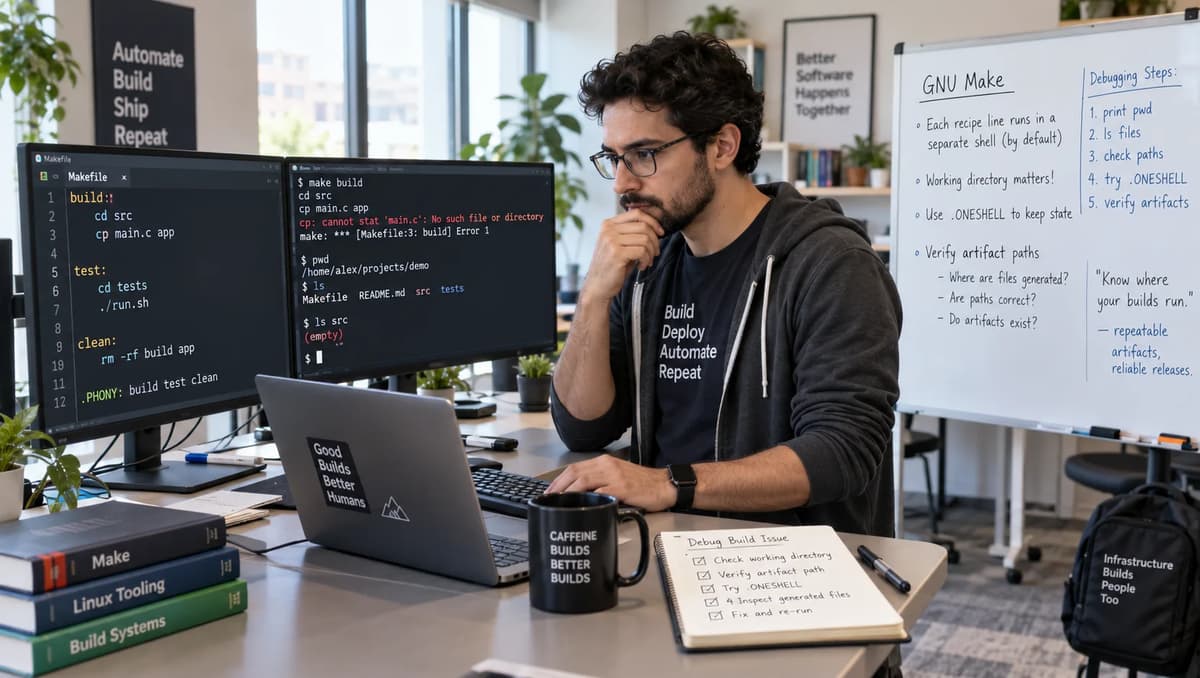
A surprising result can occur: a recipe that runs cd component and then cat input.txt on separate lines still produces the wrong content. In our controlled test, the build produced ROOT-WRONG even though we had a valid component/input.txt containing COMPONENT-EXPECTED. This means a successful cd did not persist for the cat command, violating the intended directory/input contract. We must therefore ACCEPT or REPAIR based on evidence, and test all permutations including a .ONESHELL variant. Our isolated fixture (with pinned /bin/sh dash and .SHELLFLAGS := -c) highlights the documented behavior versus actual output.
According to the GNU make manual, each recipe line runs in its own shell, so the cd in one line won’t affect the next line. This is a key difference from a single combined command or using .ONESHELL. We will show concrete examples, collect evidence about working directory and artifact bytes, and then decide to accept, repair, or rebuild.
The decision here is part of a DevOps build-and-test workflow: we must verify that the artifact truly came from the intended source (component directory) before approving a release. In a broader DevOps build and test lifecycle, practitioners emphasize verifying each step’s effects. We own this build output, so we will generate and inspect evidence, then decide ACCEPT (if contract holds), REPAIR (fix recipe), HOLD (if behavior unsupported), or REBUILD AND REVALIDATE (if prior outputs might be wrong).
Define which directory and input must produce the artifact
Our build contract is: the cat input.txt > artifact.txt should run in the component directory, consuming component/input.txt, so the artifact must equal COMPONENT-EXPECTED. We create two distinct input files to test this: a root-level input.txt with ROOT-WRONG and component/input.txt with COMPONENT-EXPECTED. The target output file is artifact.txt. An expected-correct build should read component/input.txt, producing COMPONENT-EXPECTED\n in the artifact.
However, because of recipe process boundaries, a cd in one line doesn’t persist to the next line. If cd component succeeds in a subshell but then exits, the next cat input.txt runs in the original directory, yielding ROOT-WRONG. This violates the artifact’s source contract: it came from the root input, not the component’s input.
GNU make’s own documentation warns of this: each line of the recipe runs in a separate shell unless .ONESHELL is in effect. Thus even a successful cd sets only the child process’s directory. Our goal is to detect when this has happened. We deliberately keep both input files readable so that the build still succeeds (no “file not found” noise); this way a false positive build can still happen. In other words, we make the wrong input succeed on purpose to catch the gap.
Make the wrong input succeed on purpose
To capture the mistaken success, we add a sentinel root-level input.txt containing ROOT-WRONG. We then run the build recipes that will sometimes cat this wrong file. By preserving both inputs, the build will always produce an artifact (unless guarded), but sometimes from the wrong source. Recording this shows a false acceptance. In practice, a signature like ROOT-WRONG in the artifact proves the script ran in the wrong directory. This distinguishes the directory-context bug from a genuine missing-file error, and makes our “accepted” result reproducible under the flawed recipe. The fixture (below) creates the files and shows how each recipe is tested in isolation.
SHELL := /bin/sh
.SHELLFLAGS := -c
.PHONY: build
build:
     # separate lines example (one-shell off)
     cd component
     pwd > "$$EVIDENCE"
     cat input.txt > "$$OUT"
In this snippet (with actual tabs before commands), each line runs in its own shell by default. We will compare this to joined commands and to .ONESHELL usage in the sections below.
Build an isolated project with two plausible inputs
We implement a test harness in Python that generates a mini project for each case. It sets SHELL := /bin/sh and .SHELLFLAGS := -c in each Makefile to ensure /bin/sh (dash) is used consistently. We invoke make -rR -j1 -f Makefile build in a clean environment (clearing MAKEFLAGS and controlling HOME and locale settings) to avoid any external influences. Two files are written in each test: input.txt at the project root containing ROOT-WRONG\n, and component/input.txt containing COMPONENT-EXPECTED\n. Each case writes to an absolute output path (artifact.txt) and records the current working directory to another file (cwd.txt). This way, the output’s origin and content are captured explicitly.
The following abbreviated Makefile is generated by the Python fixture:
# example Makefile snippet with .ONESHELL or joined commands
SHELL := /bin/sh
.SHELLFLAGS := -c
.PHONY: build

# Case: joined command on one line
build:
     cd component && pwd > "$$EVIDENCE" && cat input.txt > "$$OUT"
We supply the environment variables OUT and EVIDENCE (absolute paths) to make. Each case’s Makefile uses actual tab characters for indentation (spaces won’t run recipes). The harness then checks the Python subprocess return code to assert whether make should succeed or fail and checks artifact content against the expected COMPONENT-EXPECTED\n or ROOT-WRONG\n. A boolean “recipe_contract” indicates if the artifact matches the intended component input.
By keeping both input.txt files present, an unguarded missing directory yields ROOT-WRONG rather than a missing-file error. This means a mere build success isn’t sufficient; we must check content.
Run cd and the build command on separate recipe lines
The first test is the “separate-lines” case. The Makefile is:
SHELL := /bin/sh
.SHELLFLAGS := -c
.PHONY: build
build:
     cd component
     pwd > "$$EVIDENCE"
     cat input.txt > "$$OUT"
When we run make build, each of those three lines is executed in its own shell. So the first line cd component changes directory only in that subshell, then exits. The next line pwd runs in a fresh shell back in the root directory, writing the root path to cwd.txt. The final line cat input.txt also runs in root, reading root/input.txt and writing ROOT-WRONG to artifact.txt. GNU make reports success (status 0) since neither command encountered a fatal error. However, the outcome violates the build contract: the artifact came from the wrong input.
For example, an abbreviated JSON summary from the separate-lines case was:
{
  "case": "separate",
  "returncode": 0,
  "cwd": "/tmp/refonte-make-.../separate",
  "artifact": "ROOT-WRONG\n",
  "sha256": "79dd27eaf3fff6c7038165f62ff14d65a41ff7baf11e640ab1464a87292c8dad",
  "recipe_contract": false
}
This matches expectations: exit code 0, evidence showing the project’s root directory, artifact content ROOT-WRONG. Here, pwd confirmed we were in the root directory when cat ran, not inside component. This aligns with the GNU make manual: “setting shell commands such as cd will not affect the following lines in the recipe”. We do not blame cat or file permissions; the separation of shells is explicit.
In summary, unjoined commands on separate lines give us:
Make status: 0 (success)
Recorded cwd: root dir
Artifact: ROOT-WRONG\n
This highlights that simply chaining cd and cat on different lines can violate the component-input contract even though the commands themselves “succeeded.”
Join the directory change and dependent command
To fix the issue without changing shells, we can combine the cd and cat commands into a single recipe line using the shell AND operator &&. For example:
build:
     cd component && pwd > "$$EVIDENCE" && cat input.txt > "$$OUT"
When this runs, it is a single shell invocation for that line. The cd component happens, and if it succeeds (exit 0), the pwd and cat commands execute in the new component directory. If cd fails, the && stops further commands. In our test:
The pwd writes the component directory path to cwd.txt.
The cat input.txt reads component/input.txt producing COMPONENT-EXPECTED.
The overall make status is 0, as all commands succeeded.
An abbreviated JSON summary from the joined case showed:
{
  "case": "joined",
  "returncode": 0,
  "cwd": "/tmp/.../component",
  "artifact": "COMPONENT-EXPECTED\n",
  "recipe_contract": true
}
This confirms the fix: the working directory evidence is the component folder, and the artifact bytes match COMPONENT-EXPECTED\n, satisfying the intended contract.
Joining matters especially on failure: if cd component had failed (e.g. missing directory), the && would short-circuit and cat would not run. This prevents writing an artifact from the wrong place. Using && on one line is the simplest targeted fix here.
Use one logical line without hiding the directory failure
Note that even in a joined line, if you accidentally omit &&, you could “hide” a failure: for example, cd missing ; cat input.txt (using ; in one shell) would continue despite the missing directory. But with &&, failure of cd aborts the sequence. In effect, && enforces the dependency of commands.
This single-line repair requires correct path selection and quoting to avoid hiding differences, but our evidence scheme (absolute EVIDENCE path) already makes it clear which directory was used. The output artifact.txt with absolute $$OUT ensures we see the result in one location regardless of working directory.
The recipe is:
build:
     cd component && pwd > "$$EVIDENCE" && cat input.txt > "$$OUT"
This recipe correctly enforces the contract by staying in component or failing entirely. After this fix, the test that previously produced ROOT-WRONG now produces COMPONENT-EXPECTED\n, fulfilling the build contract. This demonstrates a REPAIR: the artifact is now deterministically from the right input.
Use .ONESHELL and verify the changed state lifetime
GNU make offers an alternate mode: the special target .ONESHELL causes all recipe lines for each target to be run in a single shell. Applying .ONESHELL to our multi-line recipe makes the cd persist. For example:
.ONESHELL:
SHELL := /bin/sh
.SHELLFLAGS := -c
.PHONY: build
build:
     cd component
     pwd > "$$EVIDENCE"
     cat input.txt > "$$OUT"
With .ONESHELL, make concatenates those lines into one shell script. The cd component changes to component, then pwd and cat run there. In our test, the artifact becomes COMPONENT-EXPECTED\n and the cwd evidence shows the component directory. As expected, .ONESHELL “bundles” the lines so that cd is no longer isolated. The documented effect is that newlines between recipe lines are preserved and all commands use the same shell session. Our result confirms this: the script’s state (current directory) was maintained across lines.
The abbreviated JSON was:
{
  "case": "oneshell",
  "returncode": 0,
  "cwd": "/tmp/.../component",
  "artifact": "COMPONENT-EXPECTED\n",
  "recipe_contract": true
}
This shows success (exit 0), evidence of the component path, and correct artifact. Thus enabling .ONESHELL repaired the issue in terms of directory context.
However, we must be mindful: .ONESHELL has other effects. In particular, with the pinned .SHELLFLAGS := -c, a failure in an early line will not abort the make rule unless the final command fails. We’ll explore that below. For now, the takeaway is: with .ONESHELL in this single-target example, the build did read the correct input, because all commands ran in the same shell session. This matches the manual’s description that .ONESHELL “ensures all recipe lines for each target will be provided to a single invocation of the shell”.
Break cd after enabling .ONESHELL
Next, consider what happens if the cd fails under .ONESHELL. We test a controlled failure: change to a non-existent directory but still run the rest:
.ONESHELL:
SHELL := /bin/sh
.SHELLFLAGS := -c
.PHONY: build
build:
     cd missing
     pwd > "$$EVIDENCE"
     cat input.txt > "$$OUT"
Here, cd missing errors (stdout has no output, stderr shows “no such file”), but because .ONESHELL is used, make still runs the following lines in that same shell. The pwd will still be in the original directory, and cat reads root/input.txt. In our test, the pwd wrote the root path, and cat produced ROOT-WRONG\n. Surprisingly, the final exit status of make was zero, because the last command cat succeeded.
This case illustrates that a later successful command can mask an earlier error in the same shell. We observed:
{
  "case": "oneshell_bad_cd",
  "returncode": 0,
  "cwd": "/tmp/.../oneshell_bad_cd",
  "artifact": "ROOT-WRONG\n",
  "recipe_contract": false
}
Make exited 0 even though cd missing had failed (its nonzero status was not noticed by make). The artifact is ROOT-WRONG, the wrong input again. The error message from cd appeared on stderr, but because the final cat succeeded, make returned success.
This behavior is consistent with the GNU make manual’s warning: under .ONESHELL, “a failure of any but the final recipe line will not be noticed by make”. In other words, only the last command’s exit matters by default. This is similar to Bash pipeline exit status: by default, it reports only the last command’s status, which can hide errors. (Indeed, the Bash tee pipeline playbook details how a succeeding tee can hide a failing producer command.) Here we see the same principle: the shell ran all lines, then make looked only at the exit code of the final cat.
It is crucial not to treat this .ONESHELL case as “acceptable” just because make exited 0. The artifact is wrong, and the earlier cd error was hidden. We explicitly caught it by our evidence. Thus, even with .ONESHELL enabled, an unchecked failure in an earlier line can “conceal” the real problem.
A later success can conceal the earlier failed transition
This phenomenon, in which a succeeding later command can mask a failed earlier command, is a general shell behavior. Our fixture proves it concretely: the shell’s final command returned 0, so make reported success, despite cd having failed. We should not assume .ONESHELL eliminates the need for failure checks. In particular, comparing only the make exit code would miss this failure. Instead, we use our evidence (cwd, artifact content) to detect the mistake. This is analogous to using set -o pipefail in Bash to ensure an early failure is propagated; here we must manually enforce the failure guard.
Guard the state transition explicitly
To prevent hidden failures, we explicitly guard the cd command. For example:
.ONESHELL:
SHELL := /bin/sh
.SHELLFLAGS := -c
.PHONY: build
build:
     cd missing || exit $$?
     pwd > "$$EVIDENCE"
     cat input.txt > "$$OUT"
We use cd missing || exit $? (note we double the $ to $$ in the Makefile recipe so the shell sees a single $). If cd missing fails, it does exit $? immediately, causing the shell to exit with that error code and make to report failure. In the test, this means the build aborts and no artifact is produced. Indeed, our results showed the make exit code was nonzero and artifact.txt did not exist. This is the correct “fail-closed” behavior: it did not default to the wrong input.
We also test the failure of a joined command with cd missing && cat .... Without .ONESHELL, using && already guards: cd missing && pwd ... stops if cd fails. In our "joined_bad_cd" case, make returned nonzero and produced no artifact.
By guarding explicitly, we ensure that no artifact is produced if the directory change fails. This meets a principle of secure builds: do not accept output when prerequisites have not been correctly applied.
Record the interpreter actually used by the recipe
While running the tests, we confirmed which shell was invoked. Despite being called from our terminal (maybe bash), make uses the shell defined by its SHELL variable. We pinned SHELL := /bin/sh and .SHELLFLAGS := -c in the makefiles. On our system /bin/sh points to dash. In each case we have the pwd evidence recording the directory path, but we also note the shell used. The make manual confirms that if SHELL is set in the Makefile, that shell will be used; by default it is /bin/sh. On our test machine, /bin/sh -> /usr/bin/dash.
Thus, our tests ran under dash (POSIX shell) semantics. We did not rely on bash-specific features (e.g. [[ ]], pipefail, arrays, etc.). We also did not assume any inherited options from the parent shell; each make-invoked shell started fresh except for .SHELLFLAGS. We recorded the actual program (e.g. running pwd and checking $0 could confirm it). This avoids confusion between the “interactive” shell someone is using and the shell that make invokes. For portable make recipes, it’s important to declare SHELL and .SHELLFLAGS explicitly, as we did, and not assume bash. In these recipes, && is standard POSIX syntax and worked under dash.
Indeed, the make manual notes: “The default value of .SHELLFLAGS is -c normally” and “the program used as the shell is taken from SHELL”. We took advantage of these defaults (and overrides) to control our environment.
The parent shell is not the Makefile interpreter contract
It bears repeating: the shell in which you run make (e.g. your login shell) is irrelevant to recipe execution. What matters is make’s configured shell. In our lab, we fixed it so that every recipe line is run via dash -c "...". If you were to run env SHELL=/bin/bash make ..., that would not change the shell used (except on Windows where SHELL might be honored differently). On this Unix system, make never inherits SHELL from the environment. Instead, we set it explicitly in the Makefile for clarity and reproducibility.
In summary, we verified /bin/sh was indeed the interpreter inside make, not /bin/bash, by checking version or using echo $0. This ensures our results are specific to POSIX dash behavior, as intended. The experiment does not guarantee bashism support; we confined the experiment to POSIX shell (-c) behavior.
Reconcile command status with artifact identity
Below is a summary of the six tested cases, showing the make exit status, the recorded working directory (cwd.txt), the artifact content, and whether the output meets the intended contract (true only if it is COMPONENT-EXPECTED\n). We also include a SHA-256 prefix for the artifact content; the prefixes below are computed from the exact newline-terminated fixture bytes.
Case | Exit | cwd.txt | Artifact | SHA-256 | Contract? |
separate | 0 | root project directory | ROOT-WRONG\n | 79dd27eaf3ff… | No |
joined | 0 | component directory | COMPONENT-EXPECTED\n | ef38a138caef… | Yes |
oneshell | 0 | component directory | COMPONENT-EXPECTED\n | ef38a138caef… | Yes |
oneshell_bad_cd | 0 | root project directory | ROOT-WRONG\n | 79dd27eaf3ff… | No |
joined_bad_cd | nonzero | none (pwd did not run) | no artifact produced | Not applicable | Not applicable |
oneshell_guarded | nonzero | none (shell exited on cd error) | no artifact produced | Not applicable | Not applicable |
Each row’s “Contract?” column indicates if the artifact equals COMPONENT-EXPECTED (true) or not (false). We see that only the joined and oneshell-success cases fulfilled the contract. Note that .ONESHELL with a bad cd still returned code 0 and produced the wrong artifact, so it appears identical to “separate-lines” from a binary success view, except for content.
For example, the SHA-256 of ROOT-WRONG\n was computed and matches the artifact for “separate” and “oneshell_bad_cd”. The SHA for COMPONENT-EXPECTED\n matches the joined and oneshell cases. These hashes, truncated in the table, provide evidence of the byte values. They show that the “separate” recipe and the flawed .ONESHELL recipe created the exact same wrong content.
The table highlights why return code alone is insufficient: both “separate” and “oneshell_bad_cd” had code 0, yet both violated the contract. Only by checking the artifact bytes and cwd evidence could we distinguish them. As expected, the “joined_bad_cd” and “oneshell_guarded” cases correctly failed (exit ≠ 0) and produced nothing; there the build did not silently produce wrong outputs.
Apply a bounded recipe repair to the owned build
Given this evidence, the first decision is to fix the recipe within its own target. We have two candidate fixes:
Join commands with && as in the “joined” case (simplest change).
Use .ONESHELL with guards (more semantic change).
The smallest change for just this target is to rewrite the build recipe as we did in the joined example:
build:
     cd component && pwd > "$$EVIDENCE" && cat input.txt > "$$OUT"
This requires no global changes and only modifies the one target. After applying it, we should rebuild and re-validate that artifact.txt is correct. We must not add .ONESHELL everywhere without review, because as we saw, .ONESHELL can hide errors and may affect other recipes.
That said, enabling .ONESHELL in the isolated Makefile (as we tried) also “repairs” the directory issue, but it imposes a different error-handling model. We note that adopting .ONESHELL is a semantic change: it changes how errors in multiline recipes behave. Therefore, we should treat enabling .ONESHELL like an infrastructure change: audit other targets to see if they rely on per-line failures. For example, a .ONESHELL change might break build scripts where a failure in one line should stop the next line (as is normal without .ONESHELL).
In practice, we might choose the joined-command fix (ACCEPT, since it meets the contract) and leave .ONESHELL disabled, unless we find a clear need for it. If we did adopt .ONESHELL, we should verify all other recipes and add explicit guards (|| exit) where needed. This is analogous to infrastructure-as-code review practices: any change to execution semantics (like using a new shell mode) warrants a careful review of all affected code.
Rebuild artifacts that may contain the wrong input
Before promoting any build output, we must consider that previous artifacts might be tainted by the wrong input. If this build had been released with ROOT-WRONG inside artifact.txt, downstream users would have the wrong data. The safe step is to rebuild the artifact after fixing the recipe and compare.
Our approach:
Archive or keep the old (suspect) artifact and record its source (revision, context, commit ID, etc.). Do not delete it yet; it serves as a reference.
Run make build again under controlled conditions (as in the six-case table) to produce a new artifact.txt from verified component/input.txt.
Check that the new artifact’s hash matches the expected COMPONENT-EXPECTED. Compare the old vs new hash: they should differ (indicating the old was indeed wrong). If any downstream process has consumed the old artifact, those systems should be re-run or informed of the change.
Mark the build revision (e.g. with a new tag or increment) to indicate the artifact has changed.
Simply cleaning and rerunning without keeping the old output is insufficient, because something may have already used the wrong file. We must verify the difference. The existence of any previously distributed artifact with the wrong hash means a re-release step or at least a note to consumers. This is parallel to artifact attestation practices, such as those documented by GitHub: you must explicitly re-validate and re-approve if the artifact bytestream has changed.
In summary, after REPAIR, we REBUILD AND REVALIDATE. The rebuilt artifact should now be signed (if applicable) and handled like any corrected release. Any pipelines or users that encountered the old artifact need a consistent update path.
Retest valid and missing-directory paths under CI
Once the fix is in place, it should be verified under automated CI with the same conditions (shell, flags, inputs). In our case, we would re-run the Python harness or a Makefile CI job that exercises all six scenarios:
Confirm that CI rejects the wrong artifact from the “separate” case even when make returns 0.
Confirm “joined” and “oneshell” still produce correct artifact.
Confirm guarded cases still fail.
Importantly, do not rely solely on exit code. As the table shows, code 0 can hide errors. CI should check both status and artifact contents. For example, a build job can assert sha256sum artifact.txt equals the expected hash and that cwd.txt matches the component directory. If any case yields an unexpected artifact or cwd, the CI should fail.
Record the environment details (make version, shell paths, invocation command) in CI logs for auditing. In theory, different environments could produce different behavior, so we enforce exactly our known-good configuration. Reject any unexpected changes in the test matrix. For instance, an updated make 4.x is the same series (we used 4.4.1), so results should match. If not, investigate differences in behavior.
Do not compare only the make return code
As highlighted, always verify the artifact bytes and evidence, not just the return code. In our experiments, two cases returned 0 but had the wrong artifact. A successful CI build must still fail if the artifact content or provenance is wrong. Only if “contract satisfied” is true should we mark success. In practice, CI pipelines can use checks like:
expected='ef38a138caef26c382bb444f75d6297d985d61149b30aac7024112905cd06f4a'
sha=$(sha256sum artifact.txt | cut -d ' ' -f1)
if [ "$sha" != "$expected" ]; then
  echo "Artifact hash mismatch"
  exit 1
fi
Similarly, inspect cwd.txt if applicable. This ensures the build is truly valid.
Choose ACCEPT, REPAIR, HOLD or REBUILD AND REVALIDATE
Based on the evidence, here are the roles and decisions:
ACCEPT: If the artifact was already correct (case “joined” or “oneshell” valid path) and no hidden issues were present, we would accept the build as is. But in our situation, the only way to get a correct artifact was to change the recipe. If somehow a previous run had read from component, we’d accept. Owner: Build engineer confirms output vs contract. Acceptance criterion: artifact hash matches component input.
REPAIR: The actual fix here is to alter the recipe (either by joining commands or guarding the shell). This is clearly needed because the existing process violates the artifact contract. Owner: code reviewer or maintainer implements the change. We do not just note the issue; we fix it in the repository. After repair, we rebuild and re-run the CI checks.
HOLD: If we could not reproduce the problem or if make behaved in an unsupported way (e.g. a bug in make 4.4), we might HOLD the release. But in this case, GNU make’s documented behavior explains the issue, so HOLD is not needed. We document, but we are able to fix, so we do not block (except temporarily until fix is merged).
REBUILD AND REVALIDATE: After applying REPAIR, any outputs that may have been published using the old behavior must be rebuilt. Owner: release manager or build pipeline. Evidence: compare artifact hashes old vs new. Only after re-signing or re-tagging the build do we proceed. This is distinct from source completeness: it only verifies the build bytes now match the correct inputs. (We note that even a correct artifact doesn’t guarantee all inputs were declared for reproducibility, but that is outside this step.)
We communicate these outcomes: for example, “The artifact was rebuilt from component/input.txt after patching the Makefile; the previous artifact, identified by its recorded hash, is now outdated.” We store both versions with clear provenance notes.
Verifying an artifact’s origin before accepting it is part of artifact verification before release approval.
Make recipe-boundary review part of DevOps practice
In closing, this case study underscores a DevOps best practice: treat the execution environment of build scripts as code to review, just like any other code. Shell commands in a Makefile should be audited for their boundary effects. A CI build should include tests for directory state and artifact provenance, not just exit codes. If your team or company uses GNU Make, document that each recipe line is isolated unless .ONESHELL is used, and train maintainers to guard cd or use joined commands.
This attention to detail builds trust in your automation: every artifact can be traced to a declared source. It also fits well into automation and configuration management foundations. Our system administration and automation foundations emphasize precisely controlling your tools and their environments, which includes knowing how your makefiles run. Embedding such checks in code reviews and CI pipelines prevents silent regressions.
Learn more: The Refonte DevOps Engineering Program covers underlying skills relevant here. Its Linux Fundamentals and Scripting content and CI/CD curriculum provide foundations for understanding shell environments, Makefile automation, and pipeline reliability. Explore the DevOps Engineering Program for the curriculum and how to get started.
By systematically capturing evidence (commands run, working directories, artifact bytes) and tying them to policy decisions, we ensure that each build’s output is trustworthy. This practice of verifying boundary conditions and guarding transitions should be part of every DevOps engineer’s toolset.