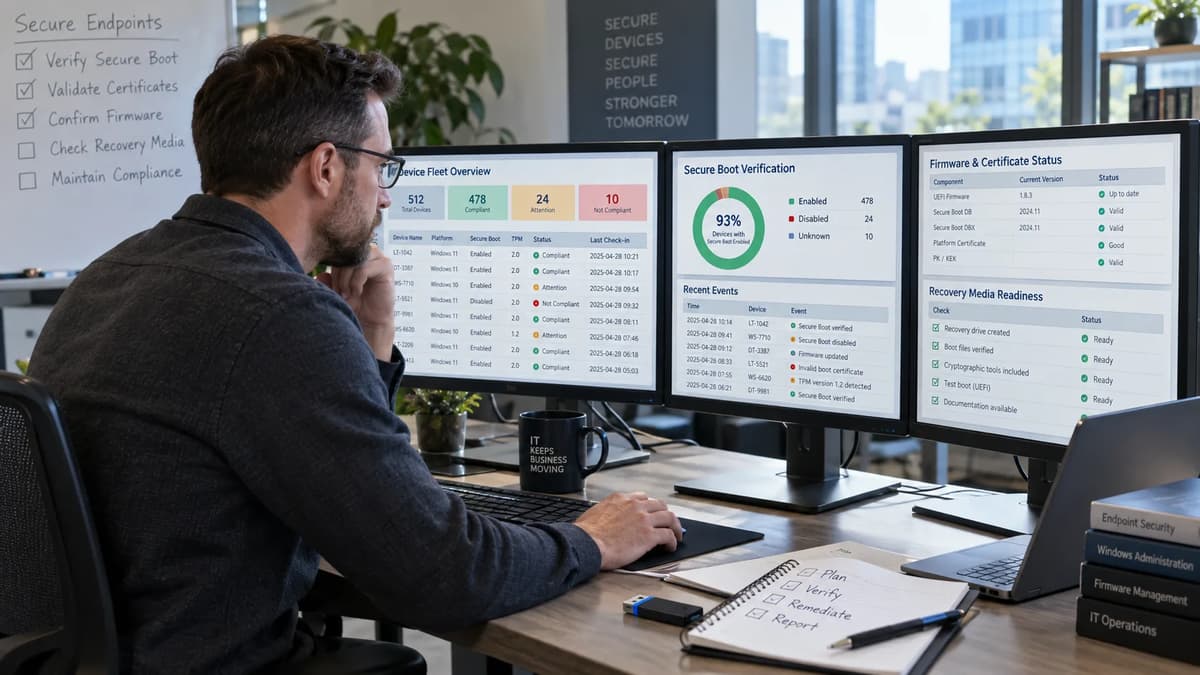
The operating question is no longer “Is Secure Boot enabled?” It is “Can I close this cohort with evidence that the required 2023 trust material reached firmware, the Windows boot manager reached the expected state, monitoring is current, and the recovery paths we actually depend on still work?” Those are different claims, owned by different parts of the platform stack.
That distinction matters in September 2026. Microsoft documents that some 2011-era Secure Boot certificates began expiring in June 2026, while the Microsoft Windows Production PCA 2011 expiration is October 19, 2026. Microsoft also states that devices without the newer certificates do not all stop booting at one universal date; they can continue to start and receive standard Windows updates while losing the ability, over time, to receive some early-boot security protections. See Microsoft’s Windows Secure Boot certificate expiration and CA updates guidance (originally published June 26, 2025; revised May 18, 2026).
This runbook is written for system administrators, endpoint engineers, security reviewers and service-desk leads. It keeps three evidence classes explicit: documented product behavior, proposed local operating controls, and unverified or environment-specific assumptions. The goal is not a registry-tweak recipe. It is a defensible pass, hold or escalate decision for every device cohort, including stale telemetry, OEM limitations and recovery-media dependencies.
A booting device is not a completed transition
A normal boot proves one narrow thing: the machine booted in its present configuration. It does not prove that all required new Secure Boot certificates are applied, that the updated Windows boot manager is present, that monitoring is fresh, or that USB, network and manufacturer recovery paths will boot under the new trust state.
Microsoft’s enterprise deployment guidance separates Secure Boot enablement, certificate application, firmware behavior, the boot-manager step and monitoring. It also says a new Windows UEFI CA 2023-signed boot manager is a critical last step for devices that already have updated certificates. See Microsoft’s Secure Boot certificate updates guidance for IT professionals and organizations (originally published June 26, 2025; change log through May 5, 2026).
Use an evidence ladder rather than one status light:
Evidence class | Question | What closes it in this runbook |
Documented behavior | Is Secure Boot enabled and has Windows reported the required certificate/boot-manager state? | Current first-party-supported telemetry or exact Windows Security status text |
Proposed local control | Is the evidence fresh enough for change closure? | A locally defined freshness window, recorded with collection time and method |
Proposed local control | Is recovery viable for the cohort? | A successful, approved recovery-path test tied to the same hardware/boot profile |
Environment-specific | Are there custom keys, third-party pre-boot tools, PXE dependencies or unusual firmware settings? | Named owner and test evidence; otherwise hold or escalate |
The close decision therefore asks several questions on purpose. A device can be booting and still be hold. It can have event 1808 and still be hold because recovery media has not been exercised. It can show a collection error and be unknown, not “failed update.”
Separate the trust stores, boot components and proof claims
Secure Boot is a Unified Extensible Firmware Interface, or UEFI, trust mechanism. Microsoft describes a hierarchy involving the Platform Key (PK), Key Exchange Key (KEK), the allowed signature database (DB) and the disallowed signature database (DBX). The 2026 transition adds newer trust certificates to the appropriate stores and updates the Windows boot manager; it should not be described as one blanket DBX-revocation operation. See Microsoft’s Windows Secure Boot certificate expiration and CA updates guidance (revised May 18, 2026).
This is also a different trust domain from public TLS certificate lifecycle automation. Public Web PKI renewal may share operational ideas such as inventory and expiry management, but it does not verify firmware trust state.
Component or surface | Evidence owner | What it can support | What it does not prove |
Secure Boot enabled state | Endpoint/platform team | Secure Boot is active | 2023 certificates are applied |
Firmware certificate state | Firmware/endpoint team | Required trust material reached firmware | Recovery media boots |
Windows boot manager state | OS servicing team | Expected 2023-signed boot manager state | Every alternative boot chain is compatible |
Event and registry telemetry | Monitoring owner | Current observed Windows state | Physical recovery drill succeeded |
Recovery test ticket | Recovery/service team | Named recovery path worked for the cohort | Every device in every firmware variant behaves identically |
Firmware trust state versus the Windows boot manager
Microsoft’s documented deployment sequence applies 2023 certificates to DB and KEK before the boot manager step, and a restart can be required before the updated boot manager is applied. The scheduled task moves through its steps only after earlier steps succeed. See Microsoft’s Secure Boot certificate updates guidance (change log through May 5, 2026).
That sequence is why “Windows Update installed” is not a sufficient completion statement. A current result must show the resulting state, not only the intent to service it. Any finer claim about PK, KEK, DB or DBX content should come from current Microsoft or OEM documentation applicable to that platform; do not infer store contents from a generic success flag.
Consumer status screens versus managed-fleet evidence
Microsoft added more Secure Boot certificate-status information to Windows Security beginning in April 2026. The page contains an important wording tension: its FAQ says a green checkmark means no action is needed, but the detailed note explicitly says a green checkmark alone does not confirm the certificates are updated and instructs users to check the accompanying text. See Microsoft’s Secure Boot certificate status guidance for Windows Security (originally published April 2, 2026; revised April 3, 2026).
For this runbook, the proposed acceptance rule follows the more precise note: retain the status text, observation time and collection method, not the icon alone. Managed-device badge changes and notifications are disabled by default, while the in-app status text remains visible on supported versions. Dismissing a warning can reset the badge appearance while leaving the status text visible, so absence of a warning is not completion evidence.
Inventory devices and their boot dependencies
Before deployment, define the denominator. Microsoft recommends inventorying manufacturer, model, firmware version and related hardware attributes, then testing representative samples before broad rollout. That aligns with ordinary system administration responsibilities: ownership, servicing, recovery and documentation must meet on the same asset record. See Microsoft’s Secure Boot certificate updates guidance (change log through May 5, 2026).
Proposed Secure Boot certificate evidence ledger:
Field | Minimum content | Owner | Why it exists |
Asset ID | Sanitized stable identifier | Asset management | Prevents duplicate or disappearing records |
Hardware cohort | Manufacturer, model, board family where relevant | Endpoint engineering | Groups firmware dependencies |
Firmware | Version and observed date | Endpoint/OEM owner | Qualifies support state |
OS state | Edition/build/update channel | OS servicing | Qualifies applicable Windows guidance |
Secure Boot | Enabled, disabled or unknown | Endpoint | Separates applicability from completion |
Certificate/boot evidence | Status text, UEFICA2023Status, event evidence as available | Monitoring | Records observed transition state |
Observation | Time, collector, script/version | Monitoring | Makes evidence freshness auditable |
Recovery dependencies | Local recovery, USB, PXE, OEM image, dual boot, third-party pre-boot | Recovery owner | Prevents hidden boot-path failures |
Disposition | Pass, hold, escalate, retired, offline, unknown | Change owner | Keeps denominator honest |
Offline devices should remain in the fleet denominator until they are formally retired, transferred or otherwise removed by an accountable asset process. “No recent check-in” is not a passing state. Likewise, a device missing from one export should not improve the rollout percentage.
The environment-specific assumption to expose is whether your configuration-management source is complete enough to represent powered-off, loaner, warehouse, kiosk and intermittently connected devices. If that cannot be demonstrated, record a denominator-confidence issue separately from the certificate state.
Define a completion gate before changing the fleet
A completion gate prevents post-change arguments about what “done” was supposed to mean. Microsoft gives product-state signals; your organization still has to decide what evidence is sufficient to close risk. This runbook deliberately makes that local control stricter than a single vendor status.
Decision | Proposed local acceptance rule | Observational or state-changing? | Owner |
Pass | Secure Boot applicable and enabled; current evidence shows required certificates and expected boot-manager state; no unresolved blocking event; cohort recovery path has a current successful test | Observation plus prior approved change/test activity | Change owner + security reviewer |
Hold | Pending restart, stale/missing collection, recovery test outstanding, temporary Microsoft/OEM pause, or evidence not yet reconciled | Usually observational until maintenance window | Endpoint/monitoring owner |
Escalate | Known unsupported combination, firmware error, persistent contradictory state, failed recovery drill, or vendor-specific limitation without approved path | No further writes until vendor/change approval | Platform lead + OEM/security |
Proposed local freshness rule, not a Microsoft requirement: during active rollout, accept device telemetry collected within 72 hours and a representative cohort recovery drill completed within 30 days before ring expansion. After stabilization, a weekly monitoring rhythm may be appropriate; Microsoft’s Intune Secure Boot monitoring guide, originally published February 18, 2026, recommends daily monitoring during active rollout and weekly for ongoing monitoring.
Observation can usually happen outside a maintenance window. Any firmware update, trust-store write, boot-manager deployment, deliberate reboot or recovery exercise belongs in an approved change/test window with the applicable first-party procedure and recovery prerequisites.
Positive evidence that supports closure
Event 1808 is strong Windows-side evidence. Microsoft documents it as informational, logged after all needed certificates are applied to firmware and the boot manager is updated to the Windows UEFI CA 2023-signed boot manager; Microsoft also added a note in April 2026 that event 1808 indicates the device is fully updated. See Microsoft’s Secure Boot DB and DBX variable update events (originally published June 15, 2022; change log through June 2, 2026).
A short hypothetical closure record might read: ASSET-LAB-042; firmware vendor-version-redacted; observation 2026-09-15T09:20Z; Secure Boot true; UEFICA2023Status=Updated; latest relevant event 1808; Windows Security text captured as “fully updated” where available; cohort recovery ticket REC-2026-0915-A passed using approved USB media. The event supports the Windows transition claim; the recovery ticket supports the external boot-path claim. Neither substitutes for the other.
Unknown, stale and conflicting evidence
Microsoft’s Intune Secure Boot monitoring guidance, published February 18, 2026, distinguishes “devices with failed detection” from “devices with issues.” That difference must survive your reporting. A failed collection is a telemetry failure, not proof of an unapplied certificate update.
Treat absent values as absent. The same Microsoft page says a missing Secure Boot Servicing registry key produces UEFICA2023Status=NoValue in its sample approach and typically means the certificate update has not been initiated; “typically” is not permission to convert null into a hard failure category.
Preserve the original export, the collection error and the contradictory observations. Recollect before escalation. If two current first-party surfaces still disagree, mark hold while the monitoring owner determines why; if disagreement persists across a maintenance cycle or vendor-supported collection method, escalate rather than selecting the more convenient result.
Collect detection-only evidence first
Microsoft’s February 2026 Intune monitoring guidance is explicitly monitoring only. Its detection script reads registry state, WMI/CIM device context and event-log evidence including 1801/1808, emits JSON, and does not make remediation changes. For Windows updates released on or after May 12, 2026, Microsoft says the sample script is present under %systemroot%\SecureBoot\ExampleRolloutScripts; the earlier sample article was retired.
Before distribution, pin the collector as a controlled artifact. Proposed collector record:
Provenance: source URL, Windows build used to obtain the sample, local file hash, review ticket and deployment date.
Execution: confirmed management host, security context and 64-bit requirement; do not assume another PowerShell runtime is equivalent.
Privacy: raw technical state retained, with unnecessary user identifiers and all recovery secrets excluded.
Also verify the current Intune Remediations prerequisites. Microsoft Learn’s Remediations documentation, last updated April 16, 2026, documents Entra join/co-management conditions, script requirements and a 2,048-character output limit.
This is where PowerShell automation and runtime compatibility matters operationally: do not assume every PowerShell host is interchangeable. Microsoft’s Secure Boot Intune monitoring guidance specifically says its package should run as SYSTEM and in 64-bit PowerShell for the required access and Confirm-SecureBootUEFI behavior.
Pseudocode: normalization only; not a replacement for Microsoft’s collector:
for each exported_device_record:
retain original_json unchanged
normalized.asset_id = sanitize(stable_device_id)
normalized.collection_time = parse_or_null(CollectionTime)
normalized.secure_boot = value_or_null(SecureBootEnabled)
normalized.uefi_ca_status = value_or_null(UEFICA2023Status)
normalized.latest_event = value_or_null(LatestEventId)
normalized.firmware = value_or_null(FirmwareVersion)
if collector_error:
normalized.disposition = "UNKNOWN_COLLECTION_FAILURE"
else if any_required_field_is_null:
normalized.disposition = "HOLD_INCOMPLETE_EVIDENCE"
else:
normalized.disposition = "EVALUATE_AGAINST_GATE"
redact(user_identifiers, recovery_secrets, unnecessary_personal_data)
The proposed rule is simple: normalization may classify evidence quality, but it must not fabricate a missing device state.
Qualify firmware and support boundaries by cohort
Firmware is not a transparent transport. Microsoft’s organization guide says firmware participates in completing the certificate update and recommends representative testing by manufacturer, model and firmware version; it suggests four or more sample devices per unique category as guidance, not as a universal guarantee. It also notes that a firmware update may be required in some cases. See Microsoft’s Secure Boot certificate updates guidance (change log through May 5, 2026).
Build a qualification matrix before broad deployment:
Cohort | First-party evidence to collect | Update-method owner | Proposed disposition |
Surface released in 2024 or later | Current Surface guidance, firmware version, Windows state | Microsoft/endpoint team | Pass only after device + recovery evidence |
Earlier supported Surface | Model-specific minimum UEFI guidance, chosen deployment path, recovery image | Endpoint team | Hold until model qualified |
Physical Dell PowerEdge in KB scope | Platform model, BIOS minimum, supported Windows Server state | Server/OEM team | Hold until Dell procedure matched |
Hypervisor-hosted Windows VM | Hypervisor/vendor support statement plus guest evidence | Virtualization owner | Separate cohort; do not inherit physical-OEM procedure |
Provider-managed cloud/appliance | Provider responsibility statement | Cloud/service owner | Escalate to provider path if guest team lacks firmware control |
Unsupported/unknown firmware | OEM support evidence or explicit lack of support | Platform lead | Escalate; no forced rollout |
Surface guidance says devices released in 2024 or later have an updated UEFI Secure Boot DB containing the newer 2023 certificates. For earlier models, it lists deployment paths and warns that its manual UEFI method can trigger BitLocker recovery. It also points to updated model-specific recovery images. This is Surface-specific evidence, not an all-OEM compatibility matrix. See Microsoft’s Surface Secure Boot Certificates guidance (accessed September 16, 2026; publication date not displayed in the inspected body).
Dell’s PowerEdge guidance, last modified June 23, 2026, is similarly bounded: it applies to affected Windows Server workloads on physical systems with customer-managed firmware and Secure Boot configuration, excludes provider-managed cloud/appliance platforms, and directs UEFI virtual machines to hypervisor-vendor guidance. See Dell’s PowerEdge Secure Boot certificate BIOS guidance (last modified June 23, 2026).
Choose staged deployment rings and stop conditions
The documented direction is staged rollout. Microsoft recommends small subsets, validating results, then expanding; it also says to monitor before deployment so the monitoring path itself is known to work. See Microsoft’s Secure Boot certificate updates guidance (change log through May 5, 2026).
Turn that into an approved operating model rather than an automatic cascade. This is where disciplined system administration automation helps: automation should preserve cohort boundaries, stop conditions and evidence, not erase them.
Ring | Proposed scope | Entry evidence | Exit evidence | Stop conditions |
Discovery | Entire denominator | Inventory only | Cohorts and owners assigned | Unknown ownership or missing recovery dependency |
Lab | Nonproduction representatives | OEM/platform support reviewed | Certificate + boot state and recovery tests complete | Boot failure, unexplained BitLocker prompt, recovery media failure |
Representative pilot | Small production sample per qualified cohort | Lab pass, change window | Fresh monitoring + service-desk confirmation | Any new 1795/1802/1803 pattern, repeated collection loss, unexpected boot impact |
Broader cohort | Qualified devices only | Pilot acceptance signed | Pass/hold/escalate ledger current | Failure rate above local stop threshold or unresolved state disagreement |
Exceptions | Blocked/unsupported | Named owner | Approved exception or replacement plan | No owner or expired review date |
Any numeric stop threshold you add is a proposed local threshold, not Microsoft guidance. For example, an organization might stop a ring after one unexplained boot failure in a representative pilot because the consequence is high, while allowing several ordinary collection retries. The important engineering point is to define those triggers before deployment.
Detection scheduling and deployment scheduling should remain separate. A monitoring job can run daily without granting it authority to change firmware state. Deployment has a maintenance window, rollback assumptions, communication plan and named approver. Monitoring has collection scope, error handling and freshness objectives.
Test recovery paths before calling the rollout finished
Recovery is where an otherwise clean Secure Boot audit becomes operationally credible. The Microsoft event model can tell you that the new certificates and boot manager are applied; it does not say your organization successfully booted its USB repair media, PXE path, alternate OS loader or OEM recovery image. That is a different experiment.
Use a recovery-path matrix tied to the real cohort:
Recovery dependency | Proposed test | Evidence retained | Pass condition |
Local Windows recovery | Enter supported recovery environment and validate required repair workflow | Ticket, device cohort, date, outcome | Required tools start without destructive action |
Updated Windows USB/ISO | Boot approved media on representative hardware | Media provenance, hash/version, test ticket | Media reaches expected recovery/setup environment |
OEM recovery image | Boot model-specific current image | OEM source, model, image date, result | Supported recovery environment starts |
PXE/network boot | Boot through production-equivalent isolated path | Server config version, image ID, client cohort | Signed boot chain proceeds to intended deployment environment |
Third-party pre-boot/dual boot | Vendor-supported boot test | Product/version/vendor guidance | Supported loader works under target Secure Boot state |
Microsoft provides a first-party procedure for updating Windows bootable media to use the PCA2023-signed boot manager. Its February 4, 2025 support article says the current script can update ISO, USB, local or network-path media and requires a current Windows Assessment and Deployment Kit plus fully serviced source media. That is a media-preparation procedure, not proof that your resulting media booted on your hardware. See Microsoft’s PCA2023 bootable-media update procedure (originally published February 4, 2025; change log May 1, 2025).
Local recovery and external boot media
Inventory what the service desk would actually reach for at 02:00: local Windows Recovery Environment, a corporate USB, a vendor image, a break/fix ISO, or a deployment stick. Do not mark “recovery ready” because a share contains an ISO.
Surface provides a useful bounded example. Microsoft says selected earlier Surface devices have manual UEFI update paths that can trigger BitLocker recovery and that updated recovery images are available for listed models and devices released in 2024 or later. That is a direct reason to pair firmware changes with BitLocker recovery readiness, but it does not prove the same prompt behavior on another OEM. See Microsoft’s Surface Secure Boot Certificates guidance (accessed September 16, 2026).
Keep BitLocker recovery material available through your organization’s approved secret-retrieval process. The evidence ledger should record that recovery access was validated, by whom and when; it should never contain the recovery secret itself.
Network boot and alternative operating systems
PXE, preboot authentication, third-party endpoint-security loaders, diagnostics and dual-boot systems are cohort dependencies, not footnotes. Microsoft’s general Secure Boot documentation notes that DB trust can cover third-party boot loaders and EFI applications, and the 2023 certificate transition separates some signing purposes. Do not infer compatibility from that architecture alone. See Microsoft’s Windows Secure Boot certificate expiration and CA updates guidance (revised May 18, 2026).
For each non-Windows boot path, require current platform/vendor documentation and an isolated maintenance test. The unverified assumption is that a loader trusted yesterday remains trusted after your target state. Until supported evidence or a drill resolves that assumption, the cohort stays on hold.
Triage devices that do not reach the acceptance gate
Triage starts by identifying whether you have a deployment state, a telemetry state or a compatibility state. Event 1801 is not “firmware broken”; Microsoft documents it as an error indicating updated certificates and boot manager have not yet been applied to firmware. Event 1808 indicates the required new certificates are applied and the updated boot manager is present. Neither event says your external recovery path was exercised. See Microsoft’s Secure Boot DB and DBX variable update events (change log through June 2, 2026).
Observed state | Evidence to inspect next | Next owner | Proposed decision |
Event 1801 / update not applied | Latest firmware, reboot state, confidence/known-issue fields, OEM guidance | Endpoint/OEM | Hold |
Event 1808 but recovery test missing | Recovery dependency ledger and cohort ticket | Recovery/service desk | Hold |
Failed Intune detection | Raw collector error, device check-in, script version, permissions/runtime | Monitoring | Hold as unknown |
UEFICA2023Status absent/NoValue | Raw JSON, servicing key presence, update initiation state | Endpoint | Hold; do not guess |
Event 1795 | Firmware-returned error code and OEM update availability | OEM/platform | Escalate |
Event 1802 | Known firmware issue/skip reason | OEM/platform | Escalate or vendor-directed hold |
Event 1803 | PK-signed KEK unavailable for device | OEM/platform | Escalate |
Policy exclusion/opt-out | Change record, reason, owner, review date | Change/security | Hold or approved exception |
Microsoft’s Secure Boot event documentation says event 1795 is logged when firmware returns an error during a DB, DBX or KEK update and directs administrators to the device manufacturer; event 1802 marks a known firmware issue block; event 1803 reports that a PK-signed KEK cannot be found for the device. Those are escalation signals, not invitations to clear keys or force unsigned firmware.
A pending restart can remain a normal hold state if it fits the supported servicing path. Microsoft’s organization deployment guide notes that the boot-manager update can wait for a natural restart and estimates 48 hours plus one or more restarts for completion. Treat that as vendor guidance for planning, not a service-level guarantee.
Work through a mixed-fleet evidence review
The following is a hypothetical exercise. No devices were tested as part of this research, and the counts are not an industry benchmark.
Assume a mixed Windows fleet denominator of 120 assets. The groups are mutually exclusive by design:
Hypothetical group | Count | Evidence state | Decision |
Complete fresh evidence + cohort recovery test | 82 | All local gate elements satisfied | Pass |
Device state good, recovery test pending | 14 | Windows evidence current; dependency proof incomplete | Hold |
Known firmware/OEM limitation or blocked path | 9 | Supported path unavailable or blocked | Escalate |
Stale telemetry | 10 | Last observation outside proposed freshness window | Hold/unknown |
Failed collections | 5 | Collector error; device state not known | Hold/unknown |
Total | 120 |
The evidence-backed completion rate is therefore 82/120 = 68.3% for this hypothetical fleet. That figure is intentionally conservative: every managed asset remains in the denominator until it is passed, retired through the asset process, or explicitly moved to another governed scope.
A misleading dashboard could exclude the 10 stale devices and 5 collection failures and report 82/105 = 78.1% among “observable” devices. The arithmetic is correct but the operational claim is wrong: telemetry absence has improved the apparent result. Failed collection is not successful transition evidence, so removing those devices from the denominator hides uncertainty.
Consider three synthetic records. CLT-0042 has Secure Boot enabled, fresh UEFICA2023Status=Updated, event 1808 and a passed USB recovery ticket for its model cohort: pass. CLT-0067 has event 1808 but its PXE path has not been tested after media refresh: hold. SRV-0011 maps to a physical server firmware level below the OEM-qualified minimum with event 1795: escalate to the server/OEM owner, and stop further state changes until the vendor-supported path is confirmed.
The key review habit is to write the decision beside the missing proof. “Green,” “updated” or “booted” are observations; “close” is a governance decision.
Stop safely and preserve a recovery route
Stopping deployment is not the same as reversing a completed firmware/trust change. Microsoft’s guidance describes staged deployment and remediation but does not promise a universal rollback that restores every prior firmware trust state. Treat rollback availability as model- and procedure-specific. See Microsoft’s Secure Boot certificate updates guidance (change log through May 5, 2026).
A safe stop record should contain:
Field | What to record |
Stop trigger | Boot failure, unexpected recovery prompt, recovery-media failure, firmware error, or unexplained evidence conflict |
Last safe ring | Cohort and change ticket that completed without the trigger |
Affected scope | Sanitized asset IDs, model/firmware, OS state |
Evidence | Raw event/collector output, timestamps, screenshots where policy allows |
Recovery readiness | Tested path, secret-retrieval validation, on-call owner |
Next authority | Microsoft/OEM/hypervisor procedure or vendor support case |
Prohibited shortcut | No key clearing, Secure Boot disabling, unsigned firmware or reset-to-default unless a current supported corrective procedure explicitly requires it |
Do not “fix” ambiguity by resetting firmware defaults. A reset can discard custom trust material or other platform configuration, and the correct effect is OEM-specific. Likewise, do not force a rollout past a documented Microsoft or OEM block merely to improve a dashboard.
The escalation package should let the next engineer reproduce the state without repeating unsafe actions: firmware version, exact event IDs and error fields, collector version, last successful boot, BitLocker/recovery readiness, media dependencies and the last attempted vendor-supported step. Keep secrets out of the ticket.
Close exceptions without hiding residual exposure
Some devices will not reach pass at the same time. Microsoft explicitly documents “Temporarily Paused,” “Not Supported – Known Limitation,” “Under Observation – More Data Needed” and “No Data Observed – Action Required” confidence categories in its Secure Boot event guidance. Those categories describe Microsoft’s update confidence/coverage model; they are not your organization’s final compliance verdict. See Microsoft’s Secure Boot DB and DBX variable update events (change log through June 2, 2026).
Use an exception record that keeps residual exposure visible:
Exception field | Required content |
Asset/cohort | Sanitized IDs and hardware/firmware grouping |
Reason | Known OEM limitation, provider responsibility, unsupported age, custom trust chain, pending vendor fix |
Current protection state | Secure Boot enabled/disabled/unknown; latest certificate/boot evidence |
Compensating action | Monitoring, network restriction, workload migration, replacement planning, or other approved control |
Owner | Person/team accountable for follow-up |
Review date | Proposed local date for re-evaluation |
Replacement/exit decision | Keep, upgrade, migrate, replace or decommission |
Security disposition | Accepted temporarily, rejected, or requires further review |
The security reviewer should not stamp “compliant” merely because the exception is documented. The review question is whether the known residual risk, business need and compensating controls are acceptable for a bounded period.
Keep exceptions inside the fleet denominator. In the hypothetical 120-device example, the nine blocked devices do not disappear after an exception ticket is opened. They remain nine visible non-pass assets until the governing decision changes their status or they leave scope through an explicit lifecycle action.
Retain enough original evidence to reclassify later. When an OEM firmware release arrives or Microsoft changes a confidence classification, you need to know the earlier model, firmware, event state and recovery dependency to decide whether the new guidance actually applies.
Build the administration skills behind the runbook
This work sits at the intersection of platform administration, scripting, servicing, recovery and operational evidence. The mechanics are less important than the ability to separate observation from change, automate without hiding nulls, and test recovery rather than merely owning media.
Skill | Evidence of competence in this runbook |
Windows administration | Can distinguish Secure Boot enablement, firmware trust state and boot-manager servicing |
PowerShell/scripting | Can collect and normalize evidence without converting nulls into fabricated answers |
Fleet operations | Maintains stable denominators, cohort ownership and fresh observations |
Firmware/OEM qualification | Reads model-specific support boundaries before changing state |
Recovery engineering | Tests the actual local, USB, PXE or OEM path relied upon by support teams |
Change governance | Defines pass/hold/escalate and stop conditions before deployment |
Service-desk readiness | Produces a bounded handover with safe escalation and secret handling |
For a broader pathway into these foundations, see building system administration skills.
A structured option for those foundations is Refonte Learning’s System Administration Program. Its live page, verified on September 16, 2026, lists Windows and Linux administration, networking, security, backup and recovery, command-line work, virtualization and cloud management; its FAQ names Active Directory and PowerShell. It does not verify that this specific Secure Boot certificate rollout or Intune monitoring workflow is taught.
Run the final release review and handover
Closure is an evidence review, not the moment the last deployment command was sent. Microsoft’s 2026 Windows Security changes make device status more visible, but visibility does not replace centrally retained evidence or recovery validation.
The same product page explicitly warns that a green checkmark by itself does not confirm certificate completion, even though its simplified FAQ says no action is needed when the green check is shown. This runbook resolves that editorial tension by adopting the detailed status text as the stronger local acceptance signal. See Microsoft’s Secure Boot certificate status guidance for Windows Security (April 2–3, 2026).
Use the final checklist as a release gate:
Review item | Close | Hold | Escalate |
Fleet denominator | All assets have a named disposition | Offline/stale/unknown still being reconciled | Ownership gap or unexplained disappearance |
Secure Boot state | Applicable devices enabled as designed | State unknown or pending approved configuration | Unsupported/custom state without owner |
Certificate/boot evidence | Fresh status supports required certificates + expected boot manager | Pending restart, stale, missing or contradictory | Persistent firmware error or documented block |
Monitoring | Collector version, time and method retained | One-off failure awaiting recollection | Systemic collection failure undermines evidence |
Firmware support | OEM/hypervisor boundary documented | Qualification still in progress | Unsupported combination/no supported path |
Recovery | Representative cohort drill passed | Test scheduled/not yet run | Supported recovery path fails |
Service desk | Symptoms, safe checks and escalation owner documented | Handover incomplete | Instructions would require unsafe workaround |
Security review | Residual exceptions accepted with date/owner | Review pending | Risk rejected or exception expired |
A proposed operational cadence, not a universal deadline, is: review fresh telemetry daily while rings are moving; run a ring-exit review before expansion; review open exceptions weekly during the active project; and revalidate the evidence model whenever Microsoft, the OEM or the hypervisor vendor changes relevant guidance. Microsoft’s Intune Secure Boot monitoring guidance recommends daily active-rollout monitoring and weekly ongoing monitoring, which can inform, but does not dictate, your local cadence.
The handover package should include the evidence-ledger schema, current denominator, pass/hold/escalate export, approved OEM/hypervisor references, script provenance, stop conditions, service-desk symptom map, recovery-test tickets, exception owners and the date of the next review. It should not contain BitLocker recovery secrets or other credentials.
Is a green Windows Security icon enough? No for this runbook. Microsoft’s detailed Windows Security status note says the green checkmark alone does not confirm certificate completion; retain the accompanying fully updated status text or centrally collected equivalent evidence.
Does the Intune monitoring script update firmware or certificates? No. Microsoft describes the Intune monitoring approach as detection-only: it reads state and reports it, with no remediation script or update trigger.
Does every device need the same OEM procedure? No. Surface documentation and Dell PowerEdge guidance demonstrate different, explicitly scoped responsibilities and methods, while virtualized or provider-managed firmware has separate ownership boundaries.
What remains unproven after a good device status? Your actual recovery dependencies. Even event 1808, which Microsoft documents as a fully updated device state for the required certificates and boot manager, does not record that your USB, PXE, OEM image, alternate loader or service-desk recovery workflow successfully booted. That proof comes only from a supported, bounded recovery exercise.