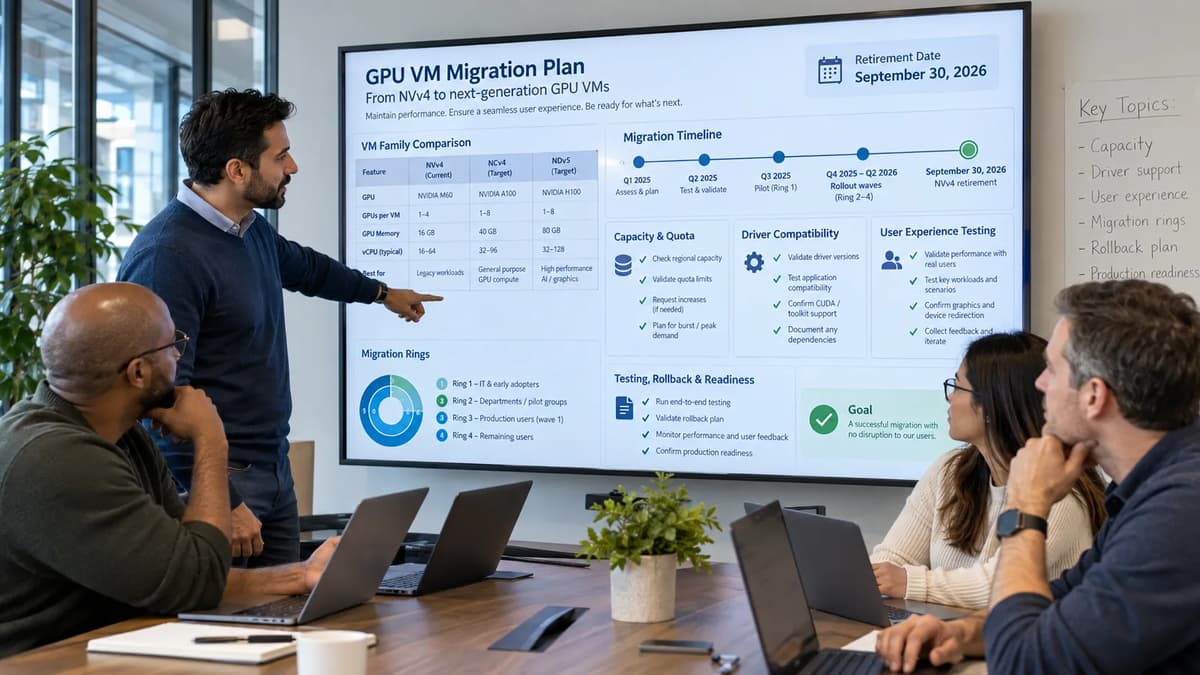
An Azure Virtual Desktop or visualization team can treat the Azure NVv4 retirement as a routine resize and still create an outage. The target family may exist in documentation but not in the required region or availability zone. The subscription may have no usable GPU-family quota. A move from AMD Radeon Instinct MI25 to NVIDIA A10 changes the driver and licensing path. An application may have quietly written profile state, render output, or a license cache to the temporary disk, then lose it when the VM is deallocated for a resize.
Microsoft will retire the eight named NVv4 sizes on September 30, 2026. According to the Microsoft Learn NVv4-series retirement guidance, remaining NVv4 virtual machines are then set to a deallocated state, stop working, and no longer receive an SLA or support. That date is a platform retirement boundary, not proof that an application has been successfully migrated.
A production NVv4 migration therefore has to requalify the workload. Build an estate and user-experience baseline, select a target by graphics or inference behavior rather than name similarity, prove quota and deployable capacity in primary and recovery locations, rebuild the driver and image pipeline, protect persistent data from ephemeral storage, and test the session experience users actually perceive. Move through risk rings with explicit stop conditions and keep rollback on a still-supported target. If an estate is discovered after September 30, the recovery plan is isolation, rebuild, data restoration, application revalidation, and controlled return to service, not an attempt to restart a retired NVv4 family.
Define What the NVv4 Retirement Actually Stops
Start with the vendor boundary. Microsoft is retiring NVv4, the AMD Radeon Instinct MI25 based family, not every Azure NV-series graphics virtual machine. The retirement page names the exact affected sizes: Standard_NV4as_v4, Standard_NV4ahs_v4, Standard_NV8as_v4, Standard_NV8ahs_v4, Standard_NV16as_v4, Standard_NV16ahs_v4, Standard_NV32as_v4, and Standard_NV32ahs_v4. Do not infer scope from a prefix alone; make those eight size identifiers your discovery filter and then inspect templates that could recreate them.
After September 30, 2026, Azure documents that remaining NVv4 VMs are deallocated, stop working, stop accruing compute charges, and are no longer covered by the NVv4 SLA or support. That automatic deallocation matters operationally: an idle VM, disaster-recovery copy, disabled host-pool member, or forgotten scale-set definition is still a retirement problem if it can no longer be used when needed. It also means NVv4 cannot be your post-deadline rollback plan.
Separate three dates in the change record. The vendor retirement date is fixed. The application migration date is your last approved production cutover. The rollback-expiry date is when the old path is no longer a legitimate recovery option. An application owner may need to migrate much earlier because certification, capacity, or user acceptance takes weeks. Treating September 30 as the first meaningful cutover date is a capacity gamble.
State | Vendor-documented behavior | Operator decision | Exit evidence |
Inventory | Eight named NVv4 sizes are in scope | Find VMs, scale sets, images, templates, host-pool assignments, schedules, and dormant DR assets | Resource inventory has owner and business service |
Pre-cutover | NVv4 still functions before retirement | Do not assume target quota, capacity, drivers, or licensing are ready | Target allocation and application qualification pass |
September 30, 2026 | NVv4 retires | No production dependency may require NVv4 | Traffic, users, jobs, and recovery procedures are off NVv4 |
Post-retirement | Remaining NVv4 is deallocated and unsupported | Recover onto a supported family; do not roll back to NVv4 | Service restored with supported image, data, tests, and owner acceptance |
Microsoft also ended new one-year and three-year Reserved Instance purchases for NVv4 on November 2, 2025 and Compute Pre-Purchase sales on June 2, 2026. Those commercial dates do not determine technical suitability; workload evidence does.
Build a Complete NVv4 Estate and User-Experience Baseline
The Azure resource is only the beginning of the estate. For every NVv4 VM or deployment definition, capture subscription, resource group, region, zone, exact size, operating system, VM generation, image source, driver, GPU partition, managed disks, temporary disk use, network path, application packages, license mechanism, monitoring agents, backup scope, deployment source, quota family, reservation or commercial commitment, business owner, support tier, recovery location, and recovery runbook. For Azure Virtual Desktop (AVD), add host pool, application group, session-host role, drain state, user cohort, profile technology, peak sessions, display requirements, and reconnect behavior.
Discovery should combine control-plane inventory with runtime evidence. Azure Resource Graph can find the current VM size quickly, but it cannot tell you whether an engineer stores render results on D:, whether a CAD package is pinned to a driver branch, or whether a license server binds to a host attribute. That requires application-owner interviews, image inspection, monitoring data, and representative user sessions.
Resources
| where type =~ 'microsoft.compute/virtualmachines'
| extend vmSize = tostring(properties.hardwareProfile.vmSize)
| where vmSize in~ (
    'Standard_NV4as_v4','Standard_NV4ahs_v4',
    'Standard_NV8as_v4','Standard_NV8ahs_v4',
    'Standard_NV16as_v4','Standard_NV16ahs_v4',
    'Standard_NV32as_v4','Standard_NV32ahs_v4')
| project subscriptionId, resourceGroup, name, location, vmSize, id
Use the query as a starting point, then search infrastructure repositories, image definitions, policy exceptions, automation, scale-set models, and disaster-recovery templates for those same size strings. The dependency-discovery discipline used in Refonte Learning's Azure VPN Client for Linux retirement migration transfers well here: enumerate what will try to create, connect to, schedule, license, or recover the resource, not only what is currently running.
Inventory VM Sizes, Regions, Images, Pools, and Dependencies
Inventory object | Required fields | Why it matters |
VM or scale set | Size, region, zone, VM generation, power state, OS/image, disks, NICs, tags | Defines the infrastructure change surface |
AVD host | Host pool, app group, user cohort, session density, drain mode, profile path, peak time | Connects the VM change to user sessions |
Image | Gallery/image version, OS build, GPU driver, extensions, agents, codecs, policies, application versions | Makes rebuild and rollback reproducible |
Application | Owner, executable/version, graphics API, GPU memory behavior, vendor certification, license path | Finds non-obvious driver or GPU-family constraints |
Storage | OS/data disks, file shares, profile containers, temp paths, scratch/output classification | Prevents ephemeral-data loss |
Capacity | Target family, region, zone, quota, tested allocation, recovery allocation, fallback size | Separates documented availability from deployable capacity |
Recovery | Supported target image, capacity reserve, profile/data restore, routing or user reassignment | Proves rollback does not depend on NVv4 |
Baseline the experience before you change anything. Capture task time for a representative model or scene, interactive responsiveness, remote frame quality, frame rate where meaningful, encoder behavior, login and reconnect time, application launch, GPU and frame-buffer utilization, CPU and memory pressure, storage latency, network throughput, disconnect rate, and license failures. Use the baseline to distinguish an intended improvement from a regression.
Choose a Target GPU Family by Workload, Not Marketing Similarity
Microsoft recommends NVads_V710_v5 as the primary successor and also lists NVadsA10_v5 and NGads_V620 for different workload classes. Treat those as candidate families, not drop-in replacements. A valid target must meet application support, user-experience, driver, operating-system, VM-generation, frame-buffer, region, quota, capacity, licensing, storage, networking, and cost requirements at the same time.
The Microsoft Learn NVads V710 v5 specification describes AMD Radeon PRO V710 with AMD EPYC Genoa CPUs, Windows and Linux support, five sizes from 1/6 of a GPU with 4 GiB of frame buffer to one GPU with 24 GiB, and Generation 2 only. Microsoft positions it for graphics, cloud virtual desktops, rendering, streaming, gaming, and small to medium inference. The NVadsA10_v5 specification uses NVIDIA A10 and includes a GRID license. The NGads_V620 specification uses AMD Radeon PRO V620, offers 8 to 32 GiB frame-buffer options, and is strongly positioned for high-quality graphics streaming and gaming.
Candidate | Strong first-fit workloads | Architecture change to qualify | Key caution |
NVads_V710_v5 | Graphics workstations, visualization, rendering/streaming, some small or medium inference | AMD MI25 to AMD Radeon PRO V710; Generation 2 target; new CPU/memory/storage/network ratios | AVD-specific support documentation must be checked separately; region and capacity are not universal |
NVadsA10_v5 | Virtual desktops, workstation graphics, NVIDIA-dependent applications, some inference | AMD to NVIDIA; new driver stack and GRID path | Treat as a platform change; confirm application certification and licensing behavior |
NGads_V620 | Gaming, interactive streaming, graphics applications, some remote desktop cases | AMD MI25 to AMD Radeon PRO V620; different frame-buffer and local NVMe profile | Gaming-oriented sizing may not fit every enterprise desktop or licensed application |
Another supported family or platform | Workloads whose certification, region, accelerator, memory, or service model is not met above | May require application replatforming or workload relocation | Must be supported for the exact workload, region, OS, licensing, and recovery design |
Reject a candidate if any mandatory constraint is unproven. Fractional GPU savings disappear if encoder contention or lower safe density offsets them, and extra frame buffer does not override vendor certification. Use cloud architecture engineering best practices for tradeoff context, while keeping the gate application-specific.
Prove Regional Capacity and Quota Before Scheduling Cutover
Published regional availability, subscription quota, zonal availability, and deployable capacity are four different facts. A target can be listed in a region but restricted for your subscription. Your subscription can have family quota but no capacity in the zone you require. A successful deployment in one zone says nothing about the disaster-recovery location. The only credible migration plan records each layer separately and includes a real allocation test.
Azure enforces standard virtual CPU (vCPU) quota at both total regional and VM-family levels. The Microsoft Learn regional vCPU quota guidance explains that these limits are per subscription and per region. Request increases early enough for approval and rework. Quota approval is authorization to request resources; it is not proof that physical capacity is available at cutover time.
az vm list-skus --location <region> --resource-type virtualMachines --all --output table
az vm list-usage --location <region> --output table
Use SKU queries to discover restrictions and zones for the exact size, then run deployment automation that creates the intended VM shape with its image, disk, network, security, and extension configuration. Perform that allocation test in the primary location and the recovery location. For a host pool, allocate enough parallel target hosts to prove the deployment pattern, not a single ceremonial VM that never sees production concurrency.
Validate SKU Availability, Zonal Placement, and Reservation Options
Evidence | Primary location | Recovery location | Go condition |
SKU published | Exact target size appears in current SKU data | Exact target or approved fallback appears | Both locations documented |
Subscription restrictions | No blocking restriction for subscription | No blocking restriction | Confirmed with current query |
Quota | Regional and family quota cover migration plus buffer | Quota covers recovery activation | Approved before production wave |
Zone | Required zone can host the target or design is explicitly regional | Recovery placement is defined | Placement matches resilience design |
Allocation test | Automation creates representative target successfully | Representative target or fallback creates successfully | Deployment evidence retained |
Commercial option | Current price, reservation eligibility, licensing, and commitment reviewed | Recovery cost model reviewed | FinOps owner accepts cost and idle-capacity strategy |
Do not treat a billing commitment as capacity evidence. Review Reserved VM Instance eligibility and any capacity-reservation option that is supported for the exact target, but still prove allocation. Record a fallback size only if it preserves the minimum frame buffer, CPU, memory, storage, network, application certification, license entitlement, and user-experience gates. Refonte Learning's FinOps practices for cloud cost optimization are useful for right-sizing and commitment governance; the retirement runbook adds the non-negotiable requirement that the cheaper option must also be deployable and qualified.
Map CPU, Memory, Frame Buffer, Storage, and Network Requirements
A 1:1 vCPU mapping is one of the fastest ways to choose the wrong replacement. GPU desktop and rendering workloads are balanced systems. CPU clock and core allocation, system memory, GPU partition size, frame buffer, encoder capacity, local scratch, managed-disk throughput, and network bandwidth all affect the user's result. Collect actual utilization at peak and during representative tasks, then map constraints to target sizes.
The Microsoft Learn NV family overview shows why name similarity is insufficient: the families use different GPU generations, CPU platforms, frame-buffer partitions, local-storage designs, and network envelopes. Treat the published limits as selection inputs, then validate the real workload. Network numbers are upper limits, not a measured guarantee for your protocol, route, client, or concurrency pattern.
Requirement | Baseline evidence | Target question | Acceptance evidence |
CPU | Per-session and peak CPU, application-thread behavior, render preparation | Does the target sustain required task time without CPU bottleneck? | Representative task and concurrency tests |
System memory | Working set, commit, paging, profile and application footprint | Is memory sufficient at approved density? | No unplanned paging or memory-related app failure |
GPU/frame buffer | GPU utilization, dedicated memory, scene/model peaks | Does the chosen partition avoid memory exhaustion and contention? | Long-session and worst-case scene results |
Encoding/display | Codec, monitors, resolution, frame size, video behavior | Can the target encode and stream the required visual experience? | Remote-session quality test from real client paths |
Storage | Managed-disk IOPS/throughput, temp scratch, profile I/O, render output | Does the design preserve durable data and meet I/O demand? | Storage latency and persistence tests |
Network | Session bandwidth, storage traffic, license calls, egress path | Is aggregate and per-session network behavior acceptable? | Peak-load network and reconnect tests |
Licensing | GPU/workstation entitlements, app license model, server binding | Does the target GPU/host identity remain licensed? | Vendor-approved install and concurrent checkout test |
License discovery deserves the same rigor as a driver. NVIDIA A10 includes the documented Azure GRID path, while AMD-based V710 needs no additional GPU license, but application licenses may still depend on GPU vendor, host identity, feature tier, or concurrent-license terms. Require application-owner and vendor validation before user migration.
Rebuild GPU Driver and Image Pipelines
The safest migration artifact is a reproducible target image, not a hand-edited source VM. Version the operating system build, VM generation, image definition, GPU driver package, GPU extension configuration, Azure Virtual Desktop agent, profile components, security agents, monitoring, codecs, browser/runtime dependencies, group policy, application packages, and license client. Build the image from source and record a hash or immutable version identifier so a failed ring can return to a known supported image.
Microsoft's AMD N-series driver guidance separates the supported packages for NVads V710 v5, NGads V620, and NVv4. It also states that only Microsoft-published GPU drivers are supported for the relevant AMD Azure VMs. The current page notes that V710 and V620 extension support has limitations and provides manual supported-driver procedures. Treat those instructions as release inputs to your image factory, not as a reason to install whatever driver is newest on a vendor website.
For NVIDIA, the Microsoft Learn N-series NVIDIA driver guidance distinguishes CUDA and GRID paths. For NVadsA10_v5 virtual workstations and virtual applications, use the supported GRID driver path. Pin the tested branch and operating-system combination, and verify with Device Manager and the documented NVIDIA tooling after every image build.
This is where Terraform and Ansible infrastructure as code can support reproducibility: infrastructure code should create the same VM, host-pool, policy, extension, network, logging, and image references in each ring. Do not hide the GPU driver behind an ad hoc post-deployment action that only one engineer knows how to repeat.
Separate AMD and NVIDIA Driver Paths
Path | Image rule | Qualification | Rollback asset |
NVv4 to NVads_V710_v5 | Use a clean V710-supported AMD image or controlled source-driver removal followed by the Microsoft-supported V710 driver | Application certification, GPU detection, display/encode behavior, long-session stability | Prior supported V710 image version |
NVv4 to NGads_V620 | Use V620-specific AMD driver package and verify supported OS | Gaming/graphics streaming plus enterprise app tests as applicable | Prior supported V620 image version |
NVv4 to NVadsA10_v5 | Treat as AMD-to-NVIDIA platform change; do not layer NVIDIA over an unmanaged AMD image | GRID driver, app vendor support, license, codecs, rendering, AVD behavior | Prior supported A10 image version |
Driver update within target family | Promote by image version, not in-place fleet drift | Install, reboot, verification, application regression, rollback test | N-1 approved target image |
AMD-to-AMD is still a requalification because V710 and V620 use different GPU and driver packages and can have different independent software vendor (ISV) certification. AMD-to-NVIDIA also changes the driver, licensing, optimization, and diagnostic path. If the image cannot reproduce the supported driver or the vendor will not support the GPU/driver/OS combination, stop the production ring.
Plan Resize Versus Rebuild for Each Host Pool or Application
An in-place resize is attractive because it keeps the VM object and managed disks, but it also preserves every historical configuration choice. That can be the wrong optimization for a retiring GPU family. Parallel replacement gives you a clean image, a testable deployment, and a supported rollback path. For Azure Virtual Desktop, a blue/green host-pool pattern or parallel session hosts within the pool is usually easier to drain and reverse than changing every GPU host in place.
The Microsoft Learn VM resize guidance should be the procedural baseline, but first confirm target compatibility. V710 is Generation 2 only, so a Generation 1 NVv4 image cannot simply be assumed to resize to it. Check Hyper-V generation, operating-system support, Trusted Launch or security configuration, ephemeral OS disk use, local-temp-disk expectations, disk controllers, networking features, extensions, and application vendor support.
Migration pattern | Best fit | Main risk | Rollback model |
In-place resize | Same driver family, compatible VM generation, reproducible image, short controlled downtime | Carries configuration drift; may require deallocation; temporary data can disappear | Resize to a tested supported target or restore/rebuild from target image, not NVv4 after retirement |
Parallel VM replacement | Dedicated workstation or server where state is on managed storage | Needs duplicate capacity during validation | Switch routing/user assignment back to previous supported target instance |
Blue/green AVD hosts | Pooled or personal GPU desktops with drainable sessions | Host-pool coordination, profiles, app registration, capacity overlap | Drain new hosts and reassign users to previous supported pool/hosts |
New scale set/image version | Rendering farm or automated worker fleet | Template and orchestration differences | Pin previous supported scale-set model/image |
Workload relocation | Target unavailable or unsupported in required region/platform | Data gravity, latency, identity, network, licensing | Return to prior supported location/platform if retained |
Choose rebuild when you cross AMD to NVIDIA, when the source image is not reproducible, when generation compatibility blocks resize, when the workload contains unexplained local state, or when you need a clean rollback boundary. Choose in-place resize only after proving it is supported and safer than replacement for that exact VM. The decision record should name the expected downtime, state preserved, state discarded, capacity requirement, rollback action, and person authorized to stop.
Handle Temporary Disk and AFEC Resize Constraints
NVv4 retirement guidance documents a specific resize issue when moving from NVv4 to NVads_V710_v5. Microsoft says to register the subscription under Azure Feature Exposure Control (AFEC) VMTempDiskResizePreview, confirm the registration state, and then perform the resize. Treat this as a vendor-documented prerequisite for that resize path, not as a general promise that every NVv4 configuration can be safely resized or that local data will survive.
Temporary storage is deliberately non-persistent. The Microsoft Learn Windows VM temporary-disk FAQ warns not to store durable data there and specifically names VM resize as an event that can move a VM to another host and cause data loss. Azure's resize tutorials also warn that deallocation can remove data on the temporary disk. The safe rule is therefore operational, not syntactic: before any resize or deallocation, prove that every local path is either disposable or migrated.
Local data class | Typical examples | Classification decision | Migration action |
Regenerable cache | Shader cache, downloaded packages, browser cache, model cache | Disposable only if regeneration is tested and time is acceptable | Document rebuild procedure and warm-up time |
Profile/session state | User profile fragments, temp project files, local workspace | Usually durable or business-significant | Move to approved profile container, managed disk, file share, or application storage |
Render/simulation output | Frames, exports, intermediate results | Durable if it represents completed work | Write to managed persistent storage before change |
Scratch | Temporary render tiles, pagefile, swap | Disposable if application is designed for loss | Verify target path and capacity |
Logs and diagnostics | Application logs, crash dumps, GPU traces | May be required for incident evidence | Forward centrally or copy before change |
License state | Borrowed tokens, activation files, host-bound cache | Vendor-specific and potentially critical | Follow vendor migration/deactivation procedure |
Protect Data That Must Not Live on Ephemeral Storage
Run a pre-change storage walk across operating-system and application configuration. Inspect scheduled tasks, environment variables, render paths, scripts, profiles, pagefile settings, logs, installers, and license caches for local temporary-volume use, and ask users about unofficial save paths.
Stop the migration if any user or application owner cannot classify data on the temporary disk.
Copy or redirect durable data to managed disks, Azure Files or another approved persistent service, then test access using the production identity and network path.
Capture hashes or application-level reconciliation for high-value outputs where silent loss would be material.
Rehearse deallocation or replacement in a non-production clone and prove the workload recreates disposable state without manual rescue.
Keep the pre-change managed disks and profile data protected until the target passes the defined acceptance window.
A successful VMTempDiskResizePreview registration is not the acceptance gate. The acceptance gate is that temporary storage contains nothing you need to recover, persistent data has a verified copy or authoritative location, and the target application can restart with the expected state after the exact deallocation or rebuild sequence planned for production.
Qualify Azure Virtual Desktop and Remote Visualization Experience
Azure Virtual Desktop GPU migration needs a stricter support check than general VM marketing. Microsoft updated the NVv4 retirement page in August 2026 to recommend V710, A10, and V620 for graphics, virtual desktops, and visualizations. However, the Microsoft Learn Azure Virtual Desktop GPU-acceleration page still lists NVv3, NVv4, NVadsA10 v5, and NCasT4_v3 as supported GPU-optimized session-host families, and it does not list NVads_V710_v5 or NGads_V620.
Do not smooth over that documentation conflict. For a production AVD session host, use the AVD-specific support table as the governing published support source unless Microsoft updates it or provides written support confirmation for the exact target. That makes NVadsA10_v5 the most straightforward documented successor among the three retirement recommendations for an AVD production path, subject to region, quota, capacity, driver, application, and benchmark proof. V710 or V620 may still be excellent graphics VMs, but general virtual-desktop positioning is not the same thing as an AVD session-host support statement.
AVD test | What to exercise | Evidence to retain |
Sign-in and brokering | New session, reconnect, stale session, drain mode, personal/pool assignment | Success/failure and host attribution |
Profile | FSLogix or other profile container mount, settings, cache, Office/app state | Profile logs, mount time, no temp-disk dependency |
Graphics rendering | CAD/3D viewport, image manipulation, video, browser GPU acceleration | GPU use, task result, user validation |
Remote frame encoding | Codec negotiation, full-screen motion, high-resolution scene changes | Host/client telemetry and visual review |
Displays | Required monitor count, resolution, scaling, window movement | User test on representative endpoints |
Density | Expected concurrent users and mixed workloads | CPU, memory, GPU/frame buffer, encoder, latency, app task time |
Recovery | Host failure, drain/reassign, reconnect to alternate host | Session recovery result and data preservation |
Test from representative user endpoints and network paths, including required high-resolution multi-monitor setups. Keep profiles and project data outside the GPU host so host rollback is a reassignment rather than a data-recovery event.
Benchmark Graphics, Encoding, Rendering, and Small AI Workloads
A target is ready only when it passes a workload-specific benchmark. Build a corpus from real scenes, models, video segments, render jobs, or inference inputs. Include light and heavy cases, warm and cold starts, interactive and batch behavior, representative concurrency, and long sessions. The test should be repeatable enough to compare image version, driver, SKU, and region without relying on memory or a user's impression from a single five-minute session.
For graphics workstations, measure application task time, viewport responsiveness, frame stability, frame-buffer headroom, crash or driver-reset behavior, and remote encoding quality. For rendering, measure job duration, failure rate, output correctness, storage throughput, and queue behavior. For gaming or interactive streaming, include frame pacing, input-to-display responsiveness, encoder quality, and sustained behavior. For small inference, measure latency and throughput at the approved concurrency and model size, while also checking GPU memory and CPU preprocessing. Do not use a graphics benchmark to certify an inference pipeline or vice versa.
Workload | Representative test object | Infrastructure signals | User/business result |
CAD/3D | Large approved model and common editing/navigation sequence | GPU, frame buffer, CPU, memory, encoder, network | Interaction remains within approved UX band; no visual corruption or app crash |
Rendering | Representative scenes across complexity tiers | GPU utilization, job time, storage throughput, error/reset events | Output reconciles and completes within approved task window |
Gaming/streaming | Representative scene, resolution, codec, concurrency | Frame timing, encoding, network, GPU headroom | Approved interaction and visual-quality review |
Small inference | Approved model/input set, batch size, warm/cold starts | Latency, throughput, GPU memory, CPU preprocessing | Service objective and output correctness pass |
AVD mixed use | Representative users and app mix during peak simulation | Session latency, disconnects, GPU/CPU/memory, profile I/O | Users can sign in, work, reconnect, and complete required tasks |
Define User-Centric Performance Gates
Set thresholds from your own baseline and service objectives. There is no universal acceptable frame rate, interaction latency, render duration, or session density for every organization. A mechanical designer, video editor, contact-center user with a GPU-enabled browser, cloud gamer, and inference service have different definitions of acceptable. Document the threshold, how it is measured, who owns it, and whether a miss stops the wave or triggers investigation.
Gate | Proposed threshold source | Owner | Stop condition |
Interaction latency/responsiveness | Approved baseline and user research | Application and EUC owner | Material regression with no approved explanation |
Frame/encode quality | Representative client and codec baseline | EUC/graphics team | Artifacts, unacceptable quality, unstable encoding |
Application task time | Measured NVv4 baseline or business SLO | Application owner | Critical workflow exceeds approved band |
Error/crash rate | Pre-change production baseline plus SRE target | SRE/application owner | Driver resets, app crashes, or errors cross stop threshold |
Session stability | AVD disconnect/reconnect and host-health baseline | AVD operations | Unexpected disconnects or failed reconnection |
User validation | Named pilot cohort for each specialist app | Business validator | Specialist user cannot complete required workflow |
Store benchmark results with image, driver, exact SKU, region/zone, application, test corpus, client, cohort, and timestamp. Without that attribution, post-cutover regressions cannot be isolated reliably.
Migrate by User and Workload Risk Rings
A retirement migration should fail small. Use rings that increase both technical and business risk: lab, platform engineers, internal power users, noncritical pools, specialist applications, production departments, peak-load validation, then recovery-region activation. Each ring needs a capacity gate, image/driver gate, application gate, user-experience gate, data-persistence gate, observability gate, and rollback decision point.
Ring | Population/workload | Entry gate | Exit gate |
Lab | Synthetic and representative workloads | Target allocates; image deploys; persistent data separated | Driver, app, benchmark, deallocation/rebuild test pass |
Internal users | Platform/EUC engineers and volunteer power users | Support path and rollback assets ready | No unexplained session, app, profile, or license defects |
Noncritical production | Low-impact pool or jobs | Capacity buffer and monitoring active | Approved observation window passes |
Specialist applications | CAD, DCC, visualization, rendering, gaming or inference cohorts | Vendor support/certification checked | Business validator signs task and UX gates |
Production departments | Broader user groups | Previous rings stable; support staffed | SLOs, cost, capacity, incident rate within approved limits |
Peak and recovery | Peak concurrency and recovery location | Recovery allocation proven | Failover/reassignment and restored service pass |
Worked example: consider an engineering AVD pool using Standard_NV8as_v4 for 3D visualization. Discovery finds the pool uses Windows multi-session, a gallery image, FSLogix profile containers, a licensed CAD package, and an undocumented local render-cache path. The team initially prefers NVads_V710_v5 because it remains AMD and Microsoft recommends it for cloud virtual desktops. The AVD-specific Microsoft page, however, does not list V710 as a supported session-host family. The migration owner therefore stops that production path rather than interpreting general virtual-desktop wording as AVD support.
The team evaluates NVadsA10_v5 because the AVD GPU page explicitly lists it. A clean NVIDIA GRID image is built instead of layering NVIDIA drivers onto the MI25 image. The first allocation test succeeds in the primary region, but the recovery-location test cannot create the planned target capacity. The production date is not scheduled. Quota and alternate size/location options are escalated until a recovery allocation can be demonstrated.
During the lab ring, deallocation removes the local render cache exactly as expected, but a user test shows one plugin had been writing recoverable work there as well. That is a stop. The plugin output is redirected to persistent project storage, the image is rebuilt, and a loss/restart test is repeated. Only after application launch, multi-monitor interaction, CAD task tests, profile mount/reconnect, license checkout, driver verification, and user acceptance pass does the noncritical pool receive users. The evidence packet records the failed V710 support assumption, the recovery-capacity block, the temporary-storage finding, the corrected image, and the final supported target. That is what a controlled Azure GPU VM migration looks like: each failure changes the plan before it becomes a production outage.
Design Rollback Without Returning to a Retiring SKU
Before September 30, a short rollback to NVv4 might appear technically possible, but it creates a recovery dependency on a family with a fixed retirement boundary. After September 30, Microsoft explicitly says NVv4 is deallocated and unsupported, so it is not a viable rollback. Design rollback to the previous known-good version of a supported target, an alternate supported target size, or a parallel supported host pool.
For AVD, keep enough supported hosts and capacity to drain the new ring, stop new session placement, preserve profile containers, and reassign users. For dedicated workstations, keep the prior supported VM or a reproducible image plus managed disks until acceptance. For rendering or scale sets, keep the N-1 target image and deployment template. If the GPU driver or application package is the suspected cause, rollback should change one attributable layer at a time rather than rebuilding an unrelated platform under incident pressure.
Failure | Immediate containment | Rollback/recovery | Required evidence |
Driver reset or display corruption | Drain or isolate affected target hosts | Deploy N-1 supported target image and reassign users/jobs | Driver/image version, event logs, reproduction test |
Application certification/licensing failure | Stop affected application cohort | Move cohort to previously qualified supported target or restore qualified image | Vendor response, license logs, app test result |
Capacity exhaustion | Freeze migration wave; preserve current supported service | Activate approved fallback size/location or reserved supported pool | Allocation errors, quota/capacity evidence, scaling result |
Profile/data problem | Stop new sessions or writes as appropriate | Restore profile/data from persistent authoritative store; reassign host | Storage logs, restore and reconciliation result |
Performance regression | Hold wave and compare attributed baseline | Return cohort to previous supported target version while investigating | Benchmark delta by SKU/driver/image/app |
The wider recovery design can draw on cloud-native disaster recovery and resilience engineering, but the GPU-specific rule is stricter: a rollback is only real if the supported target image, quota, capacity, data, license, and assignment path have been tested. A document saying 'redeploy previous size' is not a rollback plan if the previous size is NVv4.
Monitor Capacity, Driver Health, Session Quality, and Cost
Post-cutover monitoring must connect platform health to user-visible results. Track allocation failures, quota headroom, GPU and frame-buffer utilization, CPU, memory, disk and network behavior, GPU driver resets/errors, host health, AVD connection quality, login and reconnect failures, application crashes, render duration, inference latency where applicable, license checkout failures, and cost per active user-hour or per completed job. A healthy VM with a broken specialist application is a failed migration.
Tag or otherwise attribute every signal to the exact SKU, region/zone, image version, GPU driver, host pool, application version, user cohort, and migration wave. Keep pre-cutover baseline windows available long enough to compare. For cost, include compute, reservations or commitments, persistent storage added to replace unsafe temporary-state patterns, data transfer, monitoring, software licensing, and the idle supported capacity kept for rollback or recovery. Do not declare a saving from hourly VM price while ignoring a lower safe user density or longer render time.
Signal | Question | Escalation example |
Allocation/quota | Can the platform create enough target hosts in the required place? | Repeated allocation failure or quota headroom below migration buffer |
GPU/driver | Is the accelerator healthy under real load? | Driver reset, missing device, unsupported version, persistent frame-buffer saturation |
Session quality | Can users sign in, work, and reconnect? | Disconnect spike, login failures, unacceptable interaction/encode quality |
Application | Are critical workflows correct and stable? | Crash, license failure, rendering error, corrupted output |
Performance | Does the workload remain inside approved gates? | Task time, latency, or throughput breaches approved band |
Cost | Is cost per useful user/job within approved model? | Unexpected density loss, idle capacity, license or storage cost growth |
Detect Post-Cutover Regressions Early
Define stop thresholds before each wave and expose them to the incident commander and business validator. Canary every new image/driver combination, preserve deployment timestamps, and compare affected users with unchanged supported-target hosts where possible.
Stop expansion for any unexplained GPU driver reset, display corruption, critical application crash, or licensing failure tied to the new platform.
Stop an AVD ring if profile mount, login, reconnect, or session-quality failures cross the approved threshold for the cohort.
Stop a capacity wave when the remaining tested headroom is insufficient for peak load plus recovery policy.
Stop decommissioning if logs, dashboards, benchmarks, or user validation cannot attribute the production state to a known image and driver version.
Review cost and reliability together. A lower hourly price can be offset by idle recovery capacity, lower safe density, or longer jobs. Treat cost per useful user or job as a measured FinOps outcome, not an assumption.
Close the Retirement With Deallocation and Post-Deadline Remediation
Closure is an inventory proof, not a successful last wave. Search again for the eight NVv4 sizes across VMs, scale sets, image metadata, deployment templates, infrastructure variables, policy exceptions, automation, recovery definitions, schedules, and commercial records. Remove every creation path that can recreate NVv4 and retain the closure evidence.
Time window | Action | Proof |
T-minus 90 to 60 | Inventory estate, owners, app constraints; select candidates; start quota/capacity work | Complete estate register and target decision records |
T-minus 60 to 30 | Build target images, driver branches, persistent storage, benchmark corpus; run primary/recovery allocations | Approved image and capacity matrix |
T-minus 30 to 7 | Run AVD/app pilots and specialist rings; close critical defects; rehearse rollback | Signed ring evidence and recovery drill |
T-minus 7 to 0 | Freeze unplanned NVv4 changes; migrate final approved cohorts; run closure discovery | No production dependency requires NVv4 |
T-plus 0 | Retirement boundary: treat remaining NVv4 as unavailable/unsupported | Incident handling for any missed workload |
T-plus observation | Monitor target, close reservations/policies/templates, archive evidence | Final decommission approval and supported recovery path |
For a workload discovered after the deadline, open an incident. Isolate the resource and record configuration, managed disks, network, identity, image lineage, and surviving telemetry. Locate authoritative data on persistent disks, profile containers, file shares, backups, or downstream systems. Assume temporary-disk content is unrecoverable unless separate evidence proves otherwise.
Select a supported target that can allocate, rebuild from the approved image, restore persistent disks, profiles, application data, network, identity, supported GPU driver, and licensing, then rerun the planned migration acceptance pack. Return users or jobs only after capacity, correctness, data, and performance gates pass; record any unreconstructable data and obtain business risk acceptance.
If region, certification, or capacity makes every expected Azure target unsuitable, workload relocation may be necessary. Review multi-cloud versus hybrid-cloud strategies only for that constraint-driven decision; do not turn a GPU retirement into a broad platform rewrite unless the evidence requires it.
Final restoration evidence should include the estate snapshot, target placement, quota/allocation proof, image and driver version, persistent-data reconciliation, application/license tests, benchmarks, user acceptance, monitoring, rollback asset, incident decisions, and a closure scan showing no runnable NVv4 dependency remains.
A safe Azure NVv4 retirement migration is complete only when the supported target allocates in primary and recovery locations with sufficient quota; uses a reproducible supported image and driver; satisfies GPU, CPU, memory, frame-buffer, storage, network, licensing, and VM-generation constraints; keeps durable data off temporary storage; preserves AVD profile and session continuity; passes representative workload gates; and fits the approved cost model. Rollback must land on a supported target with known capacity and preserved data.
If NVv4 is discovered after September 30, 2026, treat it as service restoration: isolate, inventory, rebuild on a supported target, restore persistent data, re-establish identity and licensing, rerun the qualification pack, and only then return traffic or users. Do not make the retired family part of the recovery design.
Teams strengthening the underlying design skills for this kind of work can review the Refonte Learning Cloud Architecture Program. Its verified curriculum covers multi-cloud identity and networking, private connectivity, resilience and disaster recovery, security by design, Terraform and policy as code, observability and service objectives, FinOps and right-sizing, performance and scalability, and architecture reviews. Those foundations support migration decision-making and recovery planning; the program is not presented as NVv4, Azure Virtual Desktop GPU, Radeon, NVIDIA, or this retirement-specific training.