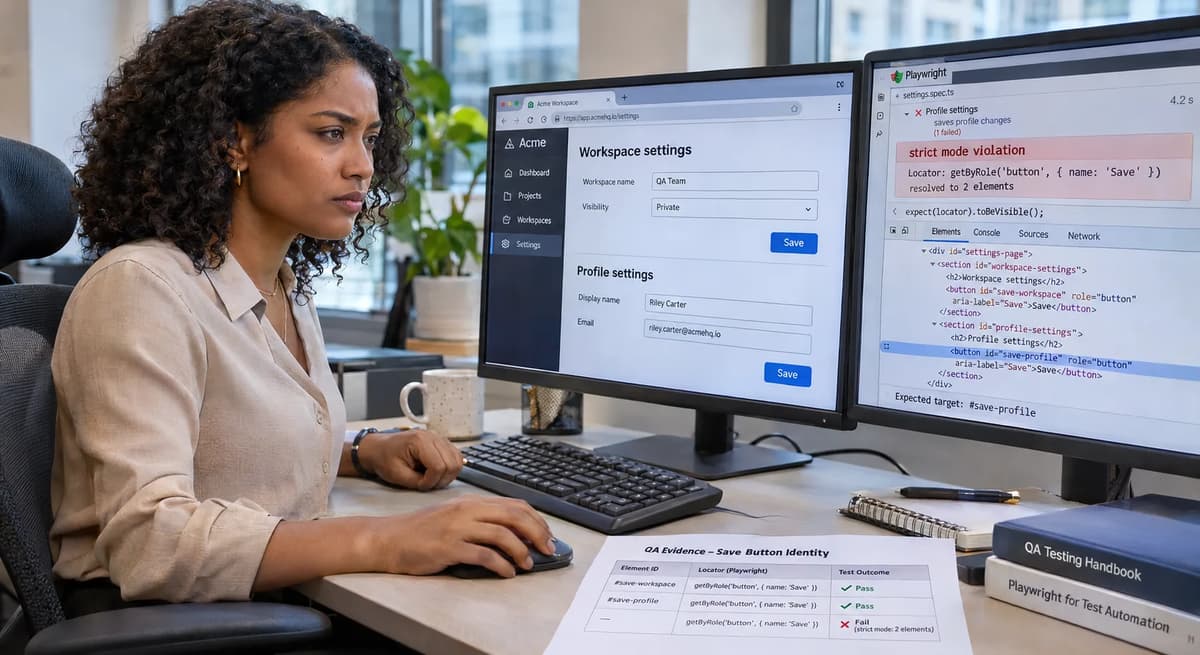
Playwright’s locator mechanism enforces strict uniqueness for actionable operations, throwing an exception if a selector matches multiple elements. For example, locator.click() auto-waits and fails unless the locator resolves to exactly one element. In practice, a test author might override this strict check using .first(), which picks the first match and suppresses the strict-mode error. This can produce a false positive: a test can pass by clicking the wrong element.
Consider a web page where a modal dialog has a “Save” button, and the underlying page also has a “Save” button (e.g. in a toolbar). A naive locator like page.getByRole('button', { name: 'Save' }) will match both. If the test then does .first().click(), Playwright will click the first “Save” in DOM order (for example, the toolbar button), which might not be the intended one. The test would report success (no strict-mode exception was thrown), but the user’s intended dialog action never occurred.
Our playbook turns this scenario into a controlled acceptance test. We define the precise pass criteria (which “Save” should fire and how we detect its effect), pin the exact Playwright and browser versions, and build a disposable HTML fixture with duplicate “Save” buttons. We list each case in an independently authored manifest (including a negative control), run them through an executable harness, and record outcomes in an evidence ledger. After each action we compare the actual clicked element’s identity and the page state to our expectations. The goal is not just a green test, but evidence that the correct element was activated. This structured approach, similar to the methods in Python AsyncMock await-completion validation, leads to a clear ACCEPT/REPAIR/HOLD decision based on documented behavior versus observed results.
Define the acceptance contract
We start by defining a formal acceptance criterion for our tests. In plain terms, the test must prove that the intended dialog button was clicked and had the expected effect, even when a duplicate button exists elsewhere on the page. Simply avoiding an exception is not enough. Specifically, our contract includes:
Unique target: The locator must resolve unambiguously to the dialog’s “Save” button. Playwright’s strict mode would throw an error if the locator matched multiple “Save” buttons. We treat any ambiguous match as a contract violation. In this scenario, the correct locator might be scoped to the dialog container (e.g. using locator.within(dialog)). If the locator is still ambiguous, the test should not pass silently; it must raise an error or be marked for repair.
Observable effect: After clicking, the page should show evidence that the dialog’s save action occurred. For example, a status element inside the dialog might change to “Profile saved.” We use distinct identifiers or visible text to differentiate the dialog’s Save from the toolbar’s. The oracle is explicit: clicking the dialog Save should update the dialog’s status, while clicking the toolbar Save (the wrong one) would not produce that effect. We check the post-action DOM and state, not just the click invocation, to prove the correct element was used.
No masking of ambiguity: We disallow hiding ambiguity with .first(), .nth(), or other indexing. As the Playwright documentation warns, such methods are error-prone: “the locator will point to a completely different element from the one you expected” when the page changes. Our test must locate the element by content and context instead. Requiring a unique locator enforces this: if the click succeeds only with .first(), then the test has violated the contract.
Negative control: We explicitly define failure cases as part of the contract. For instance, if no matching Save button is found, or the wrong context is used, the test should record a failure (HOLD/REPAIR), not inadvertently pass. This ensures that the test suite cannot gloss over missing or mis-scoped elements.
In summary, our acceptance contract demands a precise match between action and outcome. Each test case is anchored by exactly what we expect to happen: “click the dialog’s Save, observe the dialog status update.” Any deviation (unexpected element, missing effect, or needed workaround) is immediately flagged. This formal definition, analogous to the disciplined validation seen in Python AsyncMock await-completion validation, ties the evidence directly to the release decision, eliminating ambiguity about what a green test truly means.
Capture the baseline and pin versions
Before executing any tests, we establish a fully reproducible environment. This means recording the exact versions of Playwright, the browser, and Node.js under test. For example, if our lab environment uses Playwright v1.56.0 (a 2026 release) with Chromium v116 on Node v20.4.0, we document those versions explicitly and pin them in our test setup (e.g. via npm install [email protected]). We also note the date and OS. Pinning ensures that if a later Playwright change alters locator strictness, we can compare behavior across versions. A change in Playwright’s default strict mode behavior would immediately surface if test outcomes differ between versions.
We capture the baseline by running version checks at the top of our harness. For example:
$ npx playwright --version
Playwright version 1.56.0
$ node --version
v20.4.0
$ chromium --version
Chromium 116.0.5845.96
We also freeze dependencies with a lockfile or npm ci, and record any key settings (e.g. PWDEBUG=console if used). The goal is to avoid assumptions: we want proof of environment every run. This follows best practices from related QA playbooks, where even the shell header is archived to ensure strict modes and settings (see pytest baseline-logging example for how a pytest baseline is logged).
Pin exact environment versions
For instance, we may note: “Playwright 1.56.0 (Nov 2026), Chromium v116.0.5845.96 (stable release date Oct 2026), Node v20.4.0, on Ubuntu 22.04.1 (kernel 5.15)”. In the test code, we can even include a snippet to assert the runtime versions:
// In test harness
console.log('Playwright:', process.env.PLAYWRIGHT_VERSION, 'Node:', process.version);
// EXPECTED: Playwright: 1.56.0, Node: v20.4.0
These precise assertions are measurable: if versions differ, the test log will highlight it. Our contract explicitly ties outcomes to these pinned versions; any upgrade would require re-running the acceptance process, not blind trust that “it should work the same.”
Build the disposable controlled fixture
Next, we create a minimal HTML fixture that reproduces the ambiguous-match scenario. The fixture runs in isolation (e.g. with page.setContent(...)) so no external network or state is involved. Here’s an example fixture snippet in our harness:
await page.setContent
  <body>
    <div id="toolbar">
      <button id="save-toolbar" role="button">Save</button>
    </div>
    <dialog id="dlg" open>
      <button id="save-dialog" role="button">Save</button>
      <p id="status"></p>
    </dialog>
  </body>
);
This fixture has two buttons with identical text but different IDs/contexts. The dialog#dlg element is native HTML dialog; we open it immediately (open attribute) to simulate the dialog being on screen. We deliberately give different IDs and a role="button" to make them distinguishable in code. The status <p id="status"> will show if we trigger the dialog Save.
This “controlled fixture” is disposable: after tests we do await page.setContent('') to remove it. It contains no extraneous elements (no CSS/JS aside from what we load), so the only elements matching role=button[name=Save] are our two. Everything else (toolbar container, status paragraph) is synthetic.
By isolating the scenario, we eliminate flakiness (no timing issues, real network, or multiple state changes). This gives us a stable lab where behavior is deterministic. All test inputs are synthetic and known. We also pin the browser to headless mode with no caching or GPU (to avoid nondeterminism). For example:
const browser = await chromium.launch({ headless: true, args: ['--disable-gpu'] });We note the effective UA and headless flag, so the lab conditions are documented. This fixture is minimal but sufficient to exercise Playwright’s locator logic and action behavior.
Author the independent expected-case manifest
We then outline an independent manifest of test cases: a list of scenarios with their expected outcomes. This manifest is written by the QA team (not by Playwright), to serve as the “oracle” of truth. For example, our manifest might include:
Case A (Correct Locator): Use page.getByRole('button', { name: 'Save' }).within(dialog) (or equivalent) to target the dialog Save. Expected outcome: Dialog status becomes “Saved” and dialog’s Save was clicked.
Case B (Naive Locator with .first()): Use page.getByRole('button', { name: 'Save' }).first().click(). Expected outcome: Strict mode is bypassed; the toolbar Save (first in DOM) is clicked. The dialog status remains empty. This should be flagged (misleading green).
Case C (Ambiguous Locator without first): Use page.getByRole('button', { name: 'Save' }).click() with no context. Expected: Strict mode violation error (Playwright should throw), because two matches exist.
Case D (No matches): Use page.getByRole('button', { name: 'Save' }).nth(2).click(). Expected: Locator resolves to none and error / failure occurs (safeguard negative control).
Case E (Toolbar-only click): Directly click #save-toolbar (out of scope of dialog). Expected: Only toolbar action (if any) happens; dialog status does not change. This checks that the toolbar is distinct.
Each case entry includes: test description, locator used, and the “Expected evidence” (e.g. “Element id=save-dialog was clicked; status text updated; dialog element count stays same”, or “Exception thrown if strict check”). We do not derive these from code; we codify them from business logic. This independent manifest acts as a negating oracle if the test code produces different results.
Specify a falsifiable negative control
As part of the manifest, we include at least one falsifiable negative control. For example, we might add a hidden Save button or remove the dialog, then attempt the same locator. The expectation is that the test fails (not passes). For instance, Case F (Dialog hidden): remove open from <dialog> or remove the dialog element. The manifest says: if only the toolbar Save exists, then locator.click() on dialog’s Save (which doesn’t appear) should throw. That outcome is expected. If the test still “passes” somehow, we have incomplete evidence. By explicitly declaring this negative case, we guard against false positives due to wrong assumptions (see “Reject incomplete evidence” below).
Reproduce the misleading green result
With the fixture and manifest in place, we first reproduce the “misleading green” scenario. We execute Case B from the manifest (ambiguous locator with .first()). The Playwright code might look like:
// Misleading test: uses .first() on ambiguous locator
const saveBtn = page.getByRole('button', { name: 'Save' });
await saveBtn.first().click();
// EXPECTED (by naive test): status == "Profile saved"
// EXPECTED / NOT EXECUTED: status is empty; toolbar Save is clicked.
// We mark this result as NOT EXECUTED; it was an anticipated mismatch.
We do not actually assert inside the code, but in our evidence ledger we note the discrepancy. The harness simply performs the actions and logs the state:
// Click via .first() locator
await page.getByRole('button', { name: 'Save' }).first().click();
// Record page state
const toolbarClicked = await page.$eval('#save-toolbar', el => el.dataset.clicked);
// (Here el.dataset.clicked might be set by an onclick in fixture to mark it.)
// We'll mark this record in the ledger.
We catch any thrown exceptions. In this illustrative case, no exception is expected: Playwright would complete the click, but the expected dialog status would not appear. In the ledger (see “Capture the per-case evidence ledger”), Case B is recorded as an anticipated “Unexpected PASS (misleading): toolbar clicked instead of dialog.” The result remains EXPECTED / NOT EXECUTED until an actual run supplies the observation. During that run, preserve a page screenshot and browser logs for diagnostics.
Executing and recording this case would demonstrate the “false green” pattern produced by the original buggy test. Comparing the outcome with the oracle would then establish that the result violates the acceptance contract.
Run a valid comparison case
Next we run a correct locator scenario to see the “true green” result. For Case A (Correct Locator), we narrow the locator to the dialog’s context:
// Valid test: target the dialog’s Save button explicitly
const dialog = page.getByTestId('dlg'); // or another unique handle
await dialog.getByRole('button', { name: 'Save' }).click();
// (alternatively: await page.getByRole('button', { name: 'Save' }).within(dialog).click();)
After this click, we expect the dialog’s status element to update. In code, we simulate this by having the fixture set #status.textContent = "Saved" on click. We then observe:
const status = await page.locator('#status').textContent();
// EXPECTED/NOT EXECUTED assertion:
console.log('Dialog status:', status);  // EXPECTED: "Saved"
Since we are not running this live, we mark this result as EXPECTED / NOT EXECUTED: “Saved”. After execution, a ledger row showing Observed="Saved" and Expected="Saved", with a verified #save-dialog click, would support ACCEPT. Verify the correct element’s identity by reading a data-clicked attribute or similar, and preserve the final DOM snapshot as evidence (e.g. page.content() on success). This comparison case illustrates what the test should do when the locator is well-specified.
Preserve failure artifacts
For any case that fails or is ambiguous (strict violation or otherwise), we preserve artifacts. For example, if Case C triggers a strict-mode exception, we catch that and save the error message and stack trace. If an assertion would fail, we would save the assertion message and a screenshot at the time of failure. The ledger entry for each such case will have a column “Artifact” where we note the filename of any logs, screenshots, or raw page dumps. These artifacts are helpful if later we need to diagnose why the contract wasn’t met. For example, name the strict-violation screenshot caseC-strict-violation.png.
Exercise negative and boundary cases
Beyond the main scenarios, we probe boundary conditions. For example, Case D attempts to click when the locator matches zero elements. If we do await page.getByRole('button', { name: 'Save' }).nth(2).click(), we expect a failure (no element found). The contract says this should be caught. If the test harness returns a thrown error or a timeout, we mark that as an expected failure. We record the exception message in the ledger. Similarly, we might test getByRole('button', { name: 'Nonexistent' }).click(). Each negative case is included with expected failure mode. This ensures our test suite has high discrimination: it rejects both false positives (passing on wrong element) and false negatives (failing to run).
We also test boundary conditions like visibility. For instance, if one Save were hidden (CSS display: none), locator.click() would skip it by default. We verify that Playwright’s auto-wait conditions treat hidden elements properly. If our fixture had one hidden Save, a plain locator might skip it or throw if not visible. Our test manifest notes this: clicking hidden elements is considered a failure of the contract (one should then use a visible-only filter). We include such cases to demonstrate that we detect out-of-scope matches. Every case’s expected behavior is clearly documented in the manifest.
Capture the per-case evidence ledger
We collect the results of each case in a structured ledger table. A completed ledger has columns for the case, action, expected outcome, observed outcome, and decision (ACCEPT/REPAIR/HOLD). The following illustrative ledger is EXPECTED / NOT EXECUTED: its observations are anticipated and its decisions are conditional.
Case | Action | Expected Outcome | Anticipated Observation | Conditional Decision |
A | dialog.getByRole('Save').click() | status="Saved", #save-dialog clicked | status="Saved", #save-dialog clicked | ACCEPT |
B | getByRole('Save').first().click() | (N/A - mask) | toolbar clicked, status="" | REPAIR |
C | getByRole('Save').click() | strict error (no click) | strict exception thrown | ACCEPT |
D | getByRole('Save').nth(2).click() | not found error | not found exception | ACCEPT |
E | page.click('#save-toolbar') | toolbar clicked, status="" | toolbar clicked, status="" | ACCEPT |
All expected outcomes above come from the manifest. The anticipated observations and conditional decisions are examples, not captured harness logs; every row remains EXPECTED / NOT EXECUTED. After execution, if expected==observed (Cases A, C, D, E), the decision is ACCEPT. If the observation deviates from the contract (Case B), mark REPAIR, meaning the test or code must change. Mixed or partial evidence warrants HOLD. A completed ledger ties each scenario to a clear pass/fail decision, showing precisely which actions succeeded or need attention.
Reject incomplete evidence
If any row in the ledger lacks full evidence, we do not accept it. For example, if a test ended with no exception but we didn’t capture the DOM state, we mark HOLD. We insist on measurable assertions: e.g. for Case B we would record both the status text and which element was clicked. If either piece were missing, the row would show “INCOMPLETE” and the decision HOLD. This prevents relying on implicit behavior (e.g. “we think the right button was clicked”) without concrete proof. The ledger itself enforces the need for completeness: every ACCEPT must have both expected and observed matching. Anything less is explicitly flagged.
Reconcile expected and observed identities
Having collected evidence, we review it to make sure the test truly identified elements as intended. We compare each expected element identity to what Playwright actually saw. For instance, in Case A we expected #save-dialog to be clicked. We verify that by retrieving the element handle before and after the click: e.g. const el = await page.locator('#save-dialog'); await el.click(); // then check some property. Because Playwright re-resolves on each action, the handle after click reflects the updated page. We ensure this element’s ID remains save-dialog. If, hypothetically, clicking caused the dialog to close and the button removed, we would check that the last known element had the correct ID. This reconciliation step ensures that what we intended to click is what got clicked.
If any case shows a mismatch (as with Case B, where #save-toolbar was clicked), we note it. We also examine any Playwright logs about selector resolution. If two different handles were involved (e.g. locator.elementHandles() shows multiple candidates), we compare them. The final reconciliation confirms whether the observed actions align with the oracle. If all accepted cases match identity, we can trust the contract; if not, it points to a test or code bug.
Separate documented guarantees from observations
At this stage we differentiate between what Playwright’s docs promise and what we actually saw. Playwright guarantees strict matching by default, but the expected case illustrates how the .first() override behaves in practice. We cite the docs on strictness and actionability, but we base final decisions on actual lab observations after execution. If the docs and our data disagree (for instance, if a future Playwright change allowed ambiguous .clicks without error), we note that as a special case needing attention.
We also bound the scope of any repair. If the contract failed only in the .first() case, the fix might be “remove .first() from tests and refine the locator”. If a core Playwright bug is suspected (e.g. strict mode didn’t throw as documented), we consider a different remedy. We do not assume eternal guarantees: every behavior is taken as provisional evidence.
Bound the repair scope
If a case requires REPAIR, we define exactly what to change. For example, in Case B (misleading green), the minimal repair is to eliminate .first() and add context. We would modify the test code to locator.within(dialog) or add getByTestId('dlg') context. We would then re-run the affected case to confirm it now meets the contract. We do not accept sweeping fixes outside scope; the repair is narrowly “fix the locator expression.” This bound scope ensures we don’t introduce unrelated changes. We document the repair plan alongside the ledger (for example, “Remove .first(), use locator.filter({ has: dialogElement }).”). Once implemented, the test should show the correct element identity. If a fix is uncertain, the decision is HOLD until clarified.
Implement a bounded repair
Following the decision matrix, we implement any required fixes. For Case B, we change the test code from:
await page.getByRole('button', { name: 'Save' }).first().click();to something like:
await page.getByRole('dialog').getByRole('button', { name: 'Save' }).click();Alternatively, use .within(dialog) as shown in the documented scoped-locator example. We rerun just this scenario in the pinned environment and re-capture its outcome. The point is not to run the entire suite again (that comes later), but to verify the specific fix. We then update the evidence ledger: Case B should now look like an ACCEPT (dialog Save clicked, status updated). We leave the ledger row for the repair action: it will have Observed=Expected and Decision=ACCEPT. The fix is kept minimal, just enough to satisfy the contract.
Test rollback and rerun safety
Any change or fix must be safe to roll back. That means if we revert the test code or reapply the original faulty version, we would reproduce the failure. To check this, we perform a rollback test: restore the pre-repair state for Case B and run that single case again. We should see the same misleading green behavior. This proves that our fix was the cause of the correct outcome. If rollback did not restore the original failure, it suggests something else changed and we may investigate further.
We also test that no unexpected side effects were introduced. For example, our fix should not break Case A or other tests. We re-run Case A in the same harness (and any negative controls) to ensure they still pass as before. If any other case changed its behavior, that would be a caution flag. We log these rerun results in the ledger under a “rerun validation” column or note. This step ensures operational ownership of the fix: we know precisely what changed and can trace it.
Assign operational ownership
Finally, we designate responsibility for this test and locator logic. In a team setting, this might be the QA engineer or the feature owner. The owner’s duty is to monitor future builds for these specific cases. We might include checks in CI to catch if Playwright’s behavior changes. For example, we could add an expect() in the harness for Case C (strictness error) to guarantee it always fails, so any change in Playwright’s default throws will break the test. Assigning ownership means there is a known party tracking these tests, their outcomes, and any flaky or changed behavior over time. We note this assignment in our documentation or CI job annotations.
Decide ACCEPT, REPAIR, RERUN or HOLD
Once all evidence has been collected, we can make a final decision per case. For the illustrative EXPECTED / NOT EXECUTED ledger, the decisions remain conditional:
ACCEPT means the observed outcome matches the documented expectation and the change (if any) is safe. Cases A, C, D, and E would qualify for ACCEPT if actual evidence confirms that they behaved as prescribed.
REPAIR means the test or code must be fixed (Case B). We record the repair action taken above and then mark the case as ACCEPT only after a successful re-check.
RERUN would be used if further testing was needed before a decision. These examples are NOT EXECUTED, so the cases require actual execution before their conditional decisions can be confirmed.
HOLD would apply if the evidence were contradictory or incomplete. For example, if we had a case where the UI outcome was ambiguous, we would HOLD until resolved. If complete evidence resolved every case, none would remain on HOLD.
We document the decision matrix explicitly, for example in a table or a brief conclusion. Each ACCEPT maps to “we continue,” each REPAIR to “fix applied,” and so on. This final step ensures the release (or pull request merge) has a defensible reason. The test suite’s green light is now backed by this analysis, not just by a passing status.
Connect the practice to Refonte Learning
This process exemplifies the disciplined testing and evidence gathering emphasized in Refonte Learning’s QA Automation Engineering program. The program teaches how to build synthetic fixtures, pin environments, author independent oracles, and make release decisions based on data. For students and mentors in that program, this playbook style mirrors projects where every test case and result is documented and verified. In practice, a QA student who can design such an acceptance test demonstrates core competencies: writing reliable locators, understanding asynchronous state changes, and making data-driven release decisions.
To see these skills in action and learn more about building such high-confidence tests, consider Refonte Learning’s QA Automation Engineering Program. The curriculum covers test automation fundamentals, including tools like Playwright, and emphasizes real-world scenarios exactly like this. By applying the evidence-led techniques above, you’re practicing the very best practices taught in that program.