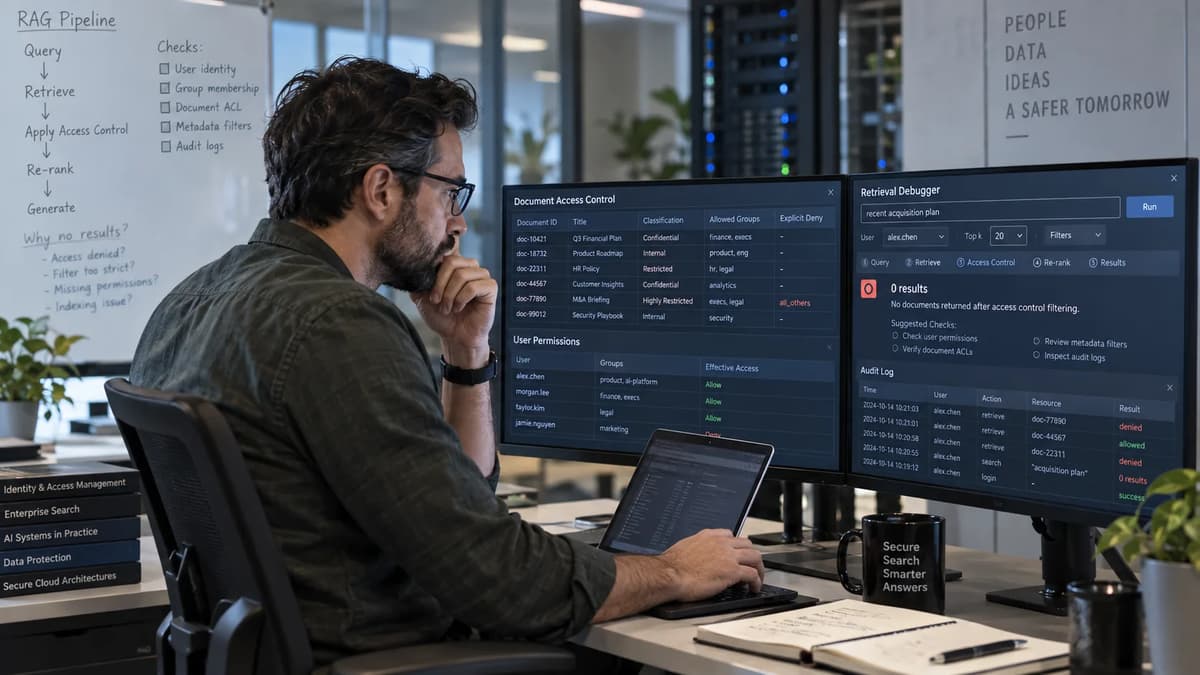
On September 9, 2026, AWS added console support and two APIs for inspecting document-level access-control behavior in Amazon Bedrock Managed Knowledge Bases. The AWS announcement matters because an empty retrieval is no longer something operators have to diagnose only by inference. They can inspect the ACL stored for one document with GetIngestedDocumentAcl, check whether one supplied user is allowed with CheckIngestedDocumentAcl, and then compare that evidence with the source system, the application identity, and the retrieval request.
That visibility does not make the problem low risk. A zero-result answer may be the correct result for a denied user, an ACL ingestion defect, a stale group mapping, a missing userContext, an indexing failure, an over-restrictive metadata filter, or an ordinary relevance miss. A hurried fix that removes filtering can turn a false denial into a data-exposure incident. The operating objective is therefore precise: restore expected retrieval for authorized users while proving that unauthorized users still cannot retrieve the same documents.
This runbook makes the document, rather than the query, the unit of proof. Start with one expected-allow document and one expected-deny document. Preserve the source permission record, retrieve the ingested ACL, trace the authenticated principal through the application, run positive and negative retrieval tests, and authorize remediation only when the evidence identifies a specific broken layer. A successful API call is not acceptance. Acceptance requires matching source and ingested permissions, correct identity propagation, relevant retrieval for allowed principals, continued denial for forbidden principals, and an auditable recovery and rollback path.
1. Define the ACL Debugging Problem Before Changing Access
Begin with an incident statement that names one knowledge base, one data source, one document identifier, one principal, and one expected outcome. “Search is broken” is not actionable. “Alex Rivera should retrieve document OPS-017 from the SharePoint data source, but a query containing its unique test phrase returns no result” is narrow enough to investigate without changing unrelated permissions.
Record the first observed time, the last known successful test, the application release, the source permission-change time, the most recent completed ingestion job, the AWS Region, the knowledge base and data source identifiers, the document identifier, the authenticated user subject, and the exact email sent as userContext.userId. Preserve the original query, retrieval configuration, metadata filter, result count, returned document identifiers, and request ID when available. This is the evidence baseline against which every change will be judged.
Use the new diagnostic capability as a read-only path before touching permissions. The GetIngestedDocumentAcl API returns the ACL ingested for a specific document, while the separate check operation evaluates whether a supplied user has access. Those operations answer different questions. The first shows what Bedrock stored; the second shows the outcome of evaluating that stored representation for one principal. Neither proves that the source permission is correct, the application authenticated the right person, the document is indexed, or the query is relevant.
Expected denial: the source and ingested ACL both exclude the principal, and the negative retrieval test returns no protected document.
False denial: the source authorizes the principal, but the ingested ACL, identity context, filtering, index, or relevance path prevents the expected document from returning.
False allow: a principal that must not access the document receives it, sees a source chunk, or obtains content through an application response.
Indeterminate: the team lacks a stable document ID, source permission record, authenticated identity trace, or reproducible query. Gather evidence before remediation.
Stop condition: If any test returns a protected document to an expected-deny principal, stop availability-focused debugging. Isolate the affected retrieval path, preserve evidence, and open the exposure-response lane in Section 13. Do not continue broad querying to “see how bad it is” from ordinary user accounts. |
2. Map Source Permissions to the Ingested Knowledge Base
Document-level retrieval crosses four independent control surfaces. First, the source system decides which users and groups may access a document. Second, the connector or ingestion payload translates those permissions into an ACL representation associated with the document. Third, Bedrock applies ACL-aware filtering and any ordinary retrieval filters. Fourth, the application authenticates a human or workload and supplies identity context. A defect in one surface can look identical to a defect in another when the only symptom is “no results.”
Control surface | Question to prove | Authoritative evidence |
Source authorization | Who should access this exact document now? | Source permission export, sharing record, group membership, and change timestamp |
Ingested ACL | What allow and deny logic did Bedrock store? | Read-only document ACL response and completed ingestion evidence |
Retrieval controls | What ACL and metadata rules were applied to this request? | Request payload, filter configuration, result document IDs, and scores |
Application identity | Which authenticated principal became userContext.userId? | Identity-provider subject, verified email mapping, server-side trace, and application release |
2.1 Build a Document–Principal Truth Table
Use two documents with deterministic content and known permissions. In this worked example, the synthetic phrase “ALLOW-OPS-017 cobalt rotation” appears only in the Payments On-Call Runbook. The phrase “DENY-HR-204 amber compensation” appears only in the Executive Compensation Planning document. The phrases are non-sensitive markers placed in controlled test copies, not in production secrets or real compensation data.
Document and source state | Principal | Expected result |
OPS-017: Payments On-Call Runbook. Allows group payments-oncall; denies group contractors. | [email protected], member of payments-oncall | Allowed. Exact marker query returns OPS-017. |
OPS-017: same document. | [email protected], member of contractors | Denied. No chunk or generated answer may reveal OPS-017 content. |
HR-204: Executive Compensation Planning. Allows group people-leadership. | [email protected], not a member | Denied. No chunk or content from HR-204. |
HR-204: same document. | [email protected], member of people-leadership | Allowed. Exact marker query returns HR-204. |
2.2 Record Source, Connector, and Sync Boundaries
Record how each permission reaches Bedrock. SharePoint, OneDrive, Google Drive, and Confluence can use pre-retrieval ACL filtering plus real-time verification when their documented connector and authentication requirements are met. Amazon S3 and custom sources rely on customer-supplied ACL metadata and do not have a live permission system for Bedrock to recheck. The Amazon S3 ACL guidance and custom data-source ACL guidance therefore make the metadata artifact part of the authorization evidence, not merely ingestion decoration.
For every data source, capture the connector type, authentication mode, ACL-enabled state, source tenant or domain, credential owner, group-resolution method, inheritance behavior, last successful sync, current sync status, and document mapping rule. For S3 or custom ingestion, capture the exact ACL metadata object or request payload version. For a crawled connector, capture a source permission export close to the test time. This is the permission lineage equivalent of the data lineage expected from well-operated cloud-native ingestion pipelines.
Do not compare a current source permission with a month-old ingested ACL and label the difference a defect without considering the sync boundary.
Do not treat a successful content sync as proof that ACL extraction succeeded for every document. Document-level ingestion logs and sampled ACL checks are separate evidence.
Do not assume a real-time connector eliminates stale group risk. Verify what is checked live and what still depends on the last crawl.
Do not change connector authentication during an active incident unless the evidence identifies credential scope or source verification as the failing layer.
3. Understand How ACLs, Metadata, and Retrieval Filters Interact
ACL filtering and metadata filtering solve different problems. ACLs answer whether a supplied principal may receive a document. Metadata filters narrow the search space by attributes such as business unit, language, product, or modification time. The current Knowledge Bases filtering guidance documents supported operators and reserved fields, but an ordinary metadata condition is not a substitute for source authorization. A user who passes an ACL check can still receive no result because a metadata filter excludes the document; a user who fails authorization must remain denied even if the metadata filter matches.
The request can also fail closed before relevance is considered. For an ACL-enabled source, the ACL-aware retrieval behavior requires userContext; omitting it causes that source to return zero results. A knowledge base can contain ACL-enabled and non-ACL sources at the same time, so a request without identity context may still return public or non-ACL content. That mixed result is dangerous to misread: “some results came back” does not prove that identity propagation worked for the protected source.
Keep ACL state separate from index state, application conversation state, and agent memory. A stale conversation summary can cause an agent to ask the wrong question, but it does not explain what ACL was attached to a document. Likewise, an ACL can be correct while the chunk containing the unique phrase was never indexed. The distinction is similar to separating AI agent memory and retrieval state from durable source truth: related components influence the answer, but they require different evidence and different rollback paths.
Observed outcome | What it proves | What it does not prove |
GetIngestedDocumentAcl returns 200 | The caller could retrieve an ACL object for the identified document. | That the ACL matches the source or that retrieval is correct. |
CheckIngestedDocumentAcl returns true | The supplied user passes evaluation against the ingested ACL. | That the app authenticated that user or that the document will rank. |
Retrieve returns the document | The document survived current ACL, filters, indexing, and ranking for that request. | That expected-deny users cannot retrieve it. |
Retrieve returns no results | No eligible chunk was returned for that request. | Whether denial, ingestion, filtering, indexing, or relevance caused it. |
4. Inspect the Ingested ACL With Read-Only Evidence
Create a diagnostic role that is separate from the application runtime role. The runtime normally needs retrieval capability; it should not automatically receive permissions to enumerate document ACLs. The diagnostic role should use federation, temporary credentials, multifactor authentication where appropriate, a narrow knowledge-base and environment scope supported by IAM, and an approved incident or change record. Follow the current AWS IAM security best practices rather than issuing long-lived access keys to a troubleshooting script.
4.1 Retrieve and Interpret One Document ACL
The current AWS CLI command reference for GetIngestedDocumentAcl requires a data-source ID, document ID, and knowledge-base ID. The following command is read-only. Replace the sample identifiers with values from the incident record; do not paste ACL output into a public channel or an unrestricted ticket.
export AWS_REGION="us-east-1"
export KB_ID="KB12345678"
export DS_ID="DS12345678"
export DOC_ID="OPS-017"

aws bedrock-agent-runtime get-ingested-document-acl \
  --knowledge-base-id "$KB_ID" \
  --data-source-id "$DS_ID" \
  --document-id "$DOC_ID" \
  --region "$AWS_REGION" \
  --output json \
  --no-cli-pager
The API response contains a documentAcl with allow and deny membership information. Inspect the allow list, deny list, condition operators, member relation, user entries, group entries, and whether each member is represented at knowledge-base or data-source scope. Compare identifiers exactly. Case, aliases, tenant suffixes, deleted groups, and renamed groups can create a source-to-ingestion mismatch even when the display names look familiar.
AccessDeniedException, 403: first test the diagnostic role and policy boundary; do not widen the application role as a shortcut.
ResourceNotFoundException, 404: verify Region, knowledge base, data source, and document mapping. A source path is not automatically the ingested document ID.
ValidationException, 400: validate identifiers and request syntax against the current API or CLI reference.
ThrottlingException, 429: slow the diagnostic job, use bounded retries with jitter, and preserve the first-failure time.
InternalServerException, 500: retry within the incident’s bounded policy; if persistent, preserve request IDs and escalate without modifying ACLs.
4.2 Compare Allow, Deny, Group, and Principal Entries
Next, evaluate the expected principal with the check operation. The CheckIngestedDocumentAcl CLI reference requires the same three identifiers plus a user context. The result is a boolean hasAccess based on the ingested ACL. Use the exact verified email that the application should send, not a display name or an operator’s convenient alias.
aws bedrock-agent-runtime check-ingested-document-acl \
  --knowledge-base-id "$KB_ID" \
  --data-source-id "$DS_ID" \
  --document-id "$DOC_ID" \
  --user-context "[email protected]" \
  --region "$AWS_REGION" \
  --output json \
  --no-cli-pager
Interpret the result alongside the retrieved ACL and source truth. If hasAccess is false and the expected group or user is absent from the ingested allow list, the leading hypothesis is ingestion or source mapping. If the expected allow entry exists but an applicable deny entry also exists, denial is correct because current ACL behavior gives deny precedence. If the ACL appears correct but the check is false, inspect member relation, conditions, group identity, and principal normalization before requesting a resync.
Do not use the check API as an application authorization endpoint. AWS describes ACL awareness as filtering based on supplied identity context, not authentication of that identity. The application must authenticate users upstream and prevent a caller from substituting another email. Likewise, diagnostic access to full ACLs should remain more privileged than ordinary retrieval. A support engineer may need to run a check without receiving the document content, while an application user may retrieve permitted content without being able to enumerate everyone on the ACL.
Audit requirement: Before remediation begins, confirm that privileged diagnostic calls are covered by the organization’s CloudTrail design. The Amazon Bedrock CloudTrail guide explains management and data-event behavior and the Bedrock knowledge-base resource type. Test in the actual account that the required events appear with caller, time, Region, action, resource, and request context. Do not assume that enabling a trail elsewhere or seeing one console event proves complete coverage. |
5. Build a Safe Positive-and-Negative Test Corpus
A useful corpus contains documents that are easy to identify, safe to query repeatedly, and permissioned in ways that exercise direct users, groups, deny precedence, missing ACL behavior, and source updates. Put unique, non-sensitive marker phrases in the document body so retrieval quality can be tested independently of authorization. Never use a real secret, customer identifier, medical detail, or compensation figure as the marker.
Fixture | Permission shape | Required assertion |
ALLOW-DIRECT | Direct allow for Alex; no deny. | Alex retrieves marker; Devon does not. |
ALLOW-GROUP | Allow payments-oncall group. | Alex retrieves while a nonmember does not. |
DENY-OVERRIDE | Allow engineering; explicitly deny contractors. | A contractor who is also in engineering remains denied. |
MISSING-ACL | ACL-enabled source with no usable ACL metadata in a controlled fixture. | No principal retrieves it; absence is not treated as public. |
SOURCE-UPDATE | Mira added, then removed, through the source’s approved process. | Retrieval follows the documented sync and real-time behavior without exposing the document during transition. |
A safe failure-injection test deliberately removes Alex’s allow entry from the synthetic ALLOW-DIRECT document in a non-production source, completes the normal sync, and verifies three signals: the ingested ACL no longer contains Alex, the check returns false, and retrieval returns no protected chunk. Recovery restores the source permission through the approved source workflow, completes the normal sync, and requires both the positive test for Alex and the negative test for Devon to pass. The exercise is successful only if denial occurs during the fault and no unrelated principal gains access during recovery.
Controlled override boundary: A temporary permission change is acceptable only on synthetic, isolated test data with named approval, an expiry, a recorded before state, and an automatic or rehearsed restoration. Disabling ACL filtering, removing userContext, changing the application to a privileged shared identity, or moving sensitive documents into a non-ACL source is a production bypass, not a diagnostic override. |
6. Trace the Retrieval Request From Identity to Results
The IAM role that calls Bedrock and the end user represented in userContext are separate identities. The role authorizes the workload to invoke the service. The user context tells ACL-aware filtering which source user to evaluate. A secure design must prove both: the workload was allowed to call the intended knowledge base, and the application derived the user email from an authenticated, server-side identity rather than from editable client input.
assert session.is_authenticated
assert session.email_verified

source_email = identity_map.to_source_email(
    subject=session.subject,
    source="sharepoint-production"
)

retrieve_request = {
    "knowledgeBaseId": "KB12345678",
    "retrievalQuery": {"text": "ALLOW-OPS-017 cobalt rotation"},
    "userContext": {"userId": source_email}
}
Trace checkpoint | Evidence to retain | Failure indicated |
Authentication | Issuer, subject, authentication time, verified claims. | Wrong or unauthenticated requester. |
Identity mapping | Canonical source email and mapping version. | Alias, tenant, lifecycle, or normalization defect. |
Bedrock request | Knowledge base, query, user context, filters, request ID. | Missing or altered identity/filter context. |
Retrieval result | Document IDs, scores, count, latency, outcome class. | Authorization, indexing, filtering, or relevance symptom. |
7. Separate Authorization Failures From Search-Quality Failures
Classify the failure before selecting a fix. The fastest safe sequence is document specific: compare source permission, retrieve the ingested ACL, check one principal, query the unique marker through the production identity path, and only then examine indexing, chunking, metadata, and ranking. Keeping ACL enforcement in place during every search-quality test prevents a relevance investigation from becoming an authorization bypass.
Failure class | Diagnostic signature | Safe next action |
ACL ingestion | Source allows Alex; ingested allow entry is missing, malformed, or stale. | Inspect connector and sync evidence, repair the source or metadata mapping, then resync the narrow source boundary. |
Principal mapping | ACL contains the expected source identity or group, but app sends a different email or tenant identity. | Fix server-side identity mapping; do not edit document ACLs to accommodate a wrong principal. |
Indexing or chunking | ACL check is true, but the exact marker never returns and ingestion logs show document or chunk problems. | Repair ingestion or chunking and reindex the controlled document while retaining ACL tests. |
Metadata filtering | ACL check is true and the document is indexed, but the request filter excludes its metadata. | Correct the business filter with owner approval; do not replace authorization with metadata. |
Relevance or reranking | Exact marker works, but realistic query does not surface the document despite correct eligibility. | Tune content, query, ranking, or evaluation set without broadening access. |
A useful decision tree is straightforward. If the source says deny, a zero result is expected and no access restoration should occur. If the source says allow but the ingested ACL does not, investigate ingestion. If the ingested ACL is correct but the check is false, investigate condition logic, deny precedence, and principal or group representation. If the check is true but an exact marker fails, investigate document ingestion and index state. If an exact marker succeeds but a natural-language query fails, the remaining problem is primarily relevance or ranking.
The current Retrieve guidance for managed knowledge bases notes that retrieval returns chunks and relevance scores and that the actual result count can be lower than the configured maximum. ACL-aware behavior adds another reason for a short result set: real-time verification can deny some candidates without backfilling additional documents. Therefore, do not use “requested ten, received three” as evidence of an ACL defect. Compare the returned document IDs with the truth table and inspect whether the three are the only eligible relevant candidates.
Recovery path: When the fault is isolated to indexing or relevance, repair that layer while leaving source permissions, ingested ACL logic, and identity propagation unchanged. Re-run the expected-allow marker test and every paired expected-deny test. A relevance improvement is rejected if any negative test begins returning the protected document. |
8. Validate Principal and Group Context End to End
Email is the universal user identifier in the current ACL model, and the value must match the source identity. The documented model does not promise alias resolution or cross-identity-provider mapping. An employee who signs in as [email protected] while the source permission is attached to [email protected] may receive a false denial even though both addresses belong to the same person in corporate identity systems. Fix the governed mapping; do not add every alias to sensitive ACLs as a permanent workaround.
Apply zero-trust verification principles at the application boundary: verify the issuer, audience, tenant, subject, authentication state, account lifecycle, and source-specific email on every request path that can retrieve protected content. Prevent browser parameters, prompt content, agent tools, or downstream services from overwriting the canonical identity. Treat email reassignment, contractor conversion, mergers, guest accounts, and shared mailboxes as identity-lifecycle events that require explicit policy.
8.1 Test Identity Propagation and Membership Changes
Test the full path with an allow transition and a deny transition. For the allow transition, add Mira to the synthetic people-leadership group through the source’s approved workflow. Record the source change time, complete the documented sync or observe the connector’s live verification path, retrieve the ingested ACL, run the check, and then query the marker through the application. For the deny transition, remove Mira and repeat the same observations until access is denied.
Time matters. Current AWS documentation says access-control updates are eventually consistent and third-party identity-provider credentials can be cached for up to one hour. Define an organization-specific transition window based on connector behavior, sync schedule, and risk, then test both inside and after that window. Do not call a delayed allow a permanent defect before the supported path has had time to converge, and do not treat a delayed revocation as acceptable merely because eventual consistency is documented. Sensitive sources may require compensating controls during the transition.
Compare the identity-provider subject with the source email, not only the display name shown in the application.
Verify direct membership and nested membership patterns that the connector is expected to support.
Test a renamed group and a deleted group in non-production to confirm how stale identifiers are handled.
Test sign-out, token refresh, and session renewal so revoked access is not prolonged by application caching.
Record whether the check API, retrieval API, and source interface converge at different times.
8.2 Run Negative Tests That Must Stay Denied
Every positive test needs a paired negative test. Alex retrieving OPS-017 proves only that one allowed path works. Devon must remain unable to retrieve OPS-017 through exact marker search, a broad semantic query, a metadata-filtered query, a follow-up conversational request, and any application feature that generates an answer from retrieved chunks. The negative assertion covers content and identifiers: the response must not reveal the title, excerpt, source URI, sensitive metadata, or a generated paraphrase derived from the protected document.
Also test omission and substitution. An ACL-enabled source should not return protected documents when userContext is absent. A request that attempts to substitute Mira’s email while authenticated as Alex must be rejected by the application before it reaches Bedrock. A principal in both an allow and deny path must remain denied. A document missing usable ACL metadata in an ACL-enabled source must not become public by default.
Negative case | Expected evidence | Release consequence |
Denied user, exact marker | Zero protected chunks; no title, URI, metadata, or generated content. | Any return is a release stop and security incident. |
Authenticated Alex submits Mira identity | Application rejects identity substitution and logs the attempt. | Any downstream call is an identity-boundary defect. |
Allow plus deny membership | Check is false and retrieval omits the document. | Any allow indicates policy-evaluation failure. |
Missing userContext | ACL-enabled source returns no protected document. | Any protected return blocks rollout. |
9. Protect Diagnostic Evidence and Sensitive Permission Data
A full document ACL can reveal executive groups, legal matters, investigations, projects, document identifiers, tenant structure, and individual relationships to sensitive content. Treat it as security evidence. The diagnostic role, case record, log store, and exported files need a classification at least as restrictive as the documents whose permission structure they describe. Operators should see only the cases and environments they are assigned to.
These controls are an application of cloud security least-privilege practices, but Bedrock-specific separation matters. A developer who can issue ordinary retrieval requests does not automatically need bedrock:GetIngestedDocumentAcl. A diagnostic operator may need the ACL without access to the document body. An automation role may need the check operation for synthetic fixtures but not full ACL enumeration. Design each role around the minimum evidence it must obtain.
Do not paste a full ACL into email, chat, source control, CI logs, or an unrestricted observability platform.
Do not log raw authentication tokens, source connector secrets, or third-party credentials during troubleshooting.
Do not include sensitive principal names as metric dimensions, because high-cardinality telemetry can become a secondary permission database.
Do preserve caller identity, action, resource, outcome, request ID, and approved case number for privileged diagnostics.
Do verify deletion from temporary workstations and scratch storage after evidence is transferred to the approved system.
10. Automate Diagnostics Without Creating an ACL Bypass
Automation should collect evidence, compare expected outcomes, and open a case. It should not rewrite source permissions, edit ACL metadata, disable filtering, or promote a release. Keep the diagnostic job read-only and declarative: input a governed list of document IDs and test principals, call the get or check operation, run a bounded retrieval test, compare with the approved truth table, and emit a minimized result.
for case in approved_test_cases:
    acl_fingerprint = get_acl_fingerprint(case.document_id)
    decision = check_access(case.document_id, case.user_id)
    retrieval = run_marker_query(case.marker, case.user_id)

    assert decision == case.expected_acl_decision
    assert retrieval.contains_document == case.expected_retrieval
    write_minimized_result(case.id, acl_fingerprint, decision, retrieval)
Bound the job by environment, knowledge base, data source, document count, request rate, retry budget, execution time, and cost center. Repeated marker queries and agent-assisted investigations consume runtime and telemetry resources. The same principle described in agentic AI cost governance applies here: attach an operational budget to automated reasoning and retrieval, then alert on behavior that exceeds the expected envelope. Never let a diagnostic agent discover arbitrary documents or principals in production.
Use an allowlisted test registry, not source-wide document enumeration.
Use synthetic principals and documents for continuous tests; reserve real sensitive cases for approved incidents.
Apply bounded exponential backoff to throttling and stop after the approved retry budget.
Sign or version the test expectations so a changed negative assertion receives review.
Require a human approval step before any source permission, connector, ingestion, or application change.
11. Observe Sync Drift, Empty Results, and Unexpected Allows
Operational metrics tell you whether requests are occurring and failing, but they do not label a result as a false allow or false denial. The current managed knowledge base observability guide documents the AWS/Bedrock/KnowledgeBases namespace and metrics such as Invocations, ClientErrors, ServerErrors, and Throttles, plus document-level ingestion logs and retrieval tracing options. Use those signals for service health, then add synthetic authorization outcomes from the governed corpus for security correctness.
Signal | Interpretation | Guardrail |
Expected-allow success rate | Percentage of approved positive cases returning the target document. | Investigate drops by connector and release; never “fix” by broadening ACLs. |
Expected-deny leakage count | Negative cases that returned any protected evidence. | Target is zero. One event stops rollout and triggers exposure response. |
Source-to-ingested ACL drift | Approved source expectation differs from ACL fingerprint or sampled members. | Open case with source owner; do not auto-rewrite either side. |
Missing-identity request rate | Requests to ACL-enabled sources without verified user context. | Reject upstream and alert by application release. |
Sync age and failed documents | How far permission and content state may lag. | Escalate stale or failed jobs before declaring retrieval healthy. |
Privileged diagnostic volume | Use of get and check operations by role, environment, and case. | Alert on unapproved, bulk, or out-of-hours patterns. |
Build dashboards according to observability foundations: each signal needs an owner, decision threshold, runbook, and retention rule. Avoid principal email as a dimension. Use test-case IDs and permission cohorts instead. Correlate spikes with connector changes, application releases, source permission campaigns, ingestion jobs, and identity-provider incidents. A flat error rate can hide a serious false denial if the request succeeds technically but returns no eligible result.
Account for partial results. Real-time verification can remove candidate documents without backfilling to the requested result count. Monitor both result count and expected-document presence. A decrease from ten results to seven is not automatically an outage; the critical signal is whether the approved principal received the required document and whether denied principals received none. Capture the reason class in the synthetic test system rather than inferring it from result count alone.
12. Roll Out ACL Debugging Across Environments and Data Sources
Roll out the capability in rings. Ring 0 is a local or isolated account with synthetic documents and no enterprise identities. Ring 1 is non-production with connector types and group shapes that mirror production but use test tenants or test sites. Ring 2 is a low-sensitivity production pilot with named source owners, a small governed corpus, and alerting. Ring 3 expands by data source and business domain only after the previous ring meets positive and negative gates.
Ring | Required proof | Rollback posture |
0: synthetic lab | Commands, logging, evidence minimization, failure injection, and restore all work. | Delete fixtures and roles; no business data is affected. |
1: non-production | Identity mapping, group changes, sync timing, metadata filters, and application traces match design. | Revert application release and source test permissions. |
2: low-sensitivity pilot | Owner-approved truth table, zero negative leakage, complete audit events, on-call response. | Disable pilot route and restore last known application version; retain ACL enforcement. |
3: broader production | Connector-specific runbooks, sampled drift tests, incident exercises, and capacity budgets. | Isolate affected data source or application route; do not globally disable ACL awareness. |
Connector readiness is not interchangeable. A crawled enterprise connector adds source permissions, group resolution, and possibly real-time verification. S3 and custom sources place more responsibility on your ACL metadata-generation pipeline. Some connector ACL configurations are documented as permanent after data-source creation, including the SharePoint ACL configuration. Treat creation settings as architecture decisions, test them before production, and do not make rollback depend on a toggle that the service does not provide.
13. Respond to False Denials and Suspected Data Exposure
Run two incident lanes with different priorities. A false denial is an availability and correctness incident: authorized users cannot obtain relevant content. A suspected false allow is a confidentiality incident: an unauthorized principal may have received protected information. Do not combine them under a generic “search issue” queue. The containment authority, evidence handling, communications, and recovery criteria are different.
False-denial lane. Freeze ACL, connector, identity-mapping, metadata-filter, and application changes for the affected path. Reproduce one document-principal case, preserve source permissions and sync evidence, retrieve the ingested ACL, run the check, and trace the application request. Repair only the failing layer. If the source metadata generator omitted an allow group, correct that generator and reingest the narrow fixture or affected set. If the app sent an alias, correct the mapping and roll back the faulty release. If the index is incomplete, reindex without changing authorization.
Recovery from a false denial requires more than the allowed user seeing a result. Re-run the paired denied user, the missing-identity case, deny precedence, and an unrelated document. Confirm source and ingested ACL alignment, record the completed sync or deployment, verify diagnostic events, and monitor for recurrence through at least the organization’s defined observation window. Close the incident only when the business owner confirms the expected document and the security owner confirms no access broadening.
Suspected-exposure lane. Stop the affected application route or isolate the knowledge base or data source according to the pre-approved playbook. Preserve request traces, CloudTrail evidence, application logs, relevant ACL snapshots, source permission history, and returned document identifiers. Revoke or restrict compromised sessions and workload permissions as appropriate. Do not delete the document, ACL, or logs before investigators have preserved evidence, because deletion can erase the scope and timeline.
Determine whether the exposure came from a wrong source permission, incorrect ingested ACL, identity substitution, non-ACL data source, missing application authentication, metadata leak, cache, or generated response that retained protected content. Remove access at the authoritative layer, complete the required sync or verification, and test from the denied principal. Involve privacy, legal, compliance, source owners, and customer-response teams according to the data classification and regulatory obligations. A successful deny test after containment does not prove what was viewed earlier; that requires evidence review.
Emergency stop: Any confirmed protected chunk, title, source URI, metadata value, or generated paraphrase delivered to an expected-deny principal is sufficient to stop rollout. Do not wait for a full document download. Follow the organization’s data-exposure process and preserve the original response. |
Rollback path. Revert the application to the last known version that supplied verified identity correctly, restore source permissions from the approved before state, and rerun the normal ingestion path. If the affected data source cannot be safely reverted, isolate it from the application or route users to a known-safe knowledge base. Never define rollback as disabling ACL awareness or moving protected content to an unrestricted connector.
14. Define Acceptance, Rollback, and Ongoing Verification
Acceptance is a matrix, not a demonstration. Test direct users, groups, deny precedence, identity omission, source changes, metadata filters, exact markers, realistic queries, and at least one unrelated document. Run through the production application path and separately through the diagnostic path so the team can distinguish end-to-end behavior from ingested ACL evaluation.
Case | Expected ACL and retrieval outcome | Acceptance evidence |
Alex, OPS-017, direct or group allow | Check true; exact marker and approved natural query return OPS-017. | Source permission, ingested ACL, app trace, document ID, score, request ID. |
Devon, OPS-017, deny path | Check false; no title, chunk, URI, metadata, or generated content. | Negative response, app trace, audit event, no protected identifier. |
Alex, HR-204, no allow | Check false; all query variants remain denied. | Source expectation and negative end-to-end tests. |
Mira, HR-204, allowed group | Check true; marker and natural query return HR-204. | Group membership, ingested ACL, identity mapping, retrieval evidence. |
Alex with Mira supplied by client | Application rejects before Bedrock invocation. | Security log with authenticated subject and rejected substitution. |
No userContext on ACL source | No protected document returns. | Request trace and zero protected IDs. |
Mira removed from source group | Access becomes denied within approved transition handling. | Source change, sync or live verification evidence, repeated negative test. |
Metadata filter excludes OPS-017 | Alex remains authorized but filtered query omits document; control query with approved filter returns it. | Same ACL decision, two governed filter configurations, expected result difference. |
Set measurable release gates. All approved positive fixtures must return their target document through the intended application path. Every negative fixture must have zero protected leakage. The source-to-ingested comparison must match the approved permission model or have a documented, accepted connector transformation. Identity-substitution tests must be rejected upstream. Required CloudTrail and application audit evidence must be present. The rollback exercise must restore the previous safe state without disabling ACL filtering.
Go: positive and negative matrix passes, evidence is auditable, owner approvals are recorded, and rollback is rehearsed.
Hold: a positive case fails but all negative cases remain secure; continue narrow diagnosis without broadening access.
Stop: any negative case leaks protected evidence, identity can be substituted, audit coverage is missing for privileged diagnostics, or rollback requires disabling ACL enforcement.
Recover: restore the authoritative source permission or last known application mapping, complete the normal sync or deployment path, and repeat the entire paired matrix.
Rollback: revert the application release, isolate the affected source or route, restore approved source state, and retain evidence for review.
After rollout, keep a small synthetic corpus in every production environment, sample real documents under restricted approval, review diagnostic-role usage, reconcile source and ingested ACLs after connector or identity changes, and exercise the exposure lane. Retire stale fixtures and principals through the same governed process that created them. Review the runbook whenever AWS changes the ACL schema, connector support, identity model, logging behavior, or retrieval configuration.
The operating standard is simple to state and demanding to prove: authorized users retrieve the right document, unauthorized users retrieve none of its protected evidence, and every decision can be traced from source permission through ingested ACL and verified application identity. Teams building those capabilities need more than one cloud command. They need AI data engineering, optimization, scaling, and responsible-governance foundations. The Refonte Learning AI Engineering Program currently runs for three months at approximately 12 to 14 hours per week and publishes coverage of neural networks, deep learning, reinforcement learning, AI model optimization, data engineering for AI, scaling AI systems, and AI ethics and governance. Those foundations are transferable to designing retrieval systems whose correctness includes both relevance and access control.
Do not close a Bedrock knowledge base no-results incident because a query finally returned something. Close it when the expected-allow document returns for the verified principal, every paired expected-deny case remains denied, the source and ingested ACL evidence agree, diagnostic access is audited, sensitive evidence is protected, and the recovery can be reversed. That is the difference between restoring search and weakening authorization.