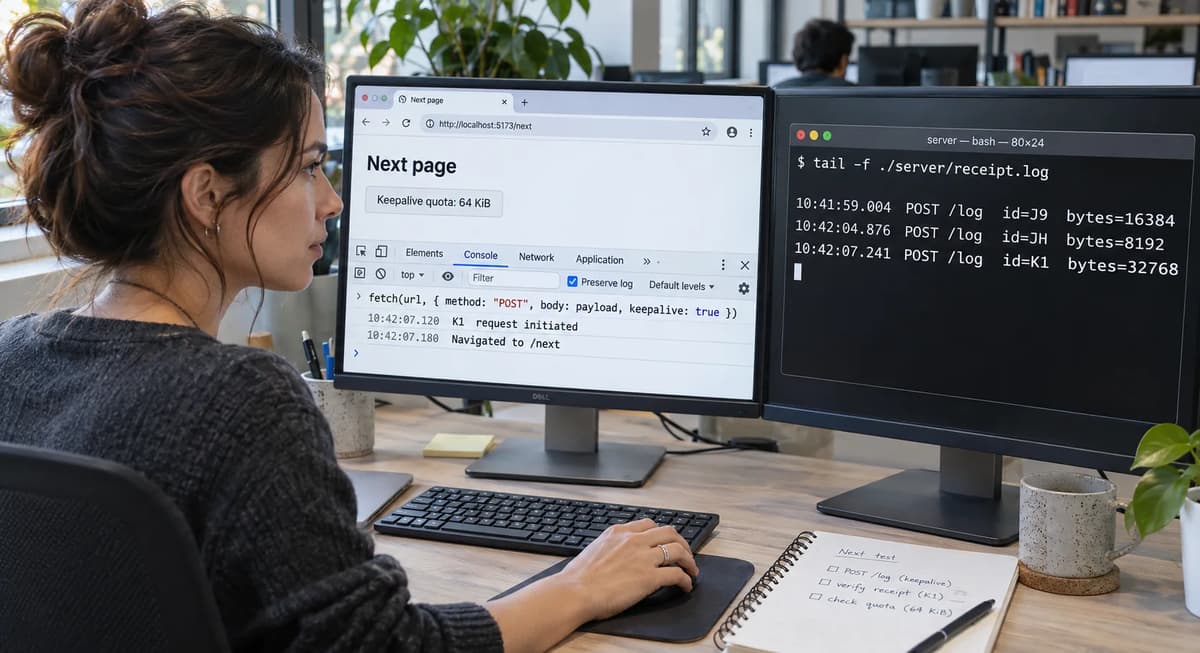
When a page calls fetch(url, {keepalive: true}), the Promise may resolve quickly even if the user immediately navigates away. The client’s “success” signal masks an operational contradiction: does keepalive truly guarantee delivery, or can the request simply continue after navigation? The WHATWG Fetch spec lets requests “outlive the environment settings object”, but only under a strict in-flight body limit. Specifically, a request with keepalive:true is admitted only if its body length plus the other in-flight keepalive body lengths in the same fetch group is at most 64 KiB. MDN likewise notes that keepalive is intended for sending analytics at the end of a session and that fetch with keepalive is an alternative to sendBeacon for cases needing non-POST or response access. However, neither source guarantees that a resolved promise means the server actually saw the request.
This playbook walks through a controlled state transition to prove or refute delivery. We will define an explicit acceptance contract, pin exact versions, and run an isolated fixture that logs evidence on both client and server. Each test case is identified (e.g. K1_UNDER_LIMIT_NAV), and expected outcomes are recorded in an independent manifest. The browser and server write separate logs before cleanup so that each recorded attempt can be reconciled with a receipt. Using this ledger of actual observations vs. expected results, we follow an evidence-led decision process (ACCEPT/REPAIR/RERUN/HOLD). For example, if a fetch returns OK but the server log lacks the entry, we REPAIR the workflow rather than accept a false success. Our methodology parallels rigorous validation examples (e.g. the requestAnimationFrame hidden-tab test), with the focus here strictly on fetch keepalive semantics and the 64 KiB quota. We compare each assertion with the specification or a recorded fixture artifact.
1. Define the operational contract
We first articulate exactly what “keepalive delivery” should mean. Our operational contract is: a request initiated with fetch(..., {keepalive: true}) under the 64 KiB body quota should be allowed to continue even if the page unloads, and the client should attempt to send it. However, the resolved promise alone is not proof of delivery. Check the server log for each case.
Case FC1 (keepalive allowed). A single POST with body ≤ 64 KiB and keepalive:true. Steps: In the test page, run fetch('/log', {method:'POST', body: 'A'.repeat(32768), keepalive:true}), then immediately navigate (e.g. window.location.href='about:blank'). Expected: No network error at creation, browser queues the request. After navigation completes, the server’s log contains one entry with the 32 KiB body. Evidence: server’s evidence/server.json shows the POST data, and, if the page can still record it, the client logs the response (e.g. HTTP 200).
Case FC2 (exceed body limit). A single POST with body > 64 KiB (e.g. 100 KiB) and keepalive:true. Steps: Invoke as above. Expected: The fetch promise rejects with a network error (per WHATWG spec). No entry should appear on the server (server evidence is absent).
Case FC3 (multiple keepalive requests). Two concurrent fetches with keepalive, each 40 KiB. Combined body = 80 KiB > 64 KiB. Steps: Send both from the same page, keeping the first request in flight while the browser checks the second against the quota. Expected: Spec implies the second should fail the quota check once the aggregate quota would exceed 64 KiB. We expect at most one success. Evidence: The server log may show one 40 KiB entry (accepted request), and the other fetch promise rejects.
Case NC1 (no-keepalive control). A POST ≤ 64 KiB with keepalive:false. Steps: Trigger and navigate. Expected: This acts as a negative control: the browser may abort it on unload. We do not guarantee delivery. Record whether the server receives it. Either outcome is consistent with this control.
Each case has a unique ID (e.g. FC1, FC2, FC3, NC1) and steps. We will map each to our evidence ledger. Note the strict boundary: the new body plus the bodies of unfinished keepalive requests in the same fetch group must fit within 64 KiB, as mandated. We plan our test payloads accordingly. All concrete steps, launching the page, invoking fetch(), simulating unload, then checking logs, will be scripted in the fixture harness. Evidence is defined as files in an evidence/ directory: e.g. server.json entries or console captures. The case outcomes in this playbook are expectations. Their status is EXPECTED / NOT EXECUTED.
2. Record the documented baseline and scope
Next, we gather what the standards and documentation say to set our baseline expectations:
WHATWG Fetch spec: A request with its keepalive flag set can outlive the environment settings object that initiated it. The standard limits the aggregate in-flight body size to 64 KiB. We treat these as normative contract terms.
MDN Web Docs: Request.keepalive is defined as keeping a request alive past unload. MDN’s sendBeacon guide explicitly notes that when other HTTP methods or response access is needed, fetch() with keepalive enabled is the appropriate alternative. It also states queued beacon data is subject to the 64 KiB limit.
HTML document lifecycle: The HTML standard’s document-load cancellation algorithm aborts fetch instances associated with a document during cancellation. Fetch separately defines how a request with the keepalive flag can outlive its initiating environment. A request with keepalive disabled may therefore be canceled on navigation. Check whether the server had already received it.
Scope boundaries: We limit ourselves to these documented behaviors. We exclude unrelated features (service workers, beacon thread specifics, etc.). Record the exact browser and Node.js versions. A version change requires revalidation.
For each of these documented facts, we map them to case IDs for traceability. For example, “Spec_Keepalive” could be a case confirming the spec text, “MDN_Keepalive” for the MDN excerpt, etc. (These are static checks, all EXPECTED, not executed via harness.) The evidence for them is simply the relevant text or URL. This ensures our test only covers what’s actually guaranteed by the standards, not assumptions.
Version and environment fingerprint
We assert a fixed, reproducible environment for this test. Assertion: We will use Chrome 133 on macOS 13 with Node.js 20 on Debian for the server. We record these versions exactly. Steps: In our harness, we capture navigator.userAgent (or navigator.userAgentData.getHighEntropyValues()) in the client and write it to evidence/client-version.txt, and run node -v && npm -v && uname -a on the server to evidence/env.txt. Expected artifact: For example, evidence/client-version.txt might contain the full Chrome 133 build and MacIntel platform, and evidence/env.txt something like Node.js v20.0.0, npm 9.5.0 and a Debian Linux 6.1 kernel. These values illustrate the expected format. Record the installed browser’s full build separately if the user-agent string omits it. If these don’t match our pinned values, we RERUN or HOLD.
3. Pin versions and build an isolated fixture
With the contract and baseline set, we now construct a disposable test fixture. We pin every relevant version to avoid drift. Steps:
Server: Use Node.js 20.0.0 with only built-in http and fs (no external libs). We’ll hardcode this in package.json or document it. In a shell:
# Prepare server environment (pinned versions)
mkdir -p evidence
echo "Node version:" > evidence/env.txt
node -v >> evidence/env.txt
npm -v  >> evidence/env.txt
uname -a >> evidence/env.txt  # record OS kernel
We launch a simple HTTP server on port 8765 that logs POST requests to evidence/server.json (see code below). The server will run only on localhost. Expected: The Node and OS versions in env.txt match our declared fixture (e.g. v20.0.0 for Node).
Client (Browser): Use the pinned browser build. We only test on this one browser to avoid variability. We serve a static HTML page (probe.html) from the same Node server. The page’s script will perform the fetches and navigations. We disable any extension or cache, and run with a custom profile to avoid interference. For example:
# In one terminal, run:
node server.js  # our test HTTP server

# In another terminal on macOS, open the local probe:
probe='localhost:8765/probe.html?case=K1'
open -a "Google Chrome" --args \
  --user-data-dir="$(pwd)/chrome-profile" "http://$probe"
Expected: The browser opens probe.html with the query parameter selecting a test case. This command assumes the fixture is reachable on the browser’s loopback interface. If Node runs in a local Debian VM, forward port 8765 to the fixture.
Logging and isolation: The server only binds to localhost. We ensure no external network calls (firewall or simply because no public URLs are referenced). After each case, we clear or snapshot evidence files. Each test run is fresh (restarting the server and browser ensures no prior state).
The ConfigMap adoption playbook pins the cluster name, image and version. Here, document the server and browser versions in the fixture description and code comments. Save each version command’s output in the evidence directory so that the run can be tied to the software used.
4. Write an independent expected-case manifest
We now specify exactly what each positive-case test should yield, in a manifest separate from the test code. Below is a JSON snippet illustrating cases and expected outcomes. In each case, "expected" lists what we should see on the server (log entry) and what the fetch Promise should do. Use the conditions below when interpreting the expected fields, especially for concurrent requests and navigation.
{
  "fixture": "fetch-keepalive-v1",
  "cases": [
    {
      "id": "K1_UNDER_LIMIT_NAV",
      "bodyBytes": 32000, "keepalive": true,
      "unload": true,
      "expected": {
        "serverEntry": true,
        "serverBytes": 32000,
        "promiseResult": "fulfilled"
      }
    },
    {
      "id": "K2_OVER_LIMIT_NAV",
      "bodyBytes": 80000, "keepalive": true,
      "unload": true,
      "expected": {
        "serverEntry": false,
        "networkError": true,
        "promiseResult": "rejected"
      }
    },
    {
      "id": "K3_DOUBLE_HIT_QUOTA",
      "bodyBytes": 40000, "keepalive": true,
      "parallelCount": 2,
      "condition": "First request complete before second quota check",
      "unload": false,
      "expected": {
        "serverEntries": 2,
        "totalBytes": 80000,
        "bothFulfilled": true
      }
    },
    {
      "id": "K4_DOUBLE_EXCEED_QUOTA",
      "bodyBytes": 40000, "keepalive": true,
      "parallelCount": 2,
      "condition": "First request in flight at second quota check",
      "unload": false,
      "expected": {
        "serverEntries": 1,
        "totalBytes": 40000,
        "oneFulfilled": true,
        "oneRejected": true
      }
    },
    {
      "id": "C1_BASELINE_NO_KEEP_NAV",
      "bodyBytes": 32000, "keepalive": false,
      "unload": true,
      "expected": {
        "serverEntry": false,
        "note": "Absence is possible; receipt is also valid"
      }
    }
  ]
}
Each case has an ID and parameters (body size, keepalive flag, parallelism, navigation). The expected object is what we require in the evidence: e.g., serverEntry: true means the server’s JSON log must contain the request (and serverBytes its size); networkError: true means the fetch promise should reject. Entries like oneFulfilled/oneRejected capture parallel outcomes. This manifest is authored independently from the harness code: the test script will read it to know when to mark a case passed. For K1_UNDER_LIMIT_NAV, we expect one POST of 32000 bytes recorded; for K2_OVER_LIMIT_NAV, we expect none and a client error. K3 and K4 each submit two 40,000-byte bodies. Both can pass the quota check in K3 only if the first has finished by the time the second is checked. K4 holds the first response open to enforce overlap. After navigation, record a promise result only if the observing context survives long enough to capture it.
Assert the expected negative case
The manifest includes an explicit negative control, C1_BASELINE_NO_KEEP_NAV. With keepalive disabled, navigation can cancel the request before the server receives it. In that outcome, evidence/server.json contains no new entry for the case. The manifest’s serverEntry: false illustrates that outcome. If the server has already received the request when the page unloads, preserve the receipt. Both outcomes are valid for this control. A missing entry in a positive delivery case requires investigation.
5. Reproduce the misleading success signal
When running the harness, compare each case with the manifest and record any anomaly. A misleading success signal is when the fetch promise appears successful but the server log lacks the entry. To simulate, consider:
Case M1 (Misleading success): Steps: Suppose the server responds immediately (e.g. 200 OK) without logging, while the client’s fetch still resolves. We might emulate this by temporarily altering the server code to drop logging or by intercepting the POST. In practice we expect that under correct conditions this shouldn’t happen. We mark this case as EXPECTED / NOT EXECUTED, because it represents a hypothetical failure mode. It serves to remind us that a client-side "fulfilled" is insufficient evidence by itself. If such a discrepancy were observed, we would log it under evidence (e.g. an empty server log line plus a successful response code) and treat it as a defect to repair.
Example ledger entries (EXPECTED / NOT EXECUTED). For K1_UNDER_LIMIT_NAV, an entry in evidence/server.json such as {"path":"/log","body":"AAAA..."} illustrates a 32,000-byte body, abbreviated here. Record a fulfilled promise separately if the client captured it. For K2_OVER_LIMIT_NAV, the expected evidence is a network error, such as TypeError: Failed to fetch, and no new server entry. These examples show what to look for when evaluating the two cases.
At the end of each case, we label results either PASS or FAIL. If a promise “fulfilled” but evidence is missing (a true misleading case), we would FAIL that case. In our test logs, we explicitly check: If expected.serverEntry:true but our log is empty, that is a false positive. Such a mismatch triggers a REPAIR action (don’t trust the success, fix the workflow). If, on the other hand, expected.serverEntry:false (like C1) and we see none, we simply note no evidence and treat it as PASS of the negative control. Any unexecuted scenario is labeled EXPECTED / NOT EXECUTED.
6. Run a controlled comparison case
We compare keepalive vs no-keepalive and baseline behavior to isolate effects:
Case C1: Keepalive=true, no navigation. Send a 32 KiB POST with keepalive and do not leave the page. Expected: Server definitely gets it (control that network works). This should produce the same log entry as K1 but with the page still loaded.
Case C2: Keepalive=false, no navigation. Same data, but keepalive off and page stays. Expected: This is a sanity check: the server should also get it, and the promise should fulfill (since we never unload). This verifies our server and network can handle the payload at all.
Case C3: Keepalive=false, with navigation. Same 32 KiB payload, but do window.location.href='about:blank' immediately. Expected: Without keepalive, the fetch may be aborted; we likely see no server log entry (negative control). If it does reach the server, record that it arrived before cancellation took effect.
Case C4: navigator.sendBeacon fallback. For completeness, we use navigator.sendBeacon('/log', data) on unload with a small payload. Expected: A true return value means the browser queued the data within its aggregate limit. Check the server log for the small payload to establish receipt. This gives us a point of comparison (though sendBeacon isn’t in our main scope).
These cases help us distinguish effects: if C2 fails (no delivery), we know the issue is not with keepalive but something more fundamental. If C1 and K1 both succeed, that isolates the effect of navigation. C3 confirms that keepalive=false indeed does not guarantee delivery, aligning with our control. Evidence is collected the same way: server logs and client console. For instance, if C2 unexpectedly failed, we would suspect an environment problem (not part of core fetch logic), requiring RERUN or investigation.
Distinguish absent evidence from failure
Importantly, we must not conflate "no evidence" with "test failure" indiscriminately. We apply the following rule: If a case’s contract says the server should have an entry, but none appears, that is a failure (we will REPAIR or HOLD). If a case is designed as a negative control or if we did not actually execute it, then absence is expected. For example, C3 (“no keepalive, navigate”) may have no server entry after navigation. Record that outcome if the client attempt and server logger are independently accounted for. In contrast, if K1 had no entry, we’d count it as a failure.
Record each case’s status in the ledger. An executed over-quota case can pass with a recorded client rejection and no matching server entry. Reserve EXPECTED / NOT EXECUTED for a case that has not run. Investigate an unexpected absence against the case’s delivery contract.
7. Test negative controls and boundary conditions
We systematically explore edge cases around the 64 KiB limit:
Case N1: Exact limit. Body = 64 KiB (65,536 bytes). Steps: send with keepalive and nav. Expected: Just at the threshold, the request should be accepted and delivered (spec doesn’t say overflow on equality). Evidence: one entry of 65536 B.
Case N2: Just above limit. Body = 65,537 bytes. Expected: Network error, no delivery (over quota by 1 B).
Case N3: Two halves hit limit exactly. Two simultaneous posts of 32,768 B each (sum 65,536 B). Both keepalive=true. Expected: Server gets both. This tests additive boundary.
Case N4: Crossing limit on second. First 32,768 B (keepalive), then send a second 32,769 B (which would sum to 65,537). Expected: First request is delivered; second fails.
Case N5: Zero-body POST. Keepalive with empty body and nav. Expected: Should be delivered (0 B payload is under limit).
Case N6: GET vs POST. A GET with no body adds no body bytes to the quota. Keepalive=true, nav. Expected: delivery of a lightweight log entry or perhaps no error. (We check server path and query parameters in log.)
Case N7: Multiple small ones. e.g. four 16 KiB posts in parallel (total 64 KiB). Expect all delivered.
Case N8: Synchronous fetch. The Fetch API has no synchronous mode, so a synchronous keepalive case does not apply.
Each boundary case verifies the exact quota logic. We label these N1, N2, etc. Any unexpected result at these boundaries requires investigation (e.g. if 64 KiB failed or 64 KiB+1 succeeded). These will be critical in deciding ACCEPT vs REPAIR. All evidence is collected as before. For instance, in N1, if the server log shows exactly 65536 bytes and promise fulfills, we accept the edge. If N2 instead logs data (violation), we would mark failure. Negative controls like N5 should confirm our harness isn’t missing trivial cases.
8. Capture raw evidence before cleanup
To ensure nothing is lost in the shuffle, we capture all raw evidence immediately:
Server logging: Our Node server writes each incoming request to disk synchronously. For example, upon receiving a POST /log, the handler does:
// Pseudocode from server.js
let body = '';
req.on('data', chunk => body += chunk);
req.on('end', () => {
  // Record evidence entry with timestamp, case ID, headers, body
  const entry = { caseId, timestamp: Date.now(), url: req.url, body };
  fs.appendFileSync('evidence/server.json', JSON.stringify(entry) + "\n");
  res.end('OK');
});
Once the handler receives the end event and the append succeeds, evidence/server.json contains a record for the completed request body. The requestAnimationFrame probe follows the same practice of recording evidence before cleanup.
Client-side marks: In the page’s script, before triggering navigation, we emit markers to the status display or console. For example, we log the performance.now() timestamp when fetch is initiated and, if still observable, when the promise settles, writing that into evidence/client.log.
Network sniff (optional): We could use browser devtools or a network proxy to see packets, but we rely on server logs for “hard” evidence.
Final snapshot: Immediately before closing the browser or ending the server, we copy the raw log files to versioned names (server-<case>.json, client-<case>.log).
Evidence artifact: The directory evidence/ will contain raw JSON lines, one per request. For each test case, we might have one file with that case’s data. Any additional diagnostic (e.g. full HTTP request dump) would also be saved. We do not delete or modify these logs; they are the ground truth. Let the handler finish appending the last complete record before taking the snapshot. The file then shows the bodies the server recorded during the run.
Preserve contradictory observations
If any case produces an observation that contradicts our spec-based claims or manifest, we preserve it verbatim. For example, suppose we found that a 70 KiB request actually arrived and got a 200 OK. This directly conflicts with the documented 64 KiB limit. In that event, we label the raw evidence as “contradiction” and include it in the ledger. We explicitly do not discard or overwrite it. Falsifiable assertion: If the server log shows a case that the spec forbids, that evidence stands as a bug. The raw JSON from server.json and the exact response (if any) constitute the artifact. We would mark that case for REPAIR and note “Unexpected delivery beyond spec limit” in our report. This ensures transparency: no data is thrown away just because it conflicts with expectations.
9. Reconcile state, identity and completeness
After running all cases, we reconcile the results:
State: Verify that all initiated requests (according to client logs) correspond to server entries (or expected rejections). The total count of requests matches expected server logs. If any stray request occurred (e.g. due to script bugs), we trace its case.
Identity: Each request in the log includes our caseId and a unique payload. We cross-reference client and server data to ensure they refer to the same action. For instance, a request body may include a JSON with caseId so we can match lines. We verify that the last case run (e.g. K4) is clearly marked in evidence.
Completeness: Check that the server log contains all evidence entries up to the last request sent. If the last request lacks a final newline or was truncated, that’s a problem. We inspect evidence/server.json length vs. expected. If any request seems half-written, we treat it as failure.
For example, if both K1 and K2 ran, expect two client attempts and one server entry. The under-limit K1 body should appear in the server log. The over-limit K2 body should not. Match each observable promise rejection to its attempt in client.log. Incomplete data (e.g. missing timestamp or body) triggers a HOLD. We cannot make a reliable decision on an incomplete record. We might rerun that case. The idea is to reconcile the test execution logs with the expected manifest. The final reconciliation is our case evidence ledger: a table listing for each case ID, “expected” vs “observed” outcome. For all cases that passed, we have verified state identity and completeness. Any case that fails reconciliation moves to the next step.
10. Separate normative guarantees from observations
At this point we clearly separate “what the spec or documentation promises” from “what we observed in the test run.” We use evidence only from actual observations to make our decision, but we cross-check them against the normative baseline. For example, the spec’s 64 KiB limit is normative; if we observed a delivery at 65 KiB, that is a factual contradiction requiring repair, not a rejection of the spec. Conversely, if a request is within the documented limits but failed to deliver, that misses the fixture’s delivery expectation. Passing the quota check permits the request to continue after navigation. It does not guarantee a server receipt.
In each case, we label conclusions as either Documented, Inferred, Experimented, or Observed, following the convention in the Kubernetes topology spread constraints playbook. For instance, “keepalive=true allows post-unload” is documented (Fetch spec). If the server lacks an expected entry, record the missing receipt as an observation and investigate it against the fixture’s contract. A case of insufficient evidence (e.g. inability to observe due to environment change) is marked Hold. Any defect found is justified by actual evidence. Use the recorded facts to support the decision.
Bound the repair and its risks
If any delivered/undelivered mismatch is found, we propose a minimal fix (see next section). We must also bound the risks of any change. Falsifiable assertion: The fix must not alter the tested API or produce hidden side-effects. For example, adding a delay before unload might give a request more time to complete, but if excessive, could hang the UI. We assert that any delay introduced be minimal (e.g. under 100 ms) so as not to degrade user experience. Similarly, if we consider “sendBeacon fallback,” the risk is double-sending data or violating idempotency. We must quantify such risk: if the server logs a duplicate, it triggers error (and the manifest should include a case for duplicate detection). The minimal repair must be bounded by a measurable impact: we could, for instance, assert “no request may be sent twice.” If it is, evidence must capture the duplicate and cause a HOLD. Thus, before applying any change, we document its scope and test that boundary.
11. Apply the smallest safe repair
If we encounter a violation (e.g. a case where a keepalive request did not arrive despite meeting all conditions), we choose a minimal patch. For example, suppose K1_UNDER_LIMIT_NAV sometimes failed on one browser: a safe repair might be to queue an identical fetch in a beforeunload handler. This is minimal in code but must be safe: it could cause one additional request if not carefully gated. Our repair protocol would be: 1) add window.addEventListener('beforeunload', () => fetch('/log', {method:'POST', body, keepalive:true})); in addition to the original fetch call. 2) Re-run case K1. We then test a new manifest case, say R1_DUPLICATE_CHECK, expecting at most one log entry (idempotency check).
We always choose the least change: e.g. delaying the page close by 50 ms instead of adding a second fetch, if that suffices. We justify each repair by rerunning the specific failing case. Any change to the harness code is reviewed and then tested as a separate case (e.g. “Case R1: after fix, K1_UNDER_LIMIT_NAV should still have one log entry and succeed”). We ensure the repair only affects the specific failure mode. For instance, adding beacon fallback might be overkill and risk data duplication. Our approach is to test incremental patches until the failing case passes. We log exactly what was changed (code diff with version hash) as part of the evidence. The repair’s risk is bounded by additional tests: e.g. if a duplicate appears, we’d mark the patch unsafe.
12. Test recovery, rollback and rerun safety
After repairing, we verify that we can recover cleanly and rerun without side effects. We also define rollback conditions in case a fix proves problematic. Steps:
Recovery test: If a request originally failed, ensure that after fix it succeeds only once. For example, if we added a second fetch, we check we have one combined success, not two. If two entries appear, we may need dedup logic.
Rollback safety: If our test harness or fix caused unexpected behavior (e.g. waiting too long on shutdown), we must be able to revert. We document the patch so it can be removed if the issue disappears in upstream (say a browser update fixes it). We mark any intermediate evidence (like timing logs) to measure the fix’s impact (e.g. how long delay was added).
Rerun triggers: We decide what events should cause the test suite to rerun. For example, “on browser or Node update”, “on code push to analytics endpoint”. The test output (say a CI job) should flag the need to rerun if any of these versions differ. We might include in evidence a file evidence/last-run-checksum.txt with hashes of relevant binaries; if changed, we set a rerun trigger.
In practice, we script these in CI. For example, a periodic job or a pre-deployment check. We also assign a human owner for the test.
Assign ownership and rerun triggers
We formalize who is responsible for this test and when to run it. Falsifiable assertion: The test suite (in CI or manual) must run on every deployment that could affect fetch/network behavior (for example, on browser upgrades or network stack patches). We assign ownership to the frontend team responsible for user analytics. Their ticketing system holds the playbook. For example, our evidence might include a note: “Test maintained by @frontend-team; run on every weekly build and on detecting Chrome 134 rollout.” The exact owner’s team email or PR is recorded. Rerun triggers could be: changes to the code that uses fetch, updates to the Node server, or new browser releases. Record which release notes prompted the rerun. The evidence artifact might even include a CI log showing the test suite being executed post-upgrade, proving the “reconciliation” in practice. This ensures the check stays active and traceable.
13. Make the ACCEPT / REPAIR / RERUN / HOLD decision
Finally, based on our ledger of results, we reach a verdict. The criteria:
ACCEPT: All executed cases matched expectations. For every expected.serverEntry:true, the server log had the entry (correct body size) and any observable promise result matched the manifest. For each control, the evidence supported a permitted outcome. No contradictions were found. We now consider fetch keepalive performance accepted. The evidence includes the passed-case ledger and raw logs.
REPAIR: At least one case deviated. E.g., a keepalive request under limit failed or a promise resolved with no log. We have applied a minimal fix (as above) and re-tested. If after repair all cases pass, we accept with note of the fix. If fix isn’t trivial, or if multiple bugs, we still mark REPAIR: a release should include the fix. For example, if K2 unexpectedly delivered a large payload, record the change and compare the before-and-after server receipts. Evidence: before/after logs and code diff.
RERUN: The tests could not be completed due to changing conditions. For instance, an untested browser showed “keepalive” behavior changed, or we found a partial network failure. Or we detect a change in the pinned environment (e.g. Chrome 133 → 134) since the last run. In that case, we label RERUN: the suite must run on the new setup. We do not finalize decision. The evidence ledger will say RERUN.
HOLD: The test encountered a non-deterministic or unresolvable issue (e.g. intermittent networking issues, conflicting evidence that cannot be cleanly fixed). We hold the gate for investigation. No assumption of acceptance is allowed. We may need to involve a broader fix.
The Python SpooledTemporaryFile playbook uses the same decision process. Every case in our ledger will have a status and a justification. In our final report we explicitly tie each observed discrepancy to an action (Accept/Repair/etc).
14. Frontend development at Refonte Learning
Building and executing this test harness draws on solid frontend engineering practices: precise specification interpretation, tooling with Node and browsers, and rigorous logging. These are the same core skills taught in Refonte Learning’s Frontend Development program. The four-month course requires about 10–12 hours per week and covers HTML5, CSS3, JavaScript (ES6+), and frameworks like React. Its project-based curriculum emphasizes exactly the kind of cross-component integration and debugging required here. Students who complete the program earn a Training Certificate (and can also receive a Certificate of Internship), and they work on real-world problems under mentorship. The program explicitly includes AJAX and API integration in its competencies, so a graduate would be prepared to implement and test patterns like fetch keepalive. In short, the same rigorous approach used in this evidence-led validation is part of the practical skill set that Refonte’s curriculum builds in frontend engineers. Aspiring developers can see how these classroom and internship experiences apply directly to ensuring robust, standards-compliant web functionality.