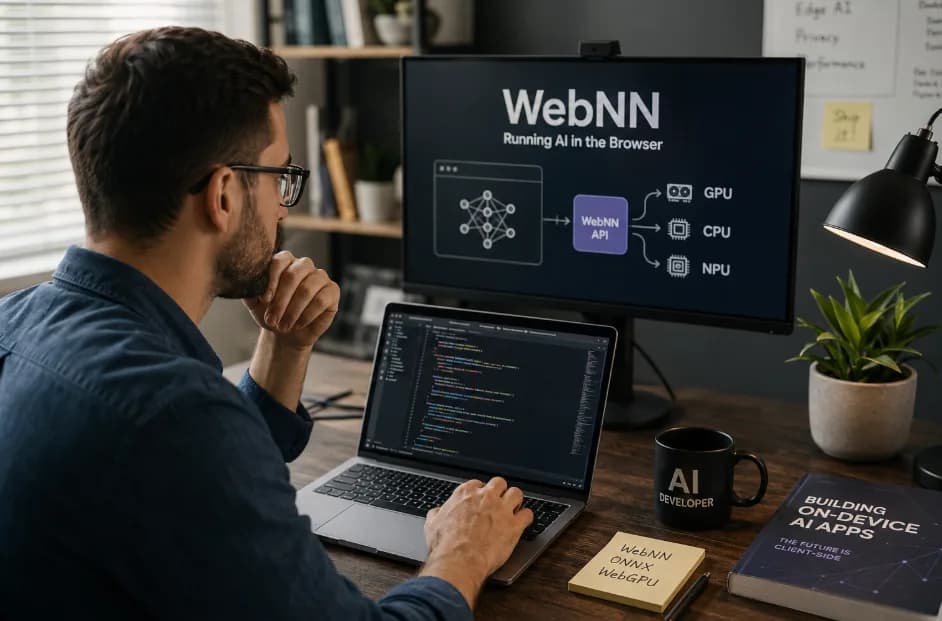
Title Tag: WebNN: Build AI Features With No Server Round-Trip
Meta Description: WebNN just reached Candidate Recommendation Draft status. Here’s how AI developers can run inference directly in the browser, with no server required.
Imagine you built a computer-vision feature that streamed video frames to a GPU server for every inference – and suffered high latency and bandwidth costs. After 8+ years shipping ML apps, you begin to ask: Do I really need that round-trip anymore? That’s the question driving this article. In August 2026 the W3C published the Web Neural Network (WebNN) API as a Candidate Recommendation Draft, marking the first time a unified, hardware-accelerated ML inference API is standardized for browsers. WebNN (100+ changes since the April 2024 draft) lets web apps run neural-network models on-device, using the user’s CPU, GPU or even specialized NPU.
As a practitioner in the Refonte Learning AI Developer Program, I’ve shipped ML features both in the cloud and on devices. This program teaches AI model deployment and computer vision, but it doesn’t yet cover in-browser inference by name. That’s why we’re explaining it here. We’ll show what WebNN’s 2026 milestone actually means, how ONNX Runtime Web uses it to power in-browser inference, and why (and when) you might choose client-side ML over cloud calls. Along the way we’ll cover Chrome’s on-device AI APIs (using the Gemini Nano model), discuss tasks that belong in-browser vs. those that still need a server, and even compare WebNN to WebGPU. If you’re ready to build privacy-preserving, low-latency AI apps with no server round-trip, read on – and check out Refonte Learning’s AI Developer Program as one way to get up to speed on the foundations.
Why “Call the Server for Every Inference” Is Starting to Break Down
Many older apps push AI work to the cloud. That once made sense: GPUs were expensive, and browsers couldn’t easily access device hardware. But today this pattern often hurts performance and UX. Server round-trips add tens or even hundreds of milliseconds of latency, which breaks real-time interactivity (think live video filters or AR). Every inference also consumes network bandwidth and must handle outages or slow connections. If user privacy is a concern, sending raw images or audio to external servers raises regulatory issues (GDPR, HIPAA, etc.). Finally, public cloud inference can be costly at scale (compute and data-transfer fees).
· Latency and UX: A round-trip adds delay per frame. Real-time apps (video processing, AR, interactive translation) suffer when each frame or query must wait for a network response. Users notice stutter or lag, especially on mobile networks.
· Bandwidth and Reliability: Continuous camera or microphone streaming can quickly saturate cellular or Wi-Fi links, and any disconnect halts the feature. On-device inference avoids dependence on a connection, enabling offline and stable use.
· Cost and Scaling: Running large models server-side incurs compute costs (GPUs in the cloud) and per-API-call fees. If your app grows, those costs scale linearly with users. In contrast, on-device inference shifts cost to client hardware (usually cheaper once users already have devices).
· Privacy and Compliance: Inference on sensitive data (e.g. health, finance) may violate privacy rules if done in cloud. On-device processing can offer “zero data retention” – nothing leaves the user’s machine – simplifying compliance.
In short, the traditional client–server AI model is reaching its limits for many use cases. Modern browsers and devices are far more capable: they often have GPUs or AI accelerators, and standards like WebGPU and now WebNN unlock that power for ML. The key question now is what to run where. The sections below will explore WebNN and the browser AI runtime landscape, to help you decide which features can move on-device and which should stay in the cloud.
What WebNN Actually Is
The Web Neural Network (WebNN) API is a new W3C standard for hardware-accelerated ML inference in browsers. At a high level, WebNN exposes primitives to execute neural-network models directly on the client’s device, using the hardware (GPU, CPU, or NPU) under the browser’s control. It does not define how to train models, only how to run them efficiently once trained. Think of it as a low-level web-native equivalent to mobile ML frameworks like Android’s Neural Networks API or iOS’s Core ML.
Under the hood, a WebNN implementation creates an MLContext object (via navigator.ml.createContext) bound to some hardware accelerator. You load a model (e.g. a TensorFlow Lite or ONNX model) through the browser or a library like ONNX Runtime Web, and then run inference on input data through that context. WebNN defines a standard set of neural network operations (convolutions, matmuls, activations, etc.) that the browser vendor’s engine will execute on the device. Because this is a web API, scripts can invoke WebNN methods (MLGraphBuilder, run, etc.), and frameworks can hook into it too.
According to ONNX Runtime Web’s docs, WebNN is designed to “accelerate deep neural networks with on-device hardware such as GPUs, CPUs, or purpose-built AI accelerators (NPUs)”. In practice this means that once WebNN is enabled in the browser (currently via a flag, not default), a web app can offload inference to the machine’s GPU or NPU, getting much higher throughput and lower latency than a plain JavaScript implementation. For example, WebNN can run convolutional neural networks for vision entirely in-browser, with no data sent to the cloud. It also includes features like MLTensor (an opaque handle for on-device buffers) to avoid costly CPU–GPU memory copies.
Key points about WebNN:
· Hardware-accelerated inference: WebNN aims to tap the same devices browsers use for graphics (GPUs) and any ML coprocessors (NPUs) for compute. It falls back to CPU if needed, but GPU/NPU gives big speedups.
· Standard operations: WebNN defines a set of neural network operators (convolution, pooling, LSTM, etc.). Model formats like ONNX or TFLite are converted into these ops. If an operator isn’t supported, implementations may fall back to a Wasm-based compute engine (as ONNX Runtime Web does).
· Browser API: It lives under navigator.ml and related JS interfaces. Frameworks like ONNX Runtime Web expose a webnn Execution Provider that uses WebNN API. This allows the same web code to run with WebNN acceleration when available.
· Privacy & security: Because models run in the page’s own context, only the page’s scripts see the data. No model or data is sent to Google/AWS/etc. (unlike a remote API). The spec also notes that, unlike WebGPU which allows custom shaders, WebNN’s fixed op set avoids certain side channels (e.g. shader cache fingerprinting).
What Changed in the August 2026 Candidate Recommendation Draft
On 13 August 2026, the W3C Web Machine Learning Working Group advanced WebNN to a Candidate Recommendation Draft. This is a significant milestone: it means the spec is feature-complete and implementation feedback is being gathered. The 2026 CRD incorporates over 100 changes since the previous candidate snapshot in April 2024.
What’s new? The spec’s changelog highlights several key additions in 2026:
· Expanded operator support: New deep-learning ops were added, including “a third wave of operators” aimed at transformers and other advanced model structures. This broadens the kinds of networks you can run (e.g. more attentive NLP and vision models).
· MLTensor API: A way to share data buffers between WebNN and other APIs (like WebGPU). This lets you keep data in device memory and avoid copies. It’s crucial for performance in multi-run models (the output of one run becomes input to the next) – it pairs with IO binding in ONNX Runtime Web.
· Device selection mechanisms: The spec adds an abstract device selection API, giving developers more control over which accelerator (GPU vs NPU) is used. For instance, you might prefer low-power settings on mobile, or explicitly pick an NPU if available. WebNN’s JS API can now express these preferences.
· Better WebGPU interoperability: WebNN now explicitly integrates with WebGPU. For example, the new MLTensor lets you share a GPU tensor between WebGPU and WebNN, and clear device contexts. This means complex pipelines can mix raw GPU compute (via WebGPU) and neural ops (via WebNN) smoothly.
· Security and privacy considerations: The CRD adds more notes on fingerprinting and isolation (e.g. sections 5 and 6 discuss how WebNN should mitigate side-channel risks).
In summary, WebNN’s 2026 CR draft refines the API and operators to better support real-world models (especially transformers), and adds features (like MLTensor) crucial for efficient deployment. The core promise remains: a browser-side API to run your neural nets fully on-device, unlocking hardware accel without needing cloud calls.
Where WebNN Stands Today: Flags, Not Defaults
As of mid-2026, WebNN is not yet enabled by default in browsers. In practice you have to opt in via flags or special builds. According to the ONNX Runtime Web docs, “WebNN is available in the latest versions of Chrome and Edge on Windows, Linux, macOS, Android and ChromeOS behind a ‘WebNN API’ flag”. In other words, even if you write WebNN code, it will only run if the user explicitly turns on the Enable WebNN API switch (accessible at chrome://flags#web-machine-learning-neural-network). Otherwise, the browser won’t expose the navigator.ml interface yet.
This flag-based rollout means WebNN is in preview mode. Microsoft Edge and Google Chrome both include the code, but it’s gated. The webnn.io project site lists the flag as #web-machine-learning-neural-network for Chrome on desktop and Android. (Edge uses a similar flag.) Other browsers have not shipped WebNN yet. For example, Firefox and Safari have no support as of 2026. So if you target WebNN today, you must instruct users to enable the flag or use a Chromium build that has it turned on. This situation could change rapidly: origin-trial programs or auto-enable in a future Chrome release might appear. In any case, don’t assume WebNN is on by default yet. Always feature-detect navigator.ml or check for window.GPUDevice compatibility.
In practice, when developing you’ll often run Chrome Canary or a nightly build with WebNN enabled. For example, ONNX Runtime Web even recommends using its nightly package (onnxruntime-web@dev) to get the latest WebNN improvements. Production apps should guard for the absence of WebNN (fallback to a CPU or Wasm engine). But the writing is on the wall: by standardizing the API and shipping it behind a flag, browsers are signaling that on-device ML is coming soon. When WebNN flags flip on, developers will have a seamless way to run models on users’ hardware.
ONNX Runtime Web and the WebNN Execution Provider
In practical terms, most browser ML frameworks will rely on libraries like ONNX Runtime Web to run models with WebNN. ONNX Runtime Web is a JavaScript library that runs ONNX-format models in the browser. It supports multiple Execution Providers (EPs) – under the hood, these are different compute backends. One of them is the WebNN Execution Provider, which we’ll call the WebNN EP.
When you create an ONNX Runtime Web session, you can specify executionProviders: ['webnn'] in the options. This tells the system: “If WebNN is available, use it.” ONNX Runtime Web will then create a WebNN MLContext and convert the ONNX model’s layers into WebNN operations. You can also pass options like { deviceType: 'gpu' } or 'npu' to prefer those accelerators. Here’s roughly how it works:
· Import the right package: Use ort.all.min.js or import * as ort from 'onnxruntime-web/all' to get the full library including all EPs.
· Enable WebNN EP: Specify executionProviders: ['webnn'] when creating the session. ONNX Runtime Web will then look for navigator.ml.
· Set device options: You can tell it deviceType: 'gpu' | 'cpu' | 'npu' and even powerPreference to hint at low-power or high-perf mode. ONNX Runtime Web will then use WebNN’s API to create that MLContext.
If WebNN is disabled or unsupported on the device, ONNX Runtime Web will fall back to other EPs (like its older Wasm CPU backend). This means your app can still run, just slower. But when WebNN is on, you get true hardware acceleration. For instance, a ResNet image classifier that takes hundreds of ms on CPU might drop to tens of ms on a modern GPU via WebNN.
ONNX Runtime Web also handles a subtle but important detail: IO binding and MLTensor. By default, when you feed an input array to the model, ONNX Runtime will allocate a regular JS Tensor on CPU memory. Running with WebNN EP will then copy that data over to the GPU or NPU behind the scenes, run inference, and copy the result back to the CPU. Those CPU-to-GPU copy operations add overhead. To avoid this, ONNX Runtime Web supports binding inputs or outputs to WebNN MLTensors, which reside in GPU/NPU memory. In practice, if your input data already lives in a MLTensor (e.g. from a WebGPU buffer), or you pre-allocate an output MLTensor, you can feed those to the session and keep data on-device. The ONNX docs explain this pattern in detail. In short, IO binding with MLTensors means no extra copies between device and host, which is crucial for transformer models or any multi-pass inference.
Finally, note that ONNX Runtime Web recommends using its nightly/dev builds to get the latest WebNN features. Because the WebNN API and its execution provider are evolving quickly, cutting-edge support (new operators, bug fixes) often lands in nightly first. If you’re prototyping an in-browser feature, try onnxruntime-web@dev. For production, keep an eye on version updates so you’re ready when the stable builds incorporate the new CRD changes.
GPU, CPU, and NPU Acceleration, Explained
The WebNN Execution Provider can target different device types via the deviceType option as documented by ONNX Runtime Web. It supports: cpu, gpu, and npu. Here’s what they mean for inference:
· CPU (deviceType: 'cpu'): This uses the browser’s main processor. It’s always available, but it’s the slowest option for heavy ML. Use it as a fallback, or for very small models. CPU mode can be useful for compatibility (e.g. on devices without WebGL/WebGPU support, or if no NPU is present).
· GPU (deviceType: 'gpu'): This is the most common hardware accelerator in desktops and many mobile devices. In GPU mode, WebNN will map operations to the graphics or compute shaders under WebGPU/GL. The speedup is often 10x or more compared to CPU, especially for parallel workloads like convolutions or matrix multiplies. GPUs are great for real-time vision and audio tasks, but note they require ample memory (e.g. >2GB VRAM on desktop). Also, on laptops, choosing GPU mode may make fans spin faster due to higher power draw.
· NPU (deviceType: 'npu'): Some modern phones and tablets include dedicated neural accelerators (NPUs or AI chips). WebNN can target these if the browser and OS expose them via APIs (for example via Android Neural Networks or ARM NN). NPUs are designed for ML: they consume much less power per inference than a GPU, and can run certain models more efficiently (especially quantized networks). However, NPUs typically have lower raw compute than high-end GPUs, and their support can be spotty across devices. If a device has an NPU, WebNN on NPU mode can give the best battery-life-friendly performance.
In practice, you can let WebNN pick a “default” device (the spec chooses CPU by default). For critical features, you might experiment: try running on gpu vs npu and measure speed. ONNX Runtime Web even provides a powerPreference hint (low-power vs high-performance) to influence which GPU (integrated vs discrete) is chosen on multi-GPU systems. The key takeaway is: WebNN opens up all these on-device options with one API, so you can tune performance vs. power trade-offs per feature.
Chrome’s Built-In AI APIs and Gemini Nano
Aside from WebNN, modern Chrome is also introducing high-level AI APIs for tasks like summarization, translation, and even general LLM queries – all running on-device. These built-in AI Web APIs (Prompt, Summarizer, Translator, Language Detector, Proofreader, Writer, Rewriter, etc.) are tied to Google’s Gemini Nano model (an on-device LLM). They represent a complementary approach: instead of bringing your own model, you use Google’s small built-in model through a Web API.
According to Google’s docs, Chrome 138+ includes several stable APIs: the Translator API, Language Detector, and Summarizer APIs are available from Chrome 138 in both desktop and extensions. These can do text translation, auto-detect language, and create text summaries respectively, without any server calls. The underlying work happens with Gemini Nano running locally. Other APIs like Prompt (AI queries), Proofreader (grammar check), Writer, and Rewriter are still in origin trials or developer previews. For example, the Prompt API (to send natural language queries to the model) is available via origin trial for web pages; it’s only fully enabled in Chrome Extensions at the time of writing. The Proofreader API, likewise, is in an origin trial.
All these built-in APIs download and use Gemini Nano on-device. That means when a page calls them, the model file is fetched (once per user) and kept locally (requiring ~22GB free disk during install, according to Google docs). No query text is ever sent to Google’s servers – it’s all local. In short: Chrome’s built-in AI features show that one can do many AI tasks entirely client-side (privately). For developers, they offer easy drop-in functionality (summarize this article, translate this comment, answer this question) without needing any ML code, but they are still experimental. Before using them, check Chrome’s status pages or chrome://flags / chrome://version to see if your target users have them enabled.
In summary, there are two overlapping trends in the browser: WebNN, for running your own models in JavaScript, and Chrome built-in APIs, for calling Google’s on-device models. Both use local execution (GPUs or dedicated on-device models like Gemini Nano) to avoid server round-trips. We cover WebNN here; developers interested in agent APIs and prompting should also see Refonte’s article on API Design for AI Agents: MCP vs. A2A vs. OpenAPI for a broader perspective on how AI is accessed from the web.
What Kinds of Features Actually Belong in the Browser
With on-device AI available, you still need to ask: Which tasks should you actually move into the browser? It’s not a matter of “everything should be on-device,” but rather “some tasks benefit greatly from client-side execution.” Here are examples where in-browser AI is a great fit:
· Real-time Vision Processing: Things like object detection, face recognition, pose estimation, or AR filters. For instance, an in-browser video chat that automatically blurs the background or does live object recognition. These need millisecond response and often don’t require very large models. Running them locally avoids sending every frame to a server.
· Voice/Audio Transcription and Translation: If your app captures user speech (e.g. voice chat, meeting transcription), doing automatic transcription or translation on-device preserves privacy (no raw audio uploads) and eliminates round-trip delays. Browsers already ship with SpeechRecognition, but for custom ML models (like domain-specific speech recognition or translation), WebNN makes it possible. Chrome’s built-in language detector and translator are examples of related functionality.
· Language and Text Assistance: Grammar correction, auto-summarization, content rewriting, etc. If integrated tightly with a web editor, doing this on-device means no network latency and better privacy. (Today some of these are via Chrome’s built-ins, but you could also run an ONNX-based summarization model in-browser.)
· Generative Filters and Effects: AI-driven image filters or styles (e.g. stylize a photo with neural style transfer, or do super-resolution) can run locally to avoid pushing potentially sensitive images to a server. These often fit in WebNN’s domain (they’re usually convolutional or transformer models).
· Interactive AI Agents (UI-level): You could build a browser-based assistant that uses a small local LLM (like a 2–3B model) to answer user questions about the page content, without ever calling an external API. This is similar to “Copilot” features but hosted entirely in the tab.
These examples share characteristics: they need low latency (real-time feedback), and/or they process sensitive user content that shouldn’t go to the cloud. They also typically use models that are not gigantic (so they can run within device memory). As a general rule, features that are part of the UI experience (especially time-critical or privacy-sensitive ones) are prime candidates for browser-native inference.
The technologies are catching up to enable this: for instance, the TensorFlow.js and ONNX.js ecosystems are growing WebNN backends. Also, framework authors can integrate WebNN so users get automatic speedups (e.g. a JS face-detection library under the hood using WebNN if available). Keep an eye on the operator support lists (e.g. ONNX Runtime’s WebNN operators page) to see if your model’s ops are covered.
Vision, Transcription, and Generative Filters as Examples
In practice, I’ve personally encountered cases where running CNN inference per video frame on the cloud was simply too slow and expensive. When we shifted a smaller model into a browser tab (using WebGL first, and now WebNN), we got essentially instantaneous results. Similarly, in the Refonte program’s recent discussions on local LLMs, tools like Ollama and LM Studio were highlighted for on-device inference; by analogy, we see that vision and audio processing is very feasible in-browser. (For a background on running ML entirely on-device outside the browser, see our Local LLM Inference: Ollama vs. LM Studio article.)
In summary, aim to put in-browser those AI features that demand immediacy or tight privacy. Use WebNN for them. But remember, the browser has limits: it’s not (yet) practical to run a 100B-parameter model locally in JavaScript. Know your task’s scale and privacy needs when deciding.
What Still Belongs on a Server
Not every AI task should move to the client. Some workloads still warrant a traditional server (or cloud API) approach. In particular:
· Very Large Models or Heavy Workloads: Models like GPT-4 (100B+ parameters) or large transformer stacks typically can’t fit in browser memory. Even if they could, inference could be extremely slow or crash less-robust devices. These remain in the domain of cloud services. For example, if you need state-of-the-art LLM capabilities or high-end video generation, call an API.
· Aggregated Intelligence: If you need to combine data from many users to improve the model (e.g. centralized training, large-DB queries, or analytics), you still need server-side compute. On-device inference is per-user only; it doesn’t automatically improve from other users’ data.
· Multi-User Coordination: Server backends facilitate complex systems (e.g. an AI-driven chatbot that must manage shared state or user accounts across sessions). Managing user sessions, routing, caching – those are easier on a server.
· Batch or Long-running Jobs: Tasks like retraining a model periodically, or processing large datasets, are better done on powerful server clusters. The browser is for inference and light computation, not for heavy-duty training pipelines.
In practice, many AI applications will be hybrid: do latency-sensitive or privacy-sensitive parts in-browser, and leave the rest on servers. For instance, a document-editing app might check grammar locally (fast feedback via WebNN) but use cloud for generating a full report or handling “agent” queries that need big LMs. Or a vision app might do real-time object detection on-device but send occasional snapshots to the server for further analysis.
Importantly, desktop tools like Ollama or LM Studio illustrate that large-model inference can be done locally on a laptop or workstation. These are standalone apps, though, not in-browser. Our focus here is purely on browser deployment. If you discover that your model is too large or slow for the browser, you could still offer a companion desktop app (as Ollama/LM Studio do) or a server fallback.
In short, still use servers when the model or task size is beyond client capability. Don’t force everything into the browser just for the sake of it. Use the server for heavy lifting, and use the client for quick interactions. Our Local LLM Inference: Ollama vs. LM Studio post covers the desktop angle; here we stay focused on what a browser can and can’t do for AI.
The Privacy and Latency Case for On-Device Inference
Two of the strongest arguments for client-side AI are privacy and latency – and they often go hand-in-hand.
· Privacy (Data Never Leaves the Device): If an image, voice recording, or personal data is fed to a model on-device, it stays on the user’s machine. No personal data is uploaded to a remote server. This means compliance is easier: for HIPAA/GDPR compliance, on-device inference effectively ensures “no data leaves the building” (zero data retention). Even outside strict regulations, it’s a powerful privacy guarantee. For example, if a browser extension does sentiment analysis on your writing, doing it locally means sensitive text is not transmitted over the internet. This builds user trust.
· No Network Delay (Low Latency): On-device inference eliminates network latency. As soon as input is ready, inference runs immediately. For interactive features (e.g. augmented reality overlays, live audio transcription), this is critical. Even a 100ms round-trip can break the fluidity of an app. By running locally, you get consistent, deterministic response times (p99 latency) that don’t vary with Wi-Fi or server load. NVIDIA’s research on real-time AI makes this clear: tasks like autonomous driving require sub-10ms on-device inference, and even video analytics can tolerate at most ~100ms cloud latency. On-device execution meets these strict budgets.
· Offline or Intermittent Access: On-device AI means your app can keep working even if the user is offline. Think of a travel app that translates signs or a medical app that analyzes symptoms; these can remain functional without connectivity if inference is local. This also saves bandwidth and battery (no constant network use).
· Cost Efficiency: Although not purely “privacy,” cost is related: on-device inference avoids per-request API charges. If you have many users or frequent queries, not calling a paid API or keeping a GPU server running can save money. This can be especially important for startups or consumer apps that want to avoid large cloud bills.
These benefits come with trade-offs (e.g. more burden on the client CPU/GPU), but in many cases they’re worth it. To summarize:
· Running a feature on-device = “no data leaves user’s device + near-zero network latency.”
· Running on a server = data traverses network (+ latency, cost) + potential cloud-side logging/retention.
When designing an app, think like this: if data is sensitive or latency is critical, on-device is preferred. If the task is casual or offline support isn’t needed, cloud may suffice. Thanks to WebNN and Chrome’s AI APIs, the client-side option is now more realistic than ever before.
WebNN vs. WebGPU: Where Each One Fits
WebNN and WebGPU are both about leveraging on-device hardware, but they serve different roles. A quick comparison:
Aspect | WebGPU | WebNN (Neural Network API) |
Level of Abstraction | Low-level, general-purpose GPU API (compute & graphics) | High-level, specialized ML inference API |
Primary Use Cases | Graphics (rendering) and general-purpose compute (custom shaders) | Neural network model execution (inference) |
Development Effort | More complex: developers write WGSL shaders or compute pipelines for tasks, including ML ops | Easier: uses fixed neural operators, no shader coding required for ML |
Custom Kernels | Yes – you can author any compute shader; useful for non-standard ops | No – only predefined NN operators (no arbitrary shaders) |
Ease of ML Use | You’d have to manually implement layers (convs, activations) via shaders or libraries | WebNN maps model ops directly to hardware; typically higher developer productivity for ML |
Optimization | Extremely powerful if you need full control (e.g. custom image filters, scientific compute) | Optimized for ML: standardized ops may be tuned by implementers for each device |
Fingerprinting | Allows creating and caching shaders; has known timing side-channels (shader cache attacks) | Lower fingerprint risk (no custom shaders); still follow WebGPU privacy guidance |
Hardware Support | Can use GPU (and potentially NPU on WebGPU if supported) | Intended to use GPU, CPU, or dedicated NPU via browser’s MLContext |
Maturity | WebGPU is shipping (stable) in Chrome/Edge/FF/WebKit as of 2024 | WebNN is newer (flag-gated in Chrome/Edge as of 2026) |
In practice, use WebGPU when you need full control over GPU operations – e.g. advanced graphics, custom ML layers not covered by WebNN, or research-level performance tuning. Use WebNN when your goal is to run a standard neural network model easily. WebNN’s built-in operators and IO binding means you don’t have to write shader code. Many ML frameworks (ONNX Runtime Web, TensorFlow.js) under the hood use WebGPU or WebGL; WebNN provides a higher-level path with better performance out of the box for common ML tasks.
One nice thing is they can interoperate: WebNN’s MLTensor API allows sharing data with WebGPU contexts (see spec §5.3). For example, you could do pre-processing in WebGPU (e.g. image transformations), pass the resulting tensor to WebNN for inference, and then use WebGPU again for post-processing or rendering. They’re complementary tools in the browser ML arsenal. (For a different angle, note that WebAssembly on the server is also emerging as an approach to host workloads – see Refonte’s discussion of WebAssembly on the Server for a contrast with client-side WebGPU/WebNN.)
Building Your First Browser-Native AI Feature
Ready to try it out? The steps to move an AI feature into the browser might look like this:
1. Choose or Convert a Model: Pick a model architecture suitable for your task that isn’t too large (e.g. a MobileNet or a small transformer). Convert it to ONNX or a WebNN-supported format. For vision, many TF or PyTorch models can be exported to TFLite or ONNX.
2. Enable WebNN in Your Browser: Run Chrome/Edge Canary (or Chromium) and go to chrome://flags. Enable “Web Machine Learning Neural Network API” (the flag name may vary by version). Restart the browser. Verify navigator.ml is defined in the console.
3. Load ONNX Runtime Web: Include the ONNX Web library (ort.all.min.js) or install via npm. Make sure it’s a version that supports WebNN (if you want bleeding-edge features, use onnxruntime-web@dev nightly).
4. Initialize a WebNN Session: In your JS code, do something like:
import * as ort from 'onnxruntime-web/all';
const session = await ort.InferenceSession.create('model.onnx', {
executionProviders: ['webnn'],
webnn: { deviceType: 'gpu', powerPreference: 'default' }
});
This explicitly picks the WebNN EP with GPU. If WebNN isn’t available, ORT will fallback to Wasm CPU and you should code accordingly.
5. Prepare Your Inputs: For example, if doing image recognition, draw an <canvas> or <video> frame and extract image data. Convert it into an ort.Tensor. WebNN supports uint8 and float32 inputs.
6. Use IO Binding for Speed (Optional): If your model runs repeatedly, consider using WebNN IO binding. This means pre-allocating MLTensor objects to hold input/output data on the GPU. For example, create a WebNN context via navigator.ml.createContext, then ctx.createTensor({dataType:'float32', shape: [...]}). You can then pass this MLTensor to ONNX Runtime (using ort.Tensor.fromMLTensor). Doing this avoids copying between CPU and GPU on each run.
7. Run Inference: Call await session.run(feeds) with your inputs. The results will come back as ORT tensors. If you used an MLTensor for the output, you can read it back into JS with ctx.readTensor().
8. Integrate into UI: Display the output. For example, overlay detection boxes on the video, or append the translated text to the page. Because it’s all in-browser, you can do smooth animations with <canvas> or WebGL for the visuals.
Throughout development, test on actual devices. Different devices have different GPU/NPU capabilities; ensure your model isn’t too big (you might need to quantize or prune). Also handle the case where WebNN is not enabled: either warn the user or fallback gracefully (for example, show a “loading model” spinner until WebNN can be enabled).
Finally, remember to check the WebNN spec and ONNX Runtime Web docs for details on supported ops. If you hit an unsupported operator, you’ll get an error at runtime (or it will silently slow down as it falls back to WASM). In that case, you may need to rework the model or wait for broader support in WebNN.
Common Pitfalls Moving From Server to Client-Side Inference
As you shift inference into the browser, be aware of these common challenges:
· Model Size: Devices have limited memory. A browser page has only so much JS heap, and GPUs have VRAM limits. If your model is hundreds of megabytes, it may fail to load or crash the tab. Even moderate models (tens of MB) might cause slow initial loads. Consider smaller architectures, model quantization (e.g. 8-bit), or progressive loading.
· Operator Support Gaps: Not all neural operators are in WebNN yet. For example, very new activation functions or custom layers in your model might not have a WebNN implementation. If ONNX Runtime Web can’t map an op, it will error or fallback to Wasm (much slower). Always test early on your target model: if operators are missing, either simplify the model or wait for spec implementations to catch up.
· Hardware Fragmentation: Users have wildly different devices and browsers. Some have powerful GPUs, others only weak integrated ones. Some phones have NPUs, some don’t. And recall: WebNN is behind a flag only in Chrome/Edge. This means a feature that runs great on your developer machine might not work at all on another user’s browser. Design your app so that on unsupported browsers it disables the feature or uses a non-AI fallback.
· Battery and Performance: On mobile, firing up the GPU or NPU can drain the battery faster than a cloud API call. A highly compute-intensive model running continuously could overheat or throttle a phone. Profiling is key: measure actual FPS or inference time on target devices, and throttle your feature if needed (e.g. run detection every 5 frames, not every frame).
· Memory Management: WebNN’s MLTensors require careful handling. If you create many large MLTensors without releasing them, you can exhaust GPU memory. Always reuse and destroy tensors properly. The ONNX docs on IO binding and tensor lifecycle are valuable here.
· Debugging Difficulty: In-browser ML can be harder to debug than server-side. Errors may be obscure (e.g. a WebNN driver bug). Tools like Chrome’s chrome://gpu-internals or logging via --enable-logging flags can help diagnose issues.
Model Size and Device Fragmentation
A particularly tricky pitfall is model size vs. device memory. Mobile GPUs often have only ~2GB of VRAM or less, and some have as little as 128MB for WebGL buffers. If your model is too big (or its intermediate tensors are too large), the browser may just OOM. Fragmentation also means you might need to ship multiple model variants (e.g. a tiny model for low-end devices and a larger one for desktops). Always test on the lowest-end target: see if you can at least run a single inference, not just on a beefy dev machine.
Also, remember that “supported device” varies by OS/browser. Chrome on Android may support a certain GPU vendor, while another phone’s browser may fall back to CPU-only. Thoroughly feature-detect ('gpu' in ctx.device) and design fallbacks.
In short: plan for the weakest device you intend to support. Optimize your model accordingly, possibly offering a mix of cloud-on-big vs. on-device-on-small-tier experience. One good practice is using smaller distilled or pruned models in-browser, while reserving heavyweight models for server-side operations.
How This Fits Into the Broader Real-Time AI Shift
WebNN’s emergence is part of a larger industry trend toward real-time, on-device AI. Different domains have different needs: for ultra-critical low-latency (e.g. self-driving cars), inference is done entirely on-device. For slightly more relaxed scenarios (e.g. live video analytics), cloud GPUs still play a role. AI in the browser sits in the middle: it’s on-device but using web tech.
Notably, companies are now rolling out realtime streaming AI APIs even on the cloud side. For example, OpenAI introduced “GPT-Realtime-2” voice models (for live speech reasoning), “GPT-Realtime-Translate” for continuous speech translation, and “GPT-Realtime-Whisper” for streaming transcription in May 2026. These let developers send audio streams over a WebSocket and get back transcription or translation as it happens. It’s a sign that even cloud AI is moving toward lower latency interfaces. Meanwhile, Chrome’s built-in APIs like the Prompt API are rolling out via origin trials, and Google’s Gemini Nano powers them on-device as discussed above.
In practice, a product may use a mix. For example, a voice assistant could first try the local Gemini Nano via Chrome’s APIs for instant response; if the request is beyond Gemini Nano’s capability or requires up-to-date knowledge, it might fall back to a Realtime cloud API session (WebRTC or WebSocket). The engineering skill is to orchestrate these: choose local inference when possible, and chain to cloud or services when needed.
As a developer, you should track both trends: on-device APIs (like WebNN or browser-native models) and evolving cloud/edge interfaces. They’re two sides of the same coin. For more on how AI APIs are evolving at the protocol level (MCP, A2A, OpenAPI, etc.), see Refonte’s post “API Design for AI Agents: MCP vs. A2A vs. OpenAPI”. That article focuses on how agents should consume services; here we focus on the execution side (where the model runs).
Where OpenAI’s Realtime API Fits by Comparison
For concreteness, consider OpenAI’s Realtime API. It offers a voice-agent mode where you connect via WebRTC and stream audio to a GPT-like model in real time. This is still a cloud-hosted model, just with low-latency streaming. In comparison, WebNN is fully client-side; you ship the model to the user. Realtime API is great for very powerful LLM reasoning (GPT-5 class), but it involves network cost and latency of course. WebNN is limited to what fits on-device, but it has zero per-query latency once loaded. Some apps might use both: e.g. first try a small local model (like a 7B transformer) for quick answer, and if it’s not confident, fall back to the Realtime API for the heavy lifting.
The takeaway is that WebNN is another tool in the real-time AI toolbox. It pushes the boundary of how much can run at the client side. In 2026, we’re seeing a shift from latency as a given to latency as a design constraint. Technologies like WebNN, Chrome’s on-device APIs, and cloud streaming APIs all reflect that.
AI Developer Skills and Salaries in 2026
Given all this, what skills should an AI developer cultivate? Certainly proficiency with machine learning frameworks (Python, TensorFlow/PyTorch, Keras) and data science basics remain fundamental. On top of that, learn how to deploy models: in the cloud (AWS, Azure, GCP) and now on the edge (WebNN, WebGPU, mobile ML kits). WebNN skills fit into the “AI Model Deployment” and “AI for Computer Vision” competencies that programs like ours teach. Familiarity with WebAssembly and browser APIs is also increasingly relevant.
What about career outlook? The Refonte program (like many bootcamps) cites an entry-level figure of $92,500+ starting salary and “65,000+ annual openings”. This matches their marketing style (conservative lower-bound). In reality, market data suggests higher pay for AI talent. For example, Indeed reports the average U.S. AI developer salary around $151,970 (Sept 2026 data), with a range from ~$92,864 to $248,695. Glassdoor shows a median total pay of about $161K for “AI Developer” roles (range $134K–$196K). Even BLS data on “Data Scientists” (a related occupation) lists a 2024 median around $112,590 with projected 23,400 annual job openings through 2034. The common message is: AI-related skills are in high demand and pay well, often well into six figures.
However, be realistic about job titles and growth: the “65,000 openings” figure may aggregate many roles (data scientist, ML engineer, etc.). Indeed’s own query (mid-2026) showed only a few thousand active “AI Developer” postings. The main point is that AI developers (who can build end-to-end solutions) remain a sought-after profession. Combining AI modeling with deployment skills (cloud and on-device) is especially valuable.
In summary: AI roles pay handsomely (often well above $100K), but expect companies to use various titles. The demand is strong (tens of thousands of openings per year in the U.S. alone for data scientist/engineer roles), and it favors those who can both code models and implement them in production.
Building This Skill Set: The Refonte Learning AI Developer Program
If you want formal training to acquire these skills, consider the Refonte Learning AI Developer Program. It’s a 3-month intensive (12–14 hrs/week) designed to take you from beginner to job-ready. The curriculum covers all the fundamentals:
· Core Modules: Introduction to AI/ML; Deep Learning with TensorFlow/PyTorch; Natural Language Processing; AI Ethics; and crucially AI Model Deployment and AI for Computer Vision. These courses teach you how to take models from prototype to production – exactly the kind of knowledge you need to decide between server vs. client deployment.
· Tools: You’ll gain hands-on experience with the leading frameworks and platforms: Python, TensorFlow, PyTorch, Keras, plus cloud ML services (Google AI, Azure AI, AWS Machine Learning). (Think of WebNN as an additional runtime to learn on your own afterward.)
· Mentorship: The program is led by Dr. John Anderson (Senior AI Engineer at Refonte, 17 years in the field). His expertise in deploying scalable AI systems ensures practical guidance.
· Projects & Capstone: You’ll do real-world projects, culminating in a capstone where you apply multiple skills end-to-end. This could be building an AI web app, for example – possibly even exploring WebNN as a bonus!
· Career Outcomes: Graduates often land roles such as AI Developer, ML Engineer, Data Scientist or AI Consultant. Upon completion, Refonte cites “$92.5K+ starting salary” in their materials (we noted above that industry averages tend to be higher).
In short, the Refonte AI Developer Program provides a broad foundation: you’ll master building and deploying models (mostly in cloud contexts, since it currently emphasizes AWS/GCP/Azure). To specialize in browser-native AI, you can take what you learn and apply it to WebNN or similar tools. Think of it like learning to drive cloud AI engines – WebNN will be another vehicle in your garage.
If you’re interested, learn more on the Refonte Learning AI Developer Program page. It lays out the syllabus, mentors, and enrollment details. In a fast-changing field, this program can give you the core skills (especially in AI deployment) that you can then extend into on-device inference, WebNN, and whatever the next AI platform is.
Your Next AI Feature: With WebNN reaching CRD status, the future is clear: “AI without a backend” is becoming real. Learning to build AI features that run entirely in the browser will make you stand out as an AI developer. It offers lower latency, better privacy, and a modern edge in user experiences. By combining a solid AI foundation (like that from the Refonte program) with hands-on practice in WebNN and related APIs, you’ll be prepared to deliver the next generation of browser-native AI.